1.1.2. GWEN
1.1.2.1. Introduction
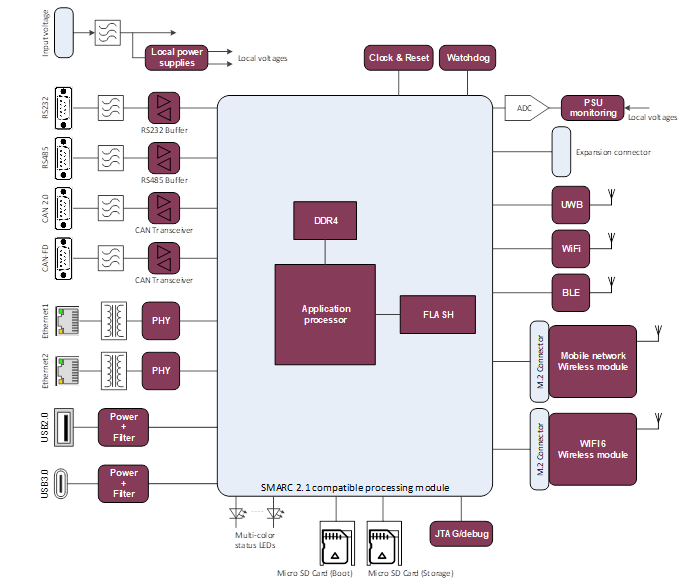
The GateWay/EdgeNode (GWEN) is a device used as interface between sensors & actuators on one side and a communication network on the other side. Sensors and actuators can be connected through wired and wireless interfaces. The interface with a network can also be wired or wireless. Available wired interfaces are: Ethernet, RS232/485, CAN & CAN FD, USB2 and USB3 Available wireless interfaces are: WiFi, Bluetooth and 3G/4G/5G. In addition an UWB interfaces is available for localisation purposes. The GWEN also contains compute power to be able to operate AI algorithms. Docker is used as container runtime on top of Linux as OS.
1.1.2.2. Features
Available wired interfaces are: - Ethernet, - RS232/485, - CAN & CAN FD, - USB2 and - USB3.
Available wireless interfaces are: - WiFi, - Bluetooth and 3G/4G/5G.
SMARC2.1 interface for use of a System On Module (SOM) which implements the compute power.
Yocto based Linux is used as OS.
Here is also the block schemantic diagram of the GWEN device:
1.1.2.3. Place in architecture
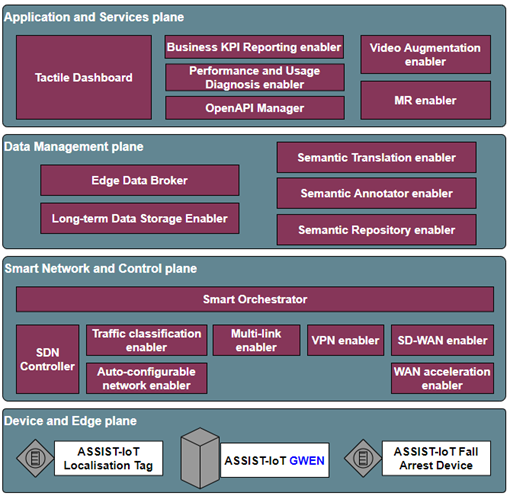
The fall arrest device is part of the device and edge plane and more specifacially the place of the device in the ASSIST-IoT architecture can be viewed in the following picture:
1.1.2.4. User guide
In case of making use of the ASSIST-IoT’s GWEN as edge node, 12V± 15% power supply is required. An adapter from 230V is provided with it to generate the needed voltage. The GWEN must be booted up and it’s primary ethernet connection must be connected to a network with internet support For security reasons the network must have a firewall since the GWEN itself does not have a firewall implemented. (this would hinder development and integration of software on the GWEN greatly therefore it was chosen to place the firewall externally. For later version a firewall can be implemented on the GWEN of course. The Docker engine allows user specific software to be run in a protected environment. Via the ethernet port the GWEN can be accessed with SSH and access to the docker container is provided. The Linux operating system Yocto prevents any software changes on the GWEN or installing specific parts under the Linux system directly.
1.1.2.5. Prerequisites
The GWEN must be connected to 12VDC power and internet to be able to function. Sufficient cooling (ventilation) must be available for the GWEN to release its heat.
1.1.2.6. Installation
The GWEN can be mounted at a fixed point inside a building or car. There are several mounting/fixation points foreseen on the GWEN board. Please be aware when using these fixation points of ESD measures. For the Pilot we made an enclosure in which the GWEN is placed to shield it (partly) from it’s surroundings. Since all is still in prototype phase no dedicated enclosure has been designed, therefore for cooling the enclosure has to be opened during usage. For the Pilot this was acceptable.
1.1.2.7. Configuration options
The GWEN can be configured to support dedicated applications, these have to be configured in the kernel install. Next to that generic applications can be installed in the Docker environment. Access is provided via SSH to the docker environment.
1.1.2.8. Developer guide
The GWEN is developed to be a development tool, and allows many custom modifications while having a secure basic programming based on Linux Yocto in combination with Docker and Kubernetes. The Docker environment allows customization to the fullest where Yocto en Kubernets oversee that the customization does not disrubt main functionality. Developers can get access via ssh to the docker environment and create their own containers and run apps. In case system level apps are needed we can support in that as well in have an app installed in the Linux rootfs.
1.1.2.9. Version control and release
Currently there are 2 versions of the GWEN driven by Memory requirements. The initial version was equipped with 2GB RAM memory, which proved insufficient for Pilot 2. Therefore we developed a second version with 4GB memory which also has some more eMMC memory. Since this version has a different SOM module they require a different Linux kernel (Hardware Abstraction Layer or HAL).
1.1.2.10. License
For HDMI a license had to be bought, legally this standard is protected. For the computational part a SOM module has been bought. This module is patented and thus not allowed to be reproduced or (partly) copied.
1.1.2.11. Notice(dependencies)
The system only works with the selected parts and is tailored for the iWave i.MX 8M Plus SMARC SOM iW-RainboW-G40M or the i.MX 8M Quad/QuadLite/Dual SMARC SOM iW-RainboW-G33Mmodule. Other modules based on the SMARC-standard may be used, however since this standard is not fully defined/fixed some connections might not work or patching of the board is needed. Also the HAL in the kernel is dedicated for each SOM model and cannot be simply swapped as hardware/software interfaces are different. New or other SOM modules can be implemented however this requires some effort both in board design as software design.