1.3.3. Semantic Annotation Enabler
1.3.3.1. Home
ASSIST-IoT Semantic Annotation Enabler Repository Enabler.
1.3.3.2. Introduction
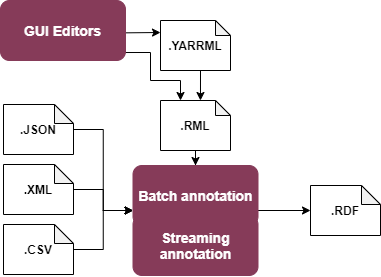
This enabler offers a service of syntactic transformation of JSON, CSV and XML data formats into RML, also known as semantic lifting, or semantic annotation.
Two methods of annotation are supported: one-time through a REST API, and message-based through a persistent stream.
Annotations are configured using the RML language.
In the first release, the REST API, with (optional) helper web GUI is supported, as well as tentative streaming infrastructure on Apache Flink. Final version will include a streaming processor for Kafka/MQTT with persistent annotation channels.
1.3.3.3. Features
Streaming Annotation Enabler has the following main feaures:
Configurable annotation from JSON, XML and CSV into RDF using the RML language
Batch annotation via a stateless REST API
Streaming annotation through persistent, configurable annotation channels
In short, the annotator lifts data to RDF in batch or streaming fashion. |SemAnn_flow|
1.3.3.4. Place in architecture
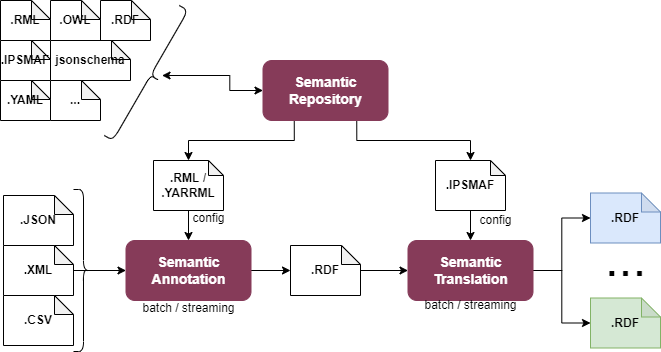
The Semantic Annotation Enabler is part of the Data Management Plane of ASSIST-IoT.
The core functionality is designed to be integrated into a pipeline before the Semantic Translation enabler, which requires the use of RDF. Semantic annotation lifts data to RDF, which can then be translated into different ontologies. Configuration files for annotation (in RML format) can optionally be shared in the Semantic Repository, provided, that they do not contain any sensitive or confidential information about used data models and formats.
SemAnn_place_in_architecture
1.3.3.5. User guide
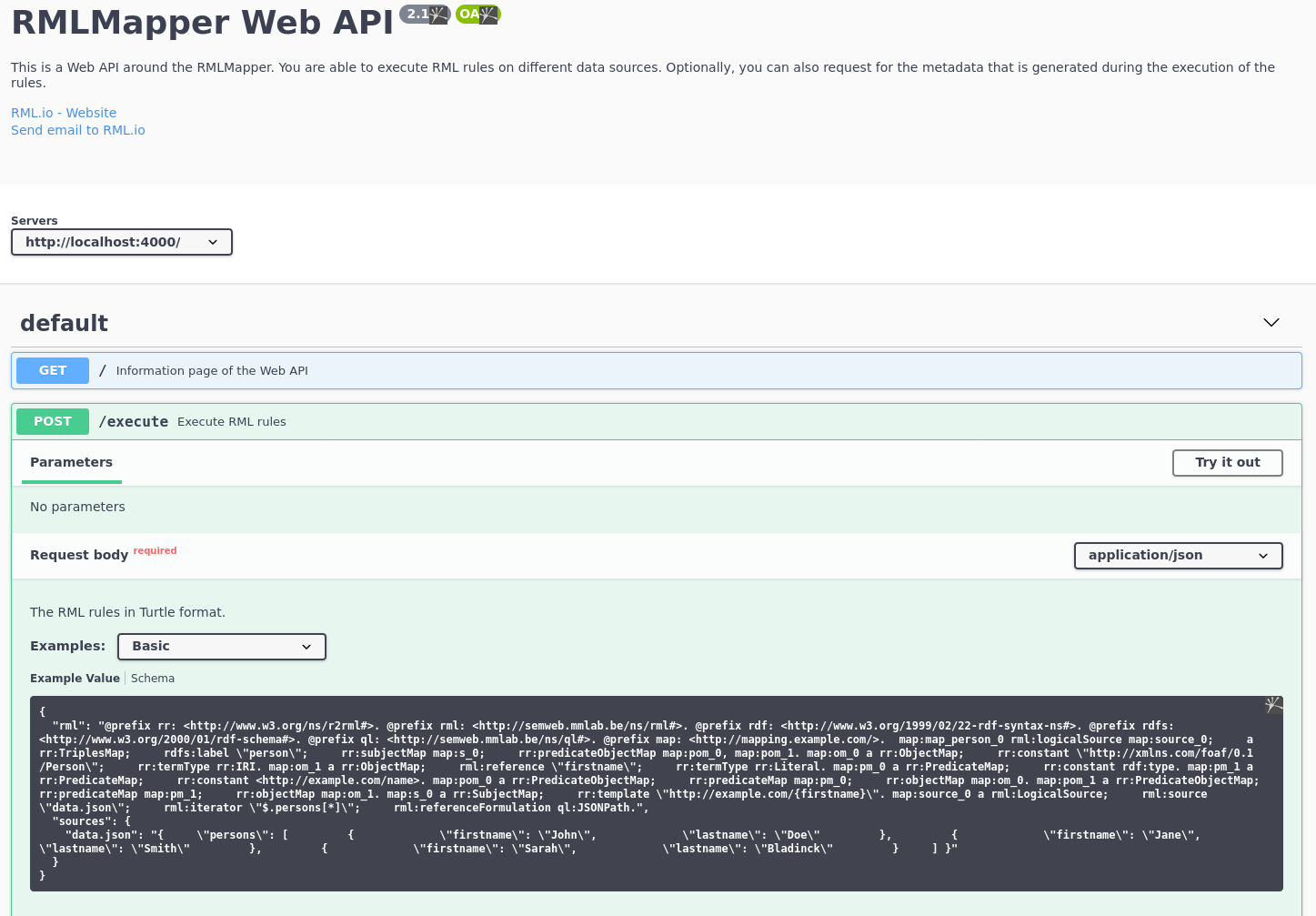
Batch translation is offered as REST API, that can be tried out with a simple example on a Swagger page. By default the Swagger Web GUI is served on port 4000:
RMLMapper_Web_API
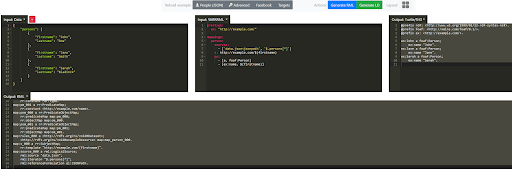
Additionally, an editor for authoring files in RML and YARRML formats is available (by default on port 5000):
Matey GUI
The GUI is connected to the batch annotation component served at the /execute endpoint. This allows the users of the GUI editor to apply RML files to some test data and validate, that the results are correct.
The GUI editor can be used to write annotations in the YARRML format, which is more readable and more succinct, than RML. The GUI editor can translate YARRML into RML. Note, that YARRML is not used directly by other components, so translation into RML is required for the annotation files to be used by the enabler. Support for YARRML is limited to the GUI editor and included for the sake of convenience.
Current streaming capability is offered through Apache Flink (by default on port 8081). Detailed usage instructions can be found here. Because of performance concerns, high resource usage, difficult configuration and complicated deployment, Flink support will be removed in the final version. Instead, a custom component for streaming with Apache Kafka is being developed.
The streaming component in the final version will use CARML (RML extension), which has the same syntax as RML, but requires different definition of data source. RML is designed primarily for persisted data sources, such as flat files. CARML extends RML to support messages passing through a stream. Consequently, annotation configuration for batch annotation must be slightly modified, before being used in streaming translation. The modification involves only description of the data source. The actual annotations of data can remain unchanged.
1.3.3.6. Prerequisites
The Semantic Annotator Enabler has no particular requirements to run, but practical usage requires familiarity with the RML language.
1.3.3.7. Installation
Current version requires docker and docker-compose, and is installed by running the ASSIST_RML/docker-compose.yml file.
Build and run:
cd ASSIST_RML
docker-compose up --build
This creates the following services:
RML Mapper REST - Swagger at http://localhost:4000/
Matery YARRML helper editor at http://localhost:5000/
Apache Flink - Web interface at http://localhost:8081/
Use RMLStreamer jar from this link
Kafka broker at localhost:9093
Note, that streaming with Apache Flink is set up temporarily, and will be substituted with a custom Kafka/MQTT streaming solution in the future.
1.3.3.8. Configuration
Currently configuration of the enabler is limited to setting environment variables in the docker-compose.yml file. If necessary, exposed ports may be configured there.
1.3.3.9. Developer guide
The Semantic Annotator Enabler is a combination of software written in different technologies.
The one-time translation depends on: - RML Mapper - RML webapi - Matey
Please, refer to the documentation for individual software to learn more about development.
The streaming component is built with Scala using Akka Streams and Akka Http - parts of the Akka framework, and depends primarily on Carml to process RML files.
1.3.3.10. Version control and releases
0.25 (Mar 2022) - added documentation and examples 0.20 (Mar 2022) - added GUI editor 0.10 (Feb 2022) - initial release with REST API
1.3.3.11. License
The Semantic Annotator is licensed under the Apache License, Version 2.0 (the “License”).
You may obtain a copy of the License at: Apache License 2.0
RML Language and all relevant software, documentation, and reference examples are licensed under MIT License.
You may obtain a copy of the License at: MIT License
1.3.3.12. Notice (dependencies)
The Semantic Annotator Enabler is packaged to be available for use without any external dependencies. However, depending on configuration, it may use components outside of what is packaged. This pertains in particular to streaming brokers for Kafka and MQTT. A broker is required for the Enabler to support streaming annotation. To use a broker different, than the ones provided in the package, simply configure the relevant ports to point to Kafka or MQTT brokers already configured in your network. Note, that the streaming annotation with Kafka/MQTT is supported in the final release and missing from the initial release.
Included in the Enabler are RML software and libraries, including RML Mapper, RML webapi, and Matey for one-time translation, and Carml for streaming translation.
For more information about development libraries dependencies, see Developer guide.