2.4.3. Distributed broker enabler
2.4.3.1. Introduction
This enabler provides a mechanism that facilitates data sharing among different heterogeneous IoT devices of the architecture. It deals with data source metadata management and provide trustable, findable, and retrievable metadata for the data sources.
This enabler has reached a TRL of 5 during the execution of the ASSIST-IoT project.
2.4.3.2. Features
It serves as a trusted registry of all the IoT domains/devices and/or ASSIST-IoT enablers that act as data producers. Indexing and querying services facilitate the efficient retrievability of the stored metadata of the registered producers by consumers in compliance with the FAIR principles.
2.4.3.3. Place in architecture
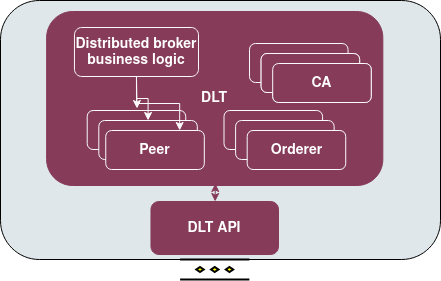
The Distributed Broker enabler is part of the vertical plane DLT enablers.
2.4.3.4. User guide
The enabler has the following API endpoints.
Method |
Endpoint |
Description |
Payload (if needed) |
Response format |
|---|---|---|---|---|
POST |
/api/DLTbroker/insert |
Insert an event (log) into the blockchain |
Described below |
Transaction key |
GET |
/api/DLTbroker/gets |
Get all events (logs) stored in the blockchain |
No payload |
List of stored logs |
GET |
/api/DLTBroker/getbyid |
Get an event (log) by its transaction id |
Described below |
Requsested log |
For the post request the payload is:
{
  "endpoint": "String",
  "id": "String",
  "type": "String",
  "timestamp": "String",
  "status": "String"
}
For the getbyid and getid requests the payload is (where the UUID is the transaction id):
{
"ID":"String"
}
2.4.3.5. Prerequisites
Kubernetes cluster, Helm, Docker
2.4.3.6. Installation
Important notice
You will have to use the nodeSelector in order to deploy all DLT components in a single node, so in values.yaml file:
# Deploy all the components in the same node. Replace k8s-node-02 with your node name.
enablerNodeSelector:
  kubernetes.io/hostname: k8s-node-02
For quick installation use the name broker (recommended)
cd distributed_broker
helm install broker .
In case you want to use another name:
cd distributed_broker
./scripts/packageCC.sh
This will ask you for a $releaseName. Use the same $releaseName on you helm install command. Each time you want to use another name, you will have to run the packageCC.sh script and do it while in the distributed_broker folder.
2.4.3.7. Configuration options
The enabler is prepared to run in a K8s environment. The creation is prepared to be autonomous in such a working environment. The service consumer will be required to communicate with the server using the described Rest interface. In general there are several environment variables that can be configured, which is not recommended. The main configurable variable is the dltapi’s nodePort which is preset to 31999.
2.4.3.8. Developer guide
Check the installation
You need to follow the logs of clipeer0org1. Get the pods and copy the name of the pod.
kubectl get po
kubectl logs -f $clipeer0org1_pod_name
When it is over you should be able to see in all chaincodes status 200
INFO [chaincodeCmd] chaincodeInvokeOrQuery -> Chaincode invoke successful. result: status:200
In case you want to clean the pvc
Important note, you need to deploy the pod inside the same node, so in dltinspectionpod.yaml you need to add the node name:
nodeSelector:
  kubernetes.io/hostname: name_of_the_node
Inside the logging_auditing fodler:
kubectl apply -f dltinspectionpod.yaml
kubectl exec -it inspect  -- sh
Inside the container:
rm -r data
exit
It returns resource is busy, but it gets cleaned. Back to the logging_auditing fodler:
kubectl delete pod inspect
2.4.3.9. Version control and release
Version 0.2.0. Fully functional and able to retrieve all data even if the cluster fails.
2.4.3.10. License
Distributed broker enabler is under BSD 3-Clause “New” or “Revised” License.
2.4.3.11. Notice(dependencies)
ASSIST-IoT - Architecture for Scalable, Self-*, human-centric, Intelligent, Se-cure, and Tactile next generation IoT
This project has received funding from the European Union’s Horizon 2020 research and innovation programme under grant agreement No 957258.
The software included is:
Hyperledger Fabric (https://github.com/hyperledger/fabric) Apache 2.0 License
Go programming language (https://github.com/golang/go) BSD 3-Clause “New” or “Revised” License
Express JS (https://github.com/expressjs/express) MIT License