1.3.1. Semantic Repository enabler
1.3.1.1. Introduction
This enabler offers a “nexus” for data models, ontologies, and other files, that can be uploaded in different file formats, and served to users with relevant documentation. This enabler is aimed to support files that describe data models or support data transformations, such as ontologies, schema files, semantic alignment files etc. However, there are no restrictions on file format and size.
Overall focus of the Semantic Repository’s design is high performance, scalability, and resiliency. It should be able to scale up and down to meet the specific use case.
1.3.1.2. Features
The enabler is in active development. Most features listed below are not implemented yet. Marked in bold are those that are already functioning.
1.3.1.2.1. Storing data models
Storage of any type of data model, both textual and binary.
Ability to provide multiple formats of one data model, depending on the requester’s preferences.
Grouping data models into namespaces.
Flexible versioning with arbitrary tag names.
Granular and easy-to-use access control.
1.3.1.2.2. Metadata
Tracking provenance information (creation/modification dates, authors).
Ability to attach arbitrary additional metadata.
Metadata searching and sorting.
1.3.1.2.3. Documentation
Support for Markdown/ASCIIDOC manual documentation pages.
Automatic documentation generation for some data model types.
Flexible plugin architecture for creating additional documentation generation modules.
1.3.1.3. Place in architecture
The Semantic Repository is located in the Data management plane of the ASSIST-IoT architecture. It serves as a versioned and namespaced central repository of data models and other files. It has few limitations with regard to the content it can store, thus it can be used for diverse data storage-related scenarios.
1.3.1.4. User guide
The Semantic Repository enabler exposes a single REST API endpoint for both manipulating the repository’s contents, as well as for retrieving stored data models. There is also a graphical user interface for performing most of the same tasks.
1.3.1.4.1. General Information
1.3.1.4.1.1. Basic concepts
Namespace – a top-level “group” in the repository, which can host any number of models.
Model – a data model, which can have many versions.
Model version – a specific version of a model. You can upload the content of a data model only to its specific version. The version can also have associated documentation pages and other metadata.
Content – each model version can have many content files attached, each in a different format.
There are few restrictions on how you can use these concepts to build your repository. For example, it is possible to upload files of arbitrary size and format.
To give some context, in GitHub terms, a namespace would translate a user or a group. A model would be a repository, and a model version would be a branch or tag. This is just an example, of course.
1.3.1.4.1.2. Model versions
The Semantic Repository does not force a specific versioning scheme on your models. You can use for example Git branches and tags, plain numbers, or Semantic Versioning.
The latest version tag is special – it is a pointer to the most
recent version of the model, as set by the model’s owner. It must always
be set manually. A model may have no latest pointer, and the pointer
may lead to a non-existent version. Enforcing a specific style of use is
up to the owner.
The benefit of the latest tag is that it allows clients to easily
retrieve the most recent version of the model (see the API user guide).
1.3.1.4.1.3. Content
One model version can have multiple content files attached, each in a different format. The format is recommended to correspond to the Media Type of the file – this is to best support HTTP-based technologies, such as Linked Data. However, you can always set the format to whatever you like.
The content for one model version should be immutable, i.e., you should avoid modifying the once-uploaded content for a specific version. This is so that clients can expect that the content for a given version will not change suddenly, introducing a backward-incompatible change. It is however possible to overwrite earlier-uploaded content, in case of a mistake, for example. See the API guide below for more details.
You can specify the default format to use when retrieving the content, when no preferences were specified. See the API guide below for more details.
1.3.1.4.1.4. Metadata
Not implemented yet.
1.3.1.4.2. REST API
The following is a brief guide to using the API in practice. The examples follow a basic use case of storing several W3C ontologies.
The full specification of the REST API can be found in the REST API reference section.
1.3.1.4.2.1. General information
The API follows a very simple structure of
/{namespace}/{model}/{model_version}. In general, POST creates a new
thing at the given URL, GET retrieves it, DELETE deletes it,
and PATCH modifies it.
The API only returns responses in plain JSON. The following guide should give you a good idea of what the responses look like, but you can also find the full schemas in the REST API reference section.
It generally does not matter whether a URL ends with a slash or not.
1.3.1.4.2.2. Creating and retrieving models
Step 1: create a namespace
First, we will need to create a namespace for your models. We will name
it w3c.
Request URL |
Request body |
|---|---|
|
(empty) |
Response code |
Response body |
|---|---|
200 |
|
You can examine the created namespace by performing an HTTP GET request:
Request URL |
Request body |
|---|---|
|
– |
Response code |
Response body |
|---|---|
200 |
|
Currently, there is no other information in the namespace other than its name.
You can also list all namespaces in the repository:
Request URL |
Request body |
|---|---|
|
– |
Response:
{
  "items": [{"name": "w3c"}],
  "totalCount": 1
}
A collection of namespaces is returned. Browsing such collections is described in detail in the Browsing collections section below.
Note: namespace name must meet the following criteria: - be at least
3 characters, and at most 100 characters long - only contain lower or
upper letters of the latin alphabet, digits, dashes (-), and
underscores (_)
Step 2: create models
In this example we will create two models: sosa and ssn,
corresponding to two well-known IoT
ontologies. Creating a model is
similar to creating a namespace:
Request |
Body |
|---|---|
|
(empty) |
Response code |
Body |
|---|---|
200 |
|
and for sosa:
Request |
Body |
|---|---|
|
(empty) |
Response code |
Body |
|---|---|
200 |
|
You can examine the created model:
Request |
Body |
|---|---|
|
– |
Response code |
Body |
|---|---|
200 |
|
When you again examine the contents of the namespace (GET /w3c), you
will see a collection of models:
{
  "models": {
    "items": [
      {
        "name": "sosa",
        "namespace": "w3c"
      },
      {
        "name": "ssn",
        "namespace": "w3c"
      }
    ],
    "totalCount": 2
  },
  "name": "w3c"
}
Note: model names must meet the following criteria: - be at least 1
and at most 100 characters long - only contain lower or upper letters of
the latin alphabet, digits, dashes (-), and underscores (_) -
not start with one of the following characters: _-
Step 3: create versions
You cannot upload content to a model directly. First, you must explicitly create a specific version of the model and work with that.
For example, to create a version 1.0 of model sosa:
Request |
Body |
|---|---|
|
(empty) |
Response code |
Body |
|---|---|
200 |
|
You can examine the content of this version:
Request |
Body |
|---|---|
|
– |
Response:
{
  "formats": {},
  "model": "sosa",
  "namespace": "w3c",
  "version": "1.0"
}
You can also retrieve a list of versions for the model (again,
GET /w3c/sosa):
{
  "name": "sosa",
  "namespace": "w3c",
  "versions": {
    "items": [
      {
        "model": "sosa",
        "namespace": "w3c",
        "version": "1.0"
      }
    ],
    "totalCount": 1
  }
}
Note: version tags must meet the following criteria: - be at least 1
and at most 100 characters long - only contain lower or upper letters of
the latin alphabet, digits, dashes (-), underscores (_), dots
(.), and plus signs (+) - not start with one of the following
characters: ._-+ - not be latest, which is a reserved tag (see
below)
latest pointer
The latest version pointer can be set on a given model using a PATCH
request:
Request |
Body |
|---|---|
|
|
Response code |
Body |
|---|---|
200 |
|
Now it can be used in GET requests instead of the explicit version. So,
GET /w3c/sosa/latest is equivalent to GET /w3c/sosa/1.0.
Important: to prevent accidental overwrites, it is not possible to make POST, PATCH, or DELETE requests via the ``latest`` pointer. Use the explicit version in the URL instead.
The version pointer can also be set during model creation:
Request |
Body |
|---|---|
|
|
Response code |
Body |
|---|---|
200 |
|
To change the pointer to a new value, simply make a PATCH request. To
unset the pointer completely, use the special @unset value in a
PATCH request:
Request |
Body |
|---|---|
|
|
Response code |
Body |
|---|---|
200 |
|
1.3.1.4.2.3. Uploading content
In the following examples we will focus on uploading and retrieving
content for the /w3c/sosa/1.0 model version we have created in the
previous section.
To upload content in format text/turtle:
Request |
Body |
|---|---|
|
content: (file) |
In the body of the request (form-data) set the field content to the
file you want to upload.
In response you will get:
{
    "message": "Uploaded content in format 'text/turtle' for model 'w3c/sosa/1.0'. Checksum: 5b844292b8402e448804f9c9f100d59e",
    "warnings": [
        "The default format of this model version was set to 'text/turtle'.'"
    ]
}
The response notes that the default format of the model version was set to “text/turtle” because that is the first format we have uploaded. You can upload more content files for the model version in a similar manner.
The Semantic Repository support multipart, streaming uploads and can handle files of any size this way.
To see the available formats, make a GET /w3c/sosa/1.0 request:
{
  "defaultFormat": "text/turtle",
  "formats": {
    "text/turtle": {
      "contentType": "text/turtle",
      "md5": "5b844292b8402e448804f9c9f100d59e",
      "size": 27326
    }
  },
  "model": "sosa",
  "namespace": "w3c",
  "version": "1.0"
}
In the response notice that: - defaultFormat has been set to
“text/turtle”. You can change that later. - formats is keyed by
format name. - contentType displays the content type of the uploaded
file, which in this case is the same as format. - md5 is the MD5
checksum of the entire file. - size is the file’s size in bytes.
1.3.1.4.2.4. Overwriting content
As noted in the User guide, the content for a specific version of a model should be immutable. So, if you try to repeat the request presented above, it will be rejected with an HTTP 400 error:
{
  "error": "Content in format 'text/turtle' already exists for this model version. If you want to update it, it is recommended to create a new version instead. If you really want to overwrite this content, retry the upload with the 'overwrite=1' query parameter."
}
If you really want to overwrite this content (in case of a mistake, for
example), add the overwrite=1 parameter:
1.3.1.4.2.4.1. Request Body
Response:
{
  "message": "Uploaded content in format 'text/turtle' for model 'w3c/sosa/1.0'. Checksum: 5b844292b8402e448804f9c9f100d59e",
  "warnings": [
    "Overwrote an earlier version of the content."
  ]
}
1.3.1.4.2.5. Changing the default format
The defaultFormat field of a model version indicates which content
format will be used, if no other preferences are specified. It is set
automatically to the first content format that is uploaded to the model
version, but can also be changed later.
Changing the defaultFormat field is done with a PATCH request:
Request |
Body |
|---|---|
|
|
Response code |
Body |
|---|---|
200 |
|
Now when you request GET /w3c/sosa/1.0/content (or any of the
equivalent forms shown above), the Repository will attempt to retrieve
content in the application/json+ld format.
Note that the Semantic Repository does not check whether the set default format is actually present in the model version. In case it is not, you will receive a 404 error when trying to retrieve the content.
The default format can also be set during model version creation:
Request |
Body |
|---|---|
|
|
Response code |
Body |
|---|---|
200 |
|
If you set the default format during model version creation, the first uploaded content will not overwrite this setting.
To change the default format to a new value, simply make a PATCH
request. To unset the default format completely, use the special
@unset value in a PATCH request:
Request |
Body |
|---|---|
|
|
Response code |
Body |
|---|---|
200 |
|
1.3.1.4.2.6. Downloading the content
Downloading the models is very straightforward. The most explicit way is to specify the namespace, model, version, and the desired format:
GET /w3c/sosa/1.0/content?format=text/turtle
You can also omit the format parameter to obtain the content in the
default format:
GET /w3c/sosa/1.0/content
If you have set the latest tag for this model, you can use it
instead of the explicit version, to fetch the most recent version of the
model.
There is also a second, shorter style of URLs for downloading content,
with the /c prefix:
GET /c/w3c/sosa/1.0/text/turtleGET /c/w3c/sosa/latest/text/turtleGET /c/w3c/sosa/1.0GET /c/w3c/sosa/latestGET /c/w3c/sosa
Assuming that the latest tag is set to version 1.0 and the
default format is text/turtle, all of the above requests will return
the same result. Request 5 is simply a shorthand for “the latest version
of this model, in the default format”, which should be sufficient for
most applications.
In all cases the response will be simply the stored file, with the appropriate Content-Type header.
1.3.1.4.2.7. Deleting models and other objects
Only partially implemented in this version. Will be implemented in the next release.
1.3.1.4.2.8. Browsing collections
Will be determined after the release of the enabler.
1.3.1.4.2.9. Meta endpoints
Will be determined after the release of the enabler.
1.3.1.4.3. Graphical User Interface
The GUI of the Semantic Repository is under development.
1.3.1.5. REST API reference
The REST API reference can be accessed through the following link:
1.3.1.6. Prerequisites
There are currently no prerequisites for installing this enabler.
1.3.1.7. Installation
Will be determined after the release of the enabler.
1.3.1.8. Configuration
This enabler currently does not have any configuration settings. They will be added later.
1.3.1.9. Developer guide
The Semantic Repository is written in Scala 3, using the Akka framework. The information about the managed objects is stored in MongoDB and the files are stored in MinIO (S3-compatible storage).
Semantic Repository’s architecture (note that it is not fully implemented yet):
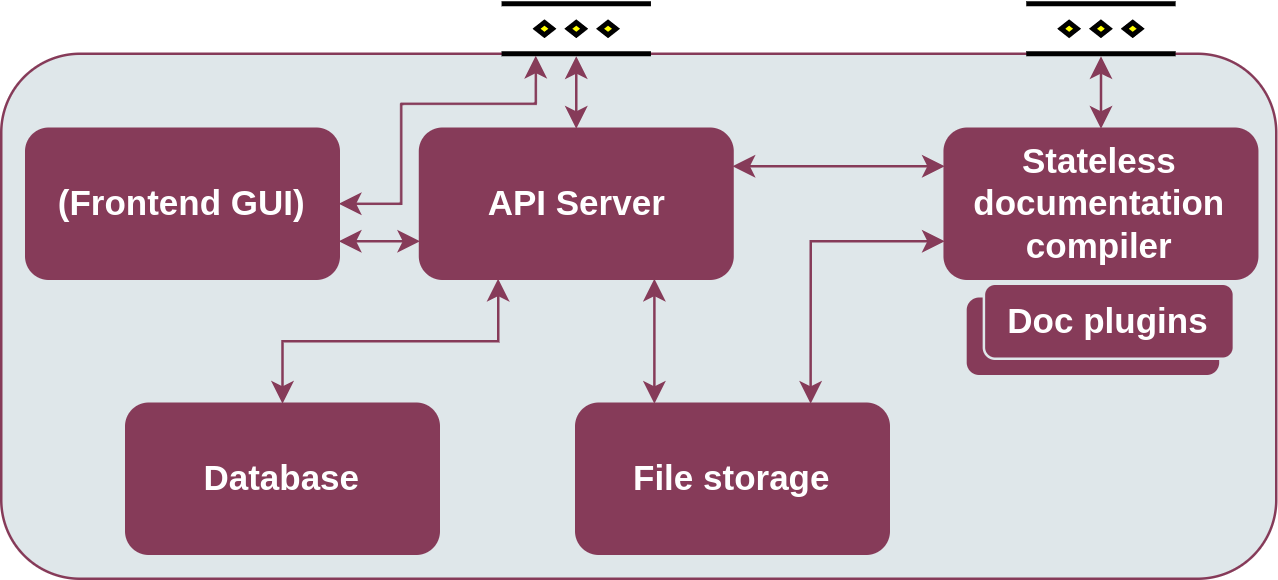
Enabler architecture
1.3.1.10. Version control and release
Version 0.1. Under development.
1.3.1.11. License
The Semantic Repository is licensed under the Apache License, Version 2.0 (the “License”).
You may obtain a copy of the License at: http://www.apache.org/licenses/LICENSE-2.0
1.3.1.12. Notice (dependencies)
Dependency list and licensing information will be provided before the first major release.