1.3.2. Semantic Translation enabler
Documentation for the Semantic Translation Enabler of ASSIST-IoT.
1.3.2.1. Introduction
Semantic interoperability is the ability of different applications and business partners to exchange data with unambiguous, shared meaning. As a result, data analysis and knowledge discovery can be done on a federation of systems.
Semantic Translation Enabler (STE) enables alignments-based semantic translation of RDF data (messages). At its core STE builds on a considerably enhanced version of the Inter Platform Semantic Mediator (IPSM) component, developed by the INTER-IoT project.
The translation performed by STE is based on alignments and uses a deployment-specific modularized central ontology. For IoT domain, the core modules describing, e.g. devices, observations are (usually) based on GOIoTP (Generic Ontology of IoT Platforms) that is a meta-data reference data model. Additionally, any domain specific module can be included e.g. medical ontology, logistic ontology. However, central ontology can be any ontology that can serve as a central data model. It is not directly used configure STE but should be considered when defining alignments that are used for STE configuration. Additionally, any domain specific module can be included e.g. medical ontology, logistic ontology.
The alignment is a set of correspondences between simple entities or complex structure from source and target ontologies. It contains rules for transformation between input and output RDF graphs. Specifically, STE translates RDF graph named payload (that is part of the message send to STE). Alignments are parts of STE instance configuration, and are used directly to execute translation. Semantic translation always constitutes application of two alignments - one from source ontology to central ontology, the other from central ontology to target ontology.
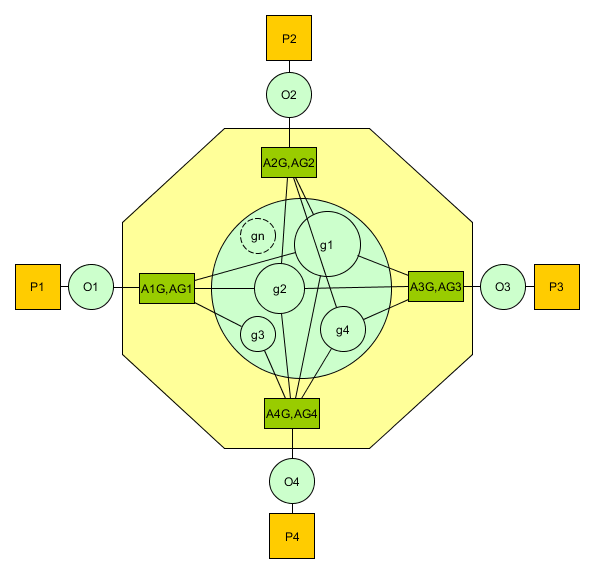
The following figure shows a sample situation with four IoT artifacts (P1-4). Each with it’s own ontology (O1-4). The central ontology contains modules g1…gn. The two-way communication requires preparation of two alignments: (i) from artifact’s ontology to central ontology e.g. A1G, (ii) from central ontology to artifact’s ontology e.g. AG1. Each alignments contains correspondences between ontology modules that are required for this part of communication. |Overview of translation with central modularized ontology|
Overview of translation with central modularized ontology
To achieve semantic interoperability between two artifacts:
Instantiate modular central ontology
Select/define artifact’s ontologies: create from scratch or use one of existing tools
Align semantics between ontology of each artifact and central ontology (set of alignments)
Implement syntactic translators
Configure STE - upload alignments, create translation channels
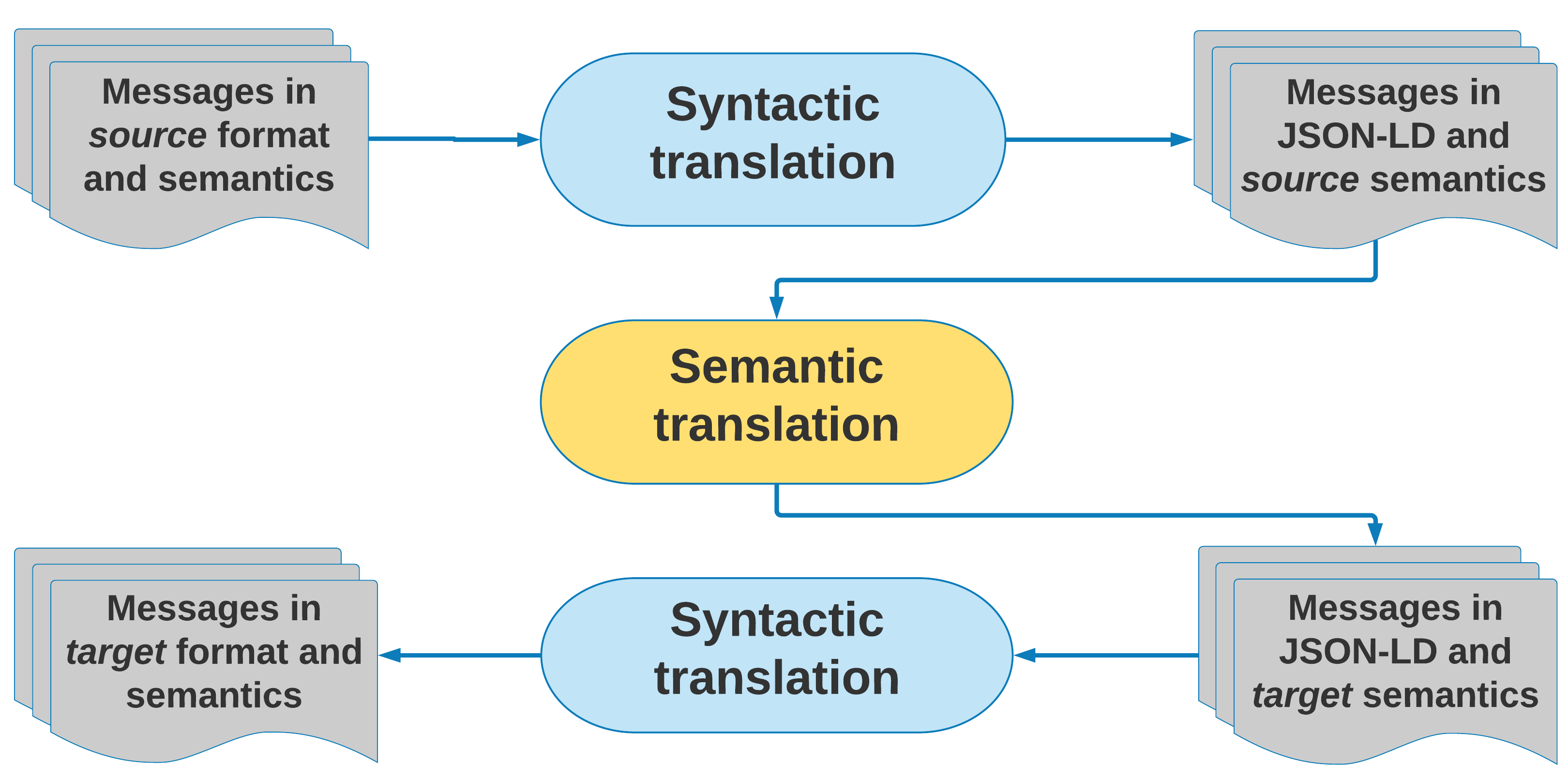
The following figure shows a process of sending a message from source to target artifact that needs to be semantically and syntactically translated. |Process overview|Process overview
The message originates at source artifact in it’s format and semantics e.g. XML message with respect to XML Schema. To use STE the message needs to be transformed to RDF with source artifact’s semantics. This translation is called syntactic translation. In fact, when STE is to be used in a standalone mode (without other INTER-IoT layers), syntactic translation can be implemented in any arbitrary component that will “prepare” input for semantic translation. Note that, conversion to RDF may not be necessary, when artifacts already have communication based on RDF. When a source artifact does not support semantics, an RDF represantation of data exchanged with the ecosystem needs to be proposed.
When the message arrives at STE, the RDF named graph payload is translated with respect to configuration of the semantic translation channel (see Architecture). Usually two alignments are applied, however STE can be configured with special predefined IDENTITY alignment that does not change the graph. Another remark here, is that STE follows the rule: translate only what can be translated, leave the rest as it was. The resultant message is expressed in RDF with semantics corresponding to target semantic of last applied alignment.
This message can be feed into another syntactic translator that will transform it’s format to e.g. JSON cosidering target artifact’s semantics. Another possible scenario is that there are applications consuming data in RDF and central semantics. In such case, second syntactic translation is not necessary.
1.3.2.2. IPSM Architecture
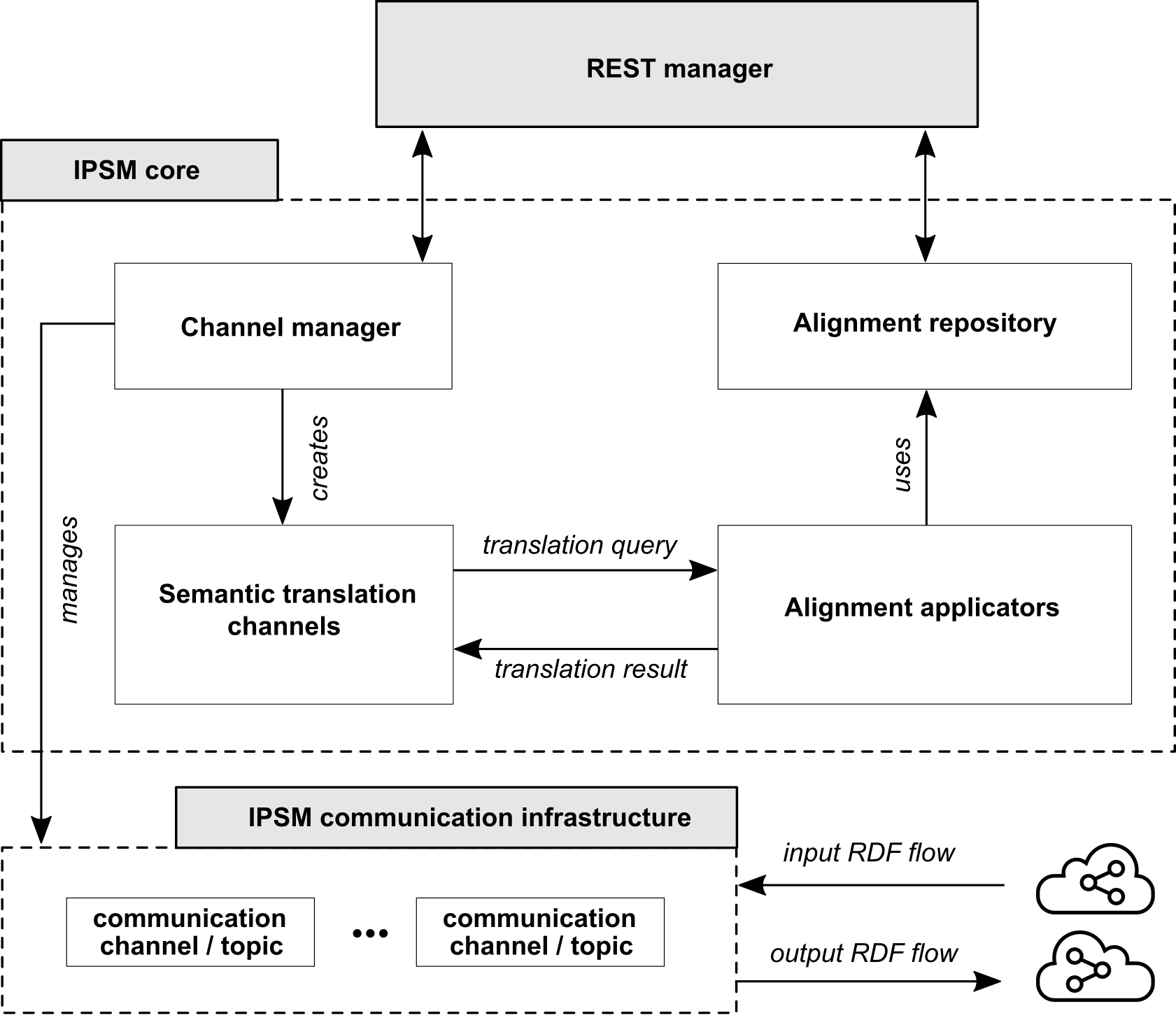
STE is a component for performing semantic translation that can be use in a standalone mode or in combination with other ASSIST-IoT enablers and application-specific tools. It has a REST interface for configuration, and both publish-subscribe and REST interfaces for translation. The used communication infrastructure that follows publish-subscribe paradigm is Apache Kafka.
Configuration includes:
Uploading alignment files that define the translation rules
Defining semantic translation channels - each channel is defined with input and output topic names, identifiers (name and version) of input and output alignments
Additionally, the following operations are possible:
List all uploaded alignments
Delete alignment identified by name and version
Retrieve alignment identified by name and version
List created translation channels
Delete channel identified by id
Performing semantic translation means sending input RDF message, and receiving output RDF message. Client can publish message to input topic of semantic translation channel, and consume message from output topic of semantic translation channel.
Another possibility is to use REST API for performing a synchronous semantic translation. Here, client in a request sends input RDF graph, and a sequence of alignments that should be applied. The response contains translated RDF graph.
|Architecture| Architecture overview
Alignments and central ontology
STE can perform translation between any pair of RDF graphs. The translation can be direct or composed from multiple alignments depending on the context. In a typical IoT platforms integration case, we use Central Ontology (CO) so that the translation has two steps: translate from source semantics to CO and translate from CO to target ontology. As a result, integration of a new platform into the ecosystem means preparing alignments to and/or from CO (depends on requirement for one- or bi-directional communication requirement).
Direct translation means that only one alignment is applied that defines mappings between source and target semantics. To configure STE to act in this way a translation channel should be defined that has as input alignment defined alignment and as output IDENTITY alignment (not changing the RDF graph). Direct translation with REST API means specifying a sequence of alignments to be applied consisting of only one alignment.
Composed translation means applying more than one alignment. In pub-sub approach, by default two alignments are used. In REST-based translation an arbitrary alignments sequence can be specified.
Note that in each case, the translation process should be handled by one semantic translation channel. By default, a translation channel is configured with two alignments that are applied sequentially.
1.3.2.3. IPSM Central ontology
Central ontology is not directly used by STE, but it needs to be established for a given STE deployment, to enable construction of consistent alignments. It is modularized, so that alignments can be created to and from selected modules, e.g. meteorological, logistic events, depending on the context of “conversation”. Specifically, there is no need to align the whole data models if an artifact that needs to be connected to the ecosystem exchanges only message related only to one aspect e.g. meteorological observation data.
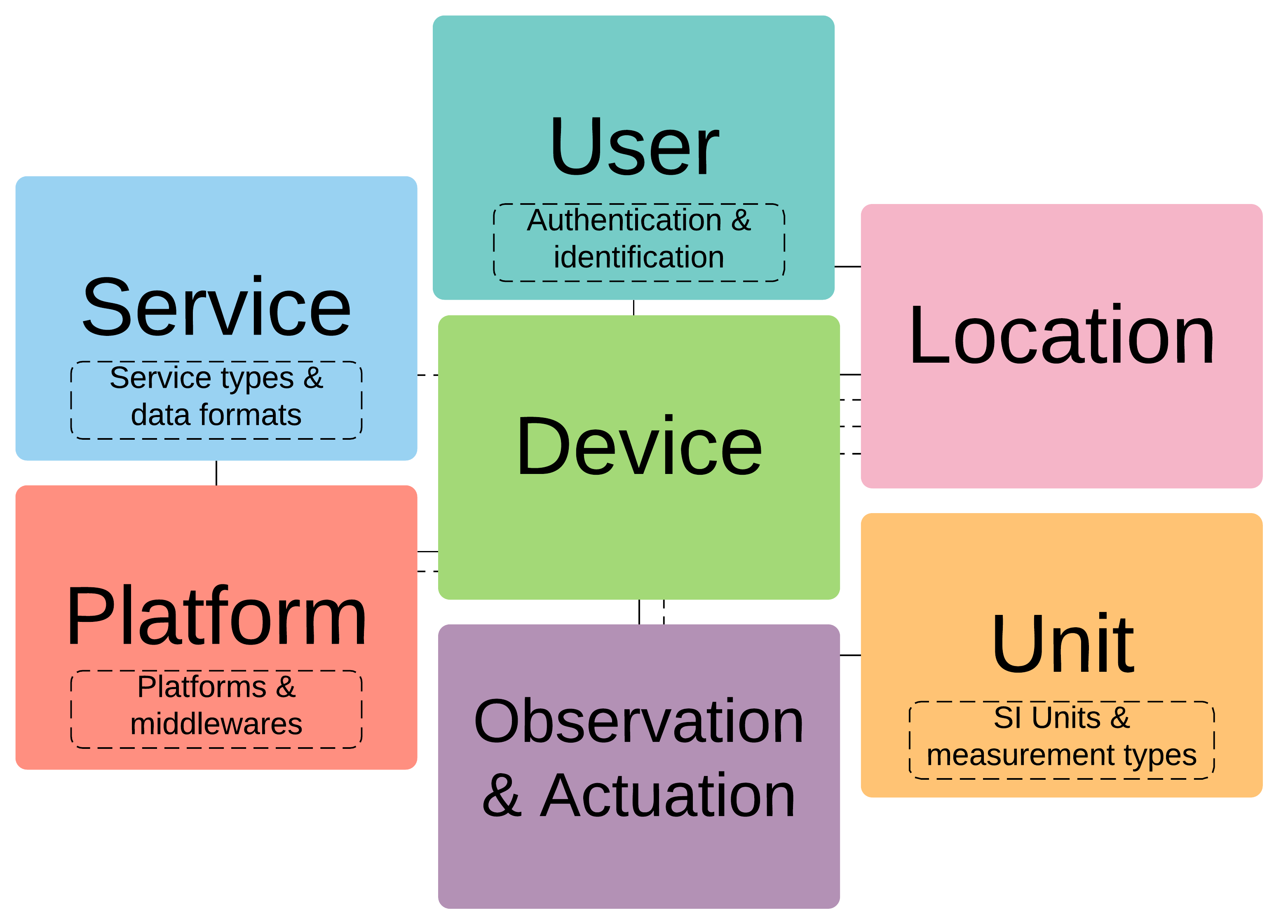
In case of IoT-centric applications the central ontology can be based on GOIoTP (Generic Ontology of IoT Platforms) and domain specific modules.
|GOIoTP and GOIoTPex modules| GOIoTP and GOIoTPex modules
In general case, central ontology can be any aribitrary ontology, since this does not influence the semantic translation engine provided by IPSM. However, semantic engineer preparing the deployment should keep in mind that:
central ontology should cover all “topics” of conversations in platforms ecosystem
it should be clear enough to enable querying and reasoning done directly on it
it should contain subject-specific modules that can be independently maintained and versioned (for easier change management)
1.3.2.4. Place in architecture
Will be determined after the release of the enabler.
1.3.2.5. User guide Alignment based semantic translation
The process of semantic translation is performed by STE based on the
configuration of translation channel (using Apache Kafka
publish-subscribe mode) or sequence of alignments received in REST
request (using REST API). The steps element in an alignment will
defines in what order cells are applied. Each cell is applied to the
RDF graph being an output of previous cell. The application of a cell
means that SPARQL UPDATE is generated from graph patterns in entity1
and entity2.
Lets know analyze step by step an example of transformation of one predefined RDF graph into another.
Let input RDF be:
{
 "@id": "p1ont:PositionMeasurementValue",
 "@type": "geo:Point",
 "geo:lat": {
   "@type" : "http://www.w3.org/2001/XMLSchema#float",
   "@value" : "52.3"
 },
 "geo:long": {
   "@type" : "http://www.w3.org/2001/XMLSchema#float",
   "@value" : "98.2"
 }
},
{
 "@id": "p2ont:Sensor_1",
 "@type": "saref:Sensor",
 "saref:IsUsedFor": {
   "@id": "p2ont:position"
 },
 "saref:hasFunction": {
   "@id": "p2ont:sensingFunction"
 },
 "saref:makesMeasurement": {
   "@id": "p2ont:Measurement_1"
 }
},
{
 "@id": "p2ont:Measurement_1",
 "@type": "saref:Measurement",
 "saref:hasTimestamp": {
   "@id": "p2ont:Time_1"
 },
 "saref:hasValue": {
   "@id": "p2ont:PositionMeasurementValue"
 },
 "saref:relatesToProperty": {
   "@id": "p2ont:positionProperty"
 }
},
{
 "@id": "p2ont:Time_1",
 "@type": "time:Instant",
 "time:inXSDDateTime": {
   "@type" : "http://www.w3.org/2001/XMLSchema#dateTime",
   "@value" : "2017-05-08T13:48:18"
 }
},
{
 "@id": "p2ont:sensingFunction",
 "@type": "saref:SensingFunction"
},
{
 "@id": "p2ont:positionProperty",
 "@type": "saref-ps:PositionProperty"
}
The corresponding diagram looks as follows:
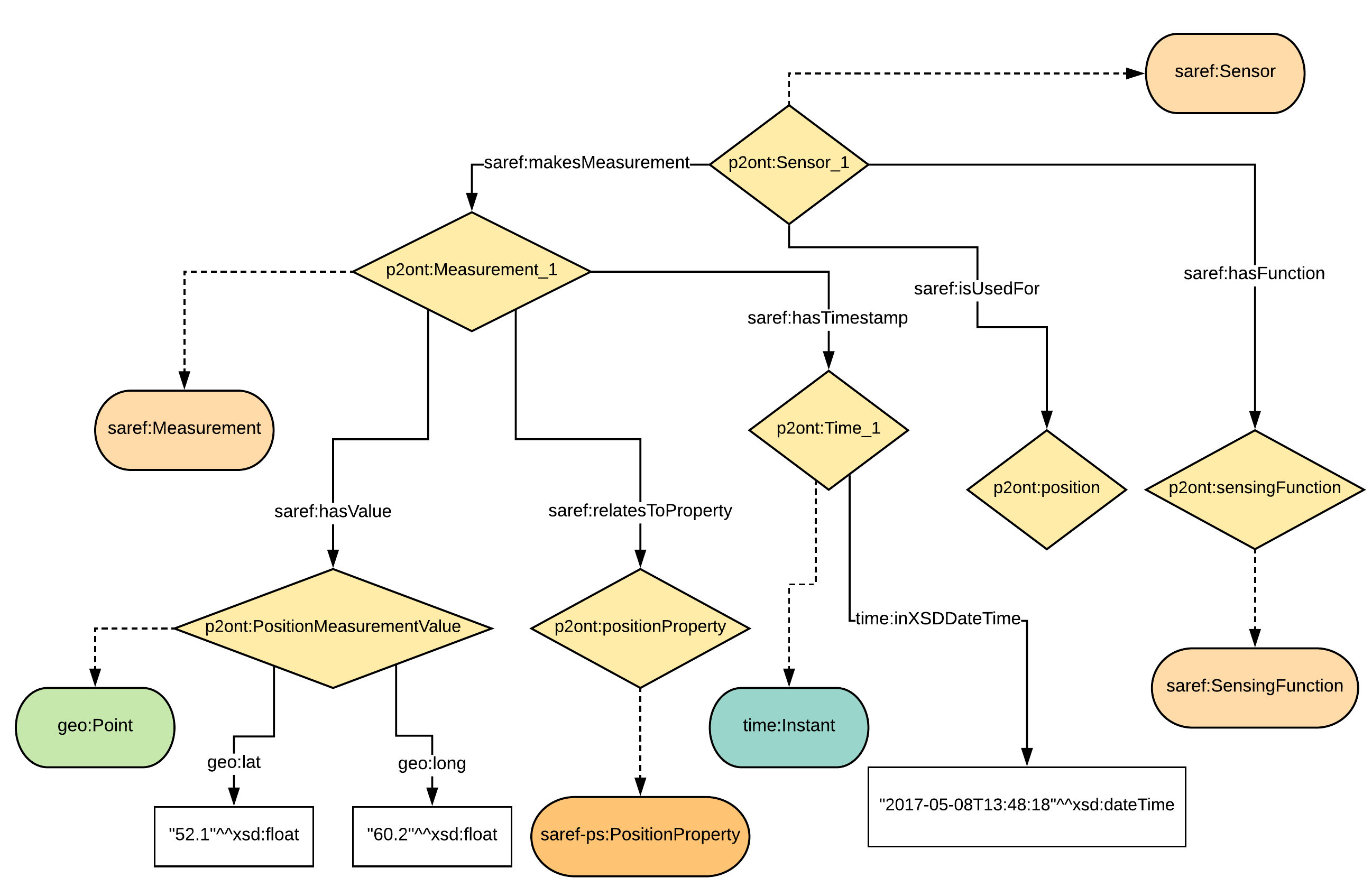
Input RDF
RDF input
The resultant RDF should be:
{
   "@id" : "_:b0",
   "@type" : "InterIoT:central#Position"
 }, {
   "@id" : "p2ont:PositionMeasurementValue",
   "@type" : [ "sosa:Result", "http://www.opengis.net/ont/geosparql#Geometry" ],
   "http://www.opengis.net/ont/geosparql#asWKT" : {
     "@type" : "http://www.opengis.net/def/sf/wktLiteral",
     "@value" : "Point(52.3 98.2)"
   }
 }, {
   "@id" : "p2ont:Measurement_1",
   "@type" : "sosa:Observation",
   "sosa:hasResult" : {
     "@id" : "p2ont:PositionMeasurementValue"
   },
   "sosa:madeBySensor" : {
     "@id" : "p2ont:Sensor_1"
   },
   "sosa:observedProperty" : {
     "@id" : "_:b0"
   },
   "sosa:resultTime" : {
     "@type" : "xsd:dateTime",
     "@value" : "2017-05-08T13:48:18"
   }
 }
],
 "@id" : "InterIoTMsg:payload"
}
The corresponding resultant graph is:
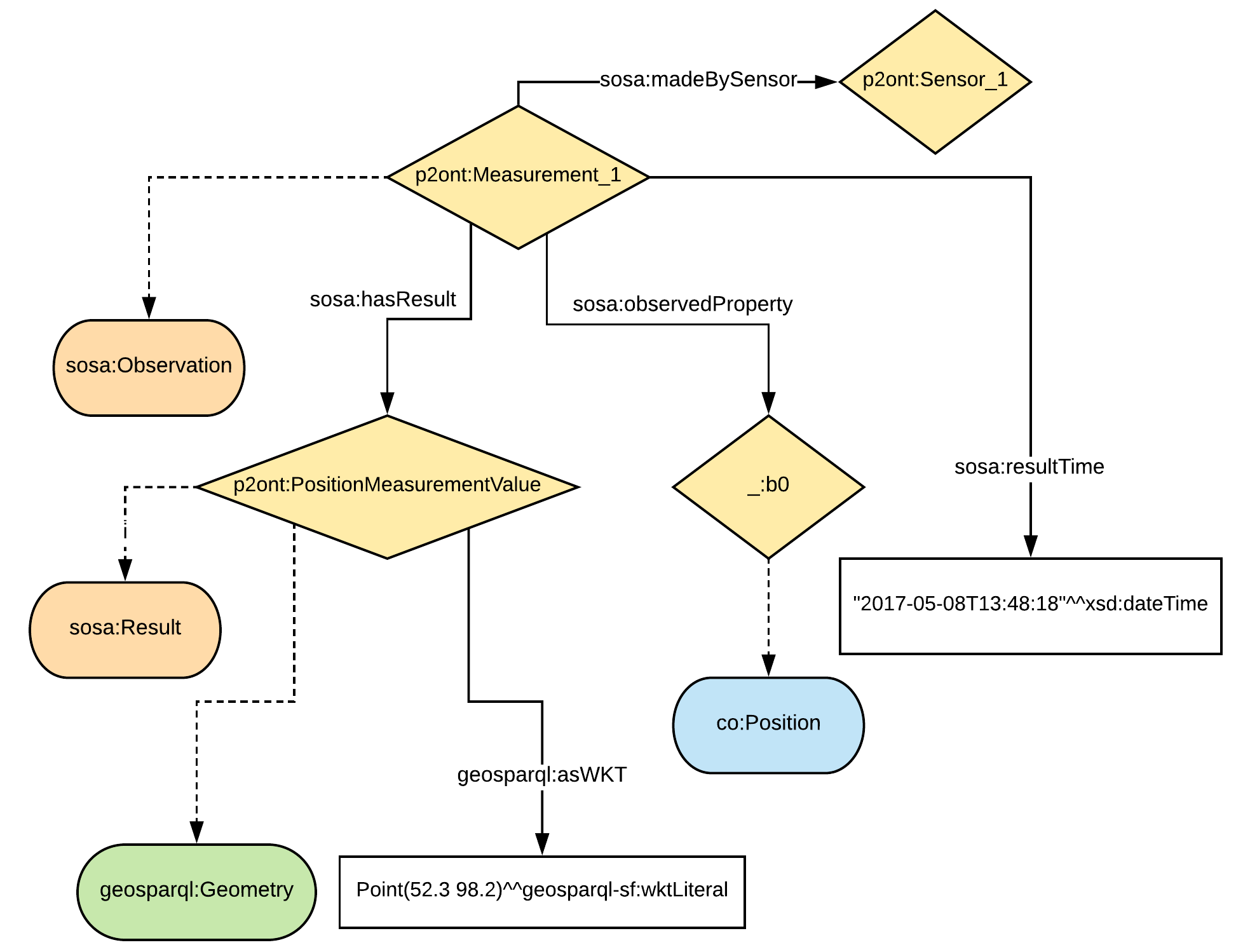
Input RDF
RDF output
Please note, that not all part of RDF graph are translated. Some parts will be left untouched as in input graph. The aforementioned code snippet and image present only part of the RDF graph that is a result of the translation.
Let us know analyze step by step an alignment that will allow to translate part of the input RDF graph into aforementioned output RDF graph.
<Alignment
       xmlns:rdf="http://www.w3.org/1999/02/22-rdf-syntax-ns#"
       xmlns:wgs84_pos="http://www.w3.org/2003/01/geo/wgs84_pos#"
       xmlns:sripas="http://www.inter-iot.eu/sripas#"
       xmlns="http://www.inter-iot.eu/sripas#"
       xmlns:sosa="http://www.w3.org/ns/sosa/"
       xmlns:geosparql="http://www.opengis.net/ont/geosparql#"
       xmlns:saref="https://w3id.org/saref#"
       xmlns:saref-ps="http://ontology.tno.nl/saref/positionsensor#"
       xmlns:time="http://www.w3.org/2006/time#"
       xmlns:co="http://inter-iot.eu/central"
       xmlns:xsd="http://www.w3.org/2001/XMLSchema#"
       xmlns:geo-sf="http://www.opengis.net/def/sf/"
       name="alignDemo_P2_CO" version="1.0" creator="P2_admin">
   <onto1>
       <Ontology about="http://platform2.eu/sensors#">
           <formalism>
               <Formalism name="OWL2.0" uri="http://www.w3.org/2002/07/owl#"/>
           </formalism>
       </Ontology>
   </onto1>
   <onto2>
       <Ontology about="http://www.inter-iot.eu/central">
           <formalism>
               <Formalism name="OWL2.0" uri="http://www.w3.org/2002/07/owl#"/>
           </formalism>
       </Ontology>
   </onto2>
   <steps>
       <step order="1" cell="cell1"/>
       <step order="2" cell="cell2"/>
       <step order="3" cell="cell3"/>
   </steps>
   <map>
       <Cell id="cell1">
           <entity1>
               <sripas:node_CTZ>
                   <saref:makesMeasurement>
                       <sripas:node_CTC>
                           <rdf:type rdf:resource="&saref;Measurement"/>
                           <saref:hasValue>
                               <sripas:node_CTA/>
                           </saref:hasValue>
                           <saref:hasTimestamp>
                               <sripas:node_CTB>
                                   <time:inXSDDateTime>
                                       <sripas:node_x/>
                                   </time:inXSDDateTime>
                               </sripas:node_CTB>
                           </saref:hasTimestamp>
                       </sripas:node_CTC>
                   </saref:makesMeasurement>
               </sripas:node_CTZ>
           </entity1>
           <entity2>
               <sripas:node_CTC>
                   <rdf:type rdf:resource="&sosa;Observation"/>
                   <sosa:observedProperty>
                       <rdf:Description>
                           <rdf:type rdf:resource="&co;Position"/>
                       </rdf:Description>
                   </sosa:observedProperty>
                   <sosa:madeBySensor>
                       <sripas:node_CTZ/>
                   </sosa:madeBySensor>
                   <sosa:hasResult>
                       <sripas:node_CTA/>
                   </sosa:hasResult>
                   <sosa:resultTime>
                       <sripas:node_x/>
                   </sosa:resultTime>
               </sripas:node_CTC>
           </entity2>
           <relation>=</relation>
           <typings>
               <typing about="&sripas;node_x" datatype="&xsd;dateTime"/>
           </typings>
       </Cell>
       <Cell id="cell2">
           <entity1>
               <sripas:node_CTX>
                   <rdf:type rdf:resource="&wgs84_pos;Point"/>
                   <wgs84_pos:lat>
                       <sripas:node_x/>
                   </wgs84_pos:lat>
                   <wgs84_pos:long>
                       <sripas:node_y/>
                   </wgs84_pos:long>
               </sripas:node_CTX>
           </entity1>
           <entity2>
               <sripas:node_CTX>
                   <rdf:type rdf:resource="&geosparql;Geometry"/>
                   <rdf:type rdf:resource="&sosa;Result"/>
                   <geosparql:asWKT>
                       <sripas:node_z/>
                   </geosparql:asWKT>
               </sripas:node_CTX>
           </entity2>
           <relation>=</relation>
           <sripas:transformation>
               <function about="str">
                   <param order="1" about="&sripas;node_x"/>
                   <return about="&sripas;node_sx"/>
               </function>
               <function about="str">
                   <param order="1" about="&sripas;node_y"/>
                   <return about="&sripas;node_sy"/>
               </function>
               <function about="concat">
                   <param order="1" val="Point("/>
                   <param order="2" about="&sripas;node_sx"/>
                   <param order="3" val=" "/>
                   <param order="4" about="&sripas;node_sy"/>
                   <param order="5" val=")"/>
                   <return about="&sripas;node_z"/>
               </function>
           </sripas:transformation>
           <filters>
               <filter about="&sripas;node_x" datatype="http://www.w3.org/2001/XMLSchema#float"/>
               <filter about="&sripas;node_y" datatype="http://www.w3.org/2001/XMLSchema#float"/>
               <filter about="&sripas;node_sx" datatype="http://www.w3.org/2001/XMLSchema#string"/>
               <filter about="&sripas;node_sy" datatype="http://www.w3.org/2001/XMLSchema#string"/>
           </filters>
           <typings>
               <typing about="&sripas;node_z" datatype="&geo-sf;wktLiteral"/>
           </typings>
       </Cell>
   </map>
</Alignment>
The translation includes two steps as indicated in:
<steps>
       <step order="1" cell="cell1"/>
       <step order="2" cell="cell2"/>
</steps>
The first step is defined as:
<Cell id="cell1">
          <entity1>
              <sripas:node_CTZ>
                  <saref:makesMeasurement>
                      <sripas:node_CTC>
                          <rdf:type rdf:resource="&saref;Measurement"/>
                          <saref:hasValue>
                              <sripas:node_CTA/>
                          </saref:hasValue>
                          <saref:hasTimestamp>
                              <sripas:node_CTB>
                                  <time:inXSDDateTime>
                                      <sripas:node_x/>
                                  </time:inXSDDateTime>
                              </sripas:node_CTB>
                          </saref:hasTimestamp>
                      </sripas:node_CTC>
                  </saref:makesMeasurement>
              </sripas:node_CTZ>
          </entity1>
          <entity2>
              <sripas:node_CTC>
                  <rdf:type rdf:resource="&sosa;Observation"/>
                  <sosa:observedProperty>
                      <rdf:Description>
                          <rdf:type rdf:resource="&co;Position"/>
                      </rdf:Description>
                  </sosa:observedProperty>
                  <sosa:madeBySensor>
                      <sripas:node_CTZ/>
                  </sosa:madeBySensor>
                  <sosa:hasResult>
                      <sripas:node_CTA/>
                  </sosa:hasResult>
                  <sosa:resultTime>
                      <sripas:node_x/>
                  </sosa:resultTime>
              </sripas:node_CTC>
          </entity2>
          <relation>=</relation>
          <typings>
              <typing about="&sripas;node_x" datatype="&xsd;dateTime"/>
          </typings>
      </Cell>
Here, a an input structure of RDF with device that makes a measurement
is specified according to SAREF ontology. Measurement has indicated
properties for value and time. This structure is translated to
observation made by sensor in SSN/SOSA ontology. In this case
observation is also characterized by result value and result time. Note,
that instance representing result is reused (the same URI) but it’s type
is translated. The entity stored in variable node_CTZ representing
SAREF device is placed in a different position in output graph - it’s
value of sosa:madeBySensor property.
In this step we also add information about observed property that is
related to SOSA observation with sosa:observedProperty. Here, we
generate a blank node of type &co;Position. This is class is assumed
to be a subclass of ssn:ObservableProperty in SSN/SOSA ontology, but
is specialized as property related to geospatial position. Note that the
first step defines a large transformation, however the same result can
be achived by applying several more simple consecutive steps. If the
input RDF graph is stable when it comes to structure then large part
of it can be translated in one step.
The SPARQL update for the above cell is:
DELETE {
  ?node_CTZ <https://w3id.org/saref#makesMeasurement> ?node_CTC.
  ?node_CTB <http://www.w3.org/2006/time#inXSDDateTime> ?node_x.
  ?node_CTC <https://w3id.org/saref#hasTimestamp> ?node_CTB.
  ?node_CTC <http://www.w3.org/1999/02/22-rdf-syntax-ns#type> <https://w3id.org/saref#Measurement>.
  ?node_CTC <https://w3id.org/saref#hasValue> ?node_CTA.
} INSERT {
  _:b0 <http://www.w3.org/1999/02/22-rdf-syntax-ns#type> <http://inter-iot.eu/central#Position>.
  ?node_CTC <http://www.w3.org/ns/sosa/resultTime> ?node_x_typed.
  ?node_CTC <http://www.w3.org/1999/02/22-rdf-syntax-ns#type> <http://www.w3.org/ns/sosa/Observation>.
  ?node_CTC <http://www.w3.org/ns/sosa/observedProperty> _:b0.
  ?node_CTC <http://www.w3.org/ns/sosa/madeBySensor> ?node_CTZ.
  ?node_CTC <http://www.w3.org/ns/sosa/hasResult> ?node_CTA.
} WHERE {
  ?node_CTZ <https://w3id.org/saref#makesMeasurement> ?node_CTC.
  ?node_CTB <http://www.w3.org/2006/time#inXSDDateTime> ?node_x.
  ?node_CTC <https://w3id.org/saref#hasTimestamp> ?node_CTB.
  ?node_CTC <http://www.w3.org/1999/02/22-rdf-syntax-ns#type> <https://w3id.org/saref#Measurement>.
  ?node_CTC <https://w3id.org/saref#hasValue> ?node_CTA.
  BIND(STRDT(STR(?node_x), <http://www.w3.org/2001/XMLSchema#dateTime>) AS ?node_x_typed)
}
The RDF graph after applying this cell is:
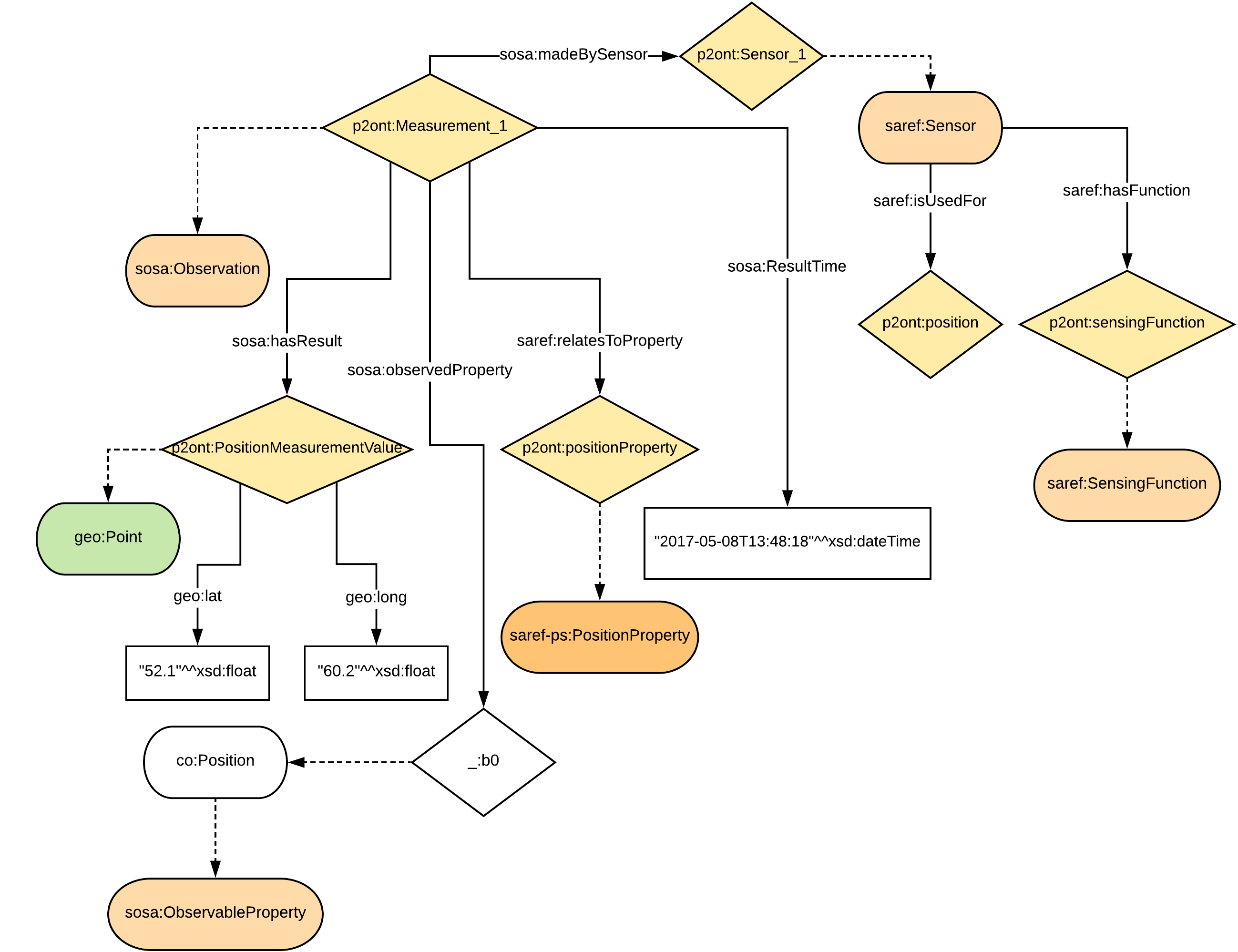
RDF after applying cell1
RDF after cell1
1.3.2.6. Input and output RDF
1.3.2.7. Deployment Installation
The installation procedure documentation for the Semantic Translation Enabler is under development.
1.3.2.8. Developers guide REST API Overview
Semantic Translation Enabler API
1.3.2.8.1. Version information
Version : 1.0.0
1.3.2.8.2. URI scheme
BasePath : / Schemes : HTTP
1.3.2.8.4. Consumes
application/json
1.3.2.8.5. Produces
application/json
1.3.2.9. Developers guide REST API Definitions
### Alignment
Name Description Schema ============================ ===================== ============================ creator optional Alignment creator string description optional Alignment description string map required map map name required Alignment name string onto1 required onto1 onto1 onto2 required onto2 onto2 steps required Steps steps version required Alignment version string ============================ ===================== ============================
map
Name |
Description |
Schema |
|---|---|---|
Cell optional |
Cell |
Cell
Name |
Description |
Schema |
|---|---|---|
entity1 required |
The first aligned ontology entity |
object |
entity2 required |
The second aligned ontology entity |
object |
relation required |
Relation |
string |
onto1
Name Description Schema ========================= ========================================= ================================== Ontology required Contains the URI identifying the ontology Ontology ========================= ========================================= ==================================
Ontology
Name |
Description |
Schema |
|---|---|---|
about optional |
URI identifying the ontology |
string |
onto2
Name Description Schema ========================= ========================================= ================================== Ontology optional Contains the URI identifying the ontology Ontology ========================= ========================================= ==================================
Ontology
Name |
Description |
Schema |
|---|---|---|
about optional |
URI identifying the ontology |
string |
steps
Name |
Description |
Schema |
|---|---|---|
step optional |
Alignment step |
step
Name |
Description |
Schema |
|---|---|---|
cell optional |
Alignment cell ID |
string |
order optional |
Order of cell application |
integer |
### AlignmentID
Name |
Description |
Schema |
|---|---|---|
name required |
Alignment name |
string |
version required |
Alignment version |
string |
### AlignmentInfo
Name |
Description |
Schema |
|---|---|---|
creator required |
Alignment creator |
string |
date required |
UNIX timestamp of upload to STE |
integer |
descId required |
Business identifier |
string |
description required |
Alignment description |
string |
id required |
Technical identifier |
integer |
name required |
Name of the alignment |
string |
sourceOntologyURI required |
URI of the source ontology for alignment |
string |
targetOntologyURI required |
URI of the target ontology for alignment |
string |
version required |
Alignment version |
string |
### ChannelConfig
Name |
Description |
Schema |
|---|---|---|
inpAlignmentName required |
Name of the input alignment, used for translating the incoming RDF data |
string |
**inpAlignmentVersion ** required |
Version of the input alignment, used for translating the incoming RDF data |
string |
outAlignmentName required |
Name of the output alignment, used for translating the outgoing RDF data |
string |
**outAlignmentVersion ** required |
Version of the output alignment, used for translating the outgoing RDF data |
string |
parallelism optional |
Internal parallelism of the channel, e.g., the value 5 means that the channel can consume 5 messages in parallel (preserving their time order) |
integer |
sink required |
Identifier of the sink of the channel, i.e., Apache Kafka topic to which STE publishes translated RDF data |
string |
source required |
Identifier representing the source of the channel, i.e. Apache Kafka topicfrom which STE reads the RDF data to be translated |
string |
### ChannelInfo
Name |
Description |
Schema |
|---|---|---|
descId required |
Business identifier of the channel |
string |
id required |
Identifier of the channel |
integer |
inpAlignmentName required |
Name of the input alignment, used for translating the incoming RDF data |
string |
**inpAlignmentVersion ** required |
Version of the input alignment, used for translating the incoming RDF data |
string |
outAlignmentName required |
Name of the output alignment, used for translating the outgoing RDF data |
string |
**outAlignmentVersion ** required |
Version of the output alignment, used for translating the outgoing RDF data |
string |
sink required |
Identifier of the sink of the channel, i.e. Apache Kafka topic to which STE publishes translated RDF data |
string |
source required |
Identifier representing the source of the channel, i.e. Apache Kafka topic from which STE reads the RDF data to be translated |
string |
### Error
Name |
Schema |
|---|---|
message required |
string |
### LoggingResponse
1.3.2.10. Name Schema
### Response
Name |
Description |
Schema |
|---|---|---|
message required |
Descriptive response |
string |
### TranslationErrorResponse
Name Description Schema
========================= =========================================
======
graphStr required Empty string Maximal length : 0 string
message required Info on the failure of the translation string
========================= =========================================
======
### TranslationRequest
Name |
Description |
Schema |
|---|---|---|
alignIDs required |
Sequence of alignment IDs to ba applied |
< AlignmentID <definit ions.md#alignmentid> __ > array |
graphStr required |
JSON-LD message as a string |
string |
### TranslationResponse
Name |
Description |
Schema |
|---|---|---|
graphStr required |
Translated JSON-LD message as a string |
string |
message required |
Info on the success of the translation |
string |
### VersionResponse
Name |
Description |
Schema |
|---|---|---|
name required |
Named of STE instance |
string |
version required |
Version of STE instance |
string |
1.3.2.11. Developers guide REST API Paths
### Alignments
#### Upload new alignment
POST /alignments
Type Name Description Schema ======== ===================== ======================= ======================================== Body conf required Alignment configuration Alignment ======== ===================== ======================= ========================================
HTTP Code Description Schema ========= ========================================================== ====================================== 201 Alignment uploaded successfully Response 208 Alignment already uploaded Response 400 Wrong arguments Error 409 Alignment with the same ID but different definition exists Error ========= ========================================================== ======================================
application/xml
application/json
#### List alignments
GET /alignments
Lists alignments uploaded to the STE.
HTTP Code Description Schema ========= ========================= ========================================================== 200 Available alignments info < AlignmentInfo > array ========= ========================= ==========================================================
#### Get an alignment identified by name+version
GET /alignments/{name}/{version}
Type Name Description Schema ======== ======================== ======================================== ====== Path name required Name of the alignment to be retrieved string Path version required Version of the alignment to be retrieved string ======== ======================== ======================================== ======
HTTP Code Description Schema ========= ============================== ================================ 200 Alignment successfuly returned No Content 400 Alignment not found Error 500 Alignment retrieval failed Error ========= ============================== ================================
application/json
application/xml
#### Delete alignment identified by name+version
DELETE /alignments/{name}/{version}
Type Name Description Schema ======== ======================== ================================== ====== Path name required Name of the alignment to delete string Path version required Version of the alignment to delete string ======== ======================== ================================== ======
HTTP Code |
Description |
Schema |
|---|---|---|
204 |
Alignment deleted |
No Content |
400 |
Alignment not found |
|
500 |
Alignment deletion failed |
#### Convert XML alignment into RDF/XML format
POST /convert
Type |
Name |
Description |
Schema |
|---|---|---|---|
Body |
conf required |
Alignment source |
string |
HTTP Code Description Schema ========= ================================ ================================ 201 Alignment converted successfully string 500 Alignment conversion failed Error ========= ================================ ================================
application/xml
application/xml
#### Convert alignment cells to Turtle format
POST /convert/TTL
Type |
Name |
Description |
Schema |
|---|---|---|---|
Body |
conf required |
Alignment source |
string |
HTTP Code Description Schema ========= ====================================== ================================ 201 Alignment cells converted successfully string 500 Alignment cells conversion failed Error ========= ====================================== ================================
application/xml
application/xml
### Channels
#### Create new channel
POST /channels
Type Name Description Schema ======== ===================== ===================== ================================================ Body conf required Channel configuration ChannelConfig ======== ===================== ===================== ================================================
HTTP Code Description Schema ========= ========================================= ====================================== 201 Channel created successfully Response 400 Channel already exists or wrong arguments Error ========= ========================================= ======================================
application/json
application/json
#### List active STE channels
GET /channels
The endpoint returns the list of all STE channels which are currently active.
HTTP Code Description Schema ========= ==================================== ====================================================== 200 Array of channel information records < ChannelInfo > array ========= ==================================== ======================================================
#### Delete channel based on the ID
DELETE /channels/{channelId}
Type |
Name |
Description |
Schema |
|---|---|---|---|
Path |
channelId required |
ID of channel to delete |
integer |
HTTP Code |
Description |
Schema |
|---|---|---|
204 |
Channel deleted |
No Content |
400 |
Channel not found |
|
500 |
Closing channel failed |
### Logging
#### Get the current STE logging level
GET /logging
HTTP Code |
Description Schema |
application/json
#### Set logging level
POST /logging/{level}
Type |
Name |
Description |
Schema |
|---|---|---|---|
Path |
level required |
Logging level |
enum (all, trace, debug, info, warn, error, off) |
HTTP Code Description Schema ========= ============================== ==================================================== 200 Logging level set successfully LoggingResponse ========= ============================== ====================================================
application/json
### Translation
#### Translate JSON-LD message via sequence of alignments
POST /translation
Type Name Description Schema ======== ===================== ======================== ========================================================== Body data required Translation request data TranslationRequest ======== ===================== ======================== ==========================================================
HTTP Code Description Schema ========= ======================== ====================================================================== 200 Translation successful TranslationResponse 400 Error during translation TranslationErrorResponse ========= ======================== ======================================================================
application/json
### Version
#### Get this STE version info
GET /version
HTTP Code Description Schema ========= ===================================== ==================================================== 200 STE version info successfuly returned VersionResponse ========= ===================================== ====================================================
application/json
1.3.2.12. Version control and releases
Will be determined after the release of the enabler.
1.3.2.13. License
The Inter Platform Semantic Mediator is licensed under the Apache License, Version 2.0 (the “License”).
You may obtain a copy of the License at: http://www.apache.org/licenses/LICENSE-2.0
1.3.2.14. Notice dependencies
Dependency list and licensing information will be provided before the first major release of the STE.