1.2.1. Smart Orchestrator
1.2.1.1. Introduction
The Smart Orchestrator simplifies how user interfaces and other enablers interact with the primary components of the MANO framework and Kubernetes clusters. This enabler manages the complete lifecycle of Containerized Functions, whether they are network-related or not, from their creation to their termination, enabling deployment on any available k8s cluster.
1.2.1.2. Features
The Smart Orchestrator has the goal of deploying, monitoring, and orchestrating resources that have been instantiated in each of the Kubernetes clusters that have been added to it. To achieve these objectives, the enabler relies on four different technologies: API REST, Prometheus, MongoDB, mck8s, and OSM. The Smart Orchestrator includes the following main features:
Decision intelligence: The Smart Orchestrator offers Kubernetes decision intelligence by accessing the metrics servers in the other joined clusters to determine the optimal placement of enablers based on the resources available in each cluster.
Lifecycle control: The Smart Orchestrator provides lifecycle control, enabling the management of enablers from their deployment to their deletion.
Energy saving: The Smart Orchestrator saves energy by running a job only when it is required, rather than having a component continuously running for the sole purpose of servicing a single API call.
1.2.1.3. Place in architecture
The Smart Orchestrator is part of the **Smart Network and Control plane ** in the ASSIST-IoT architecture. It provides an intelligent and dynamic network infrastructure where nodes work in parallel and communicate seamlessly. The Smart Orchestrator monitors enablers and schedules them efficiently based on CPU and memory resources.
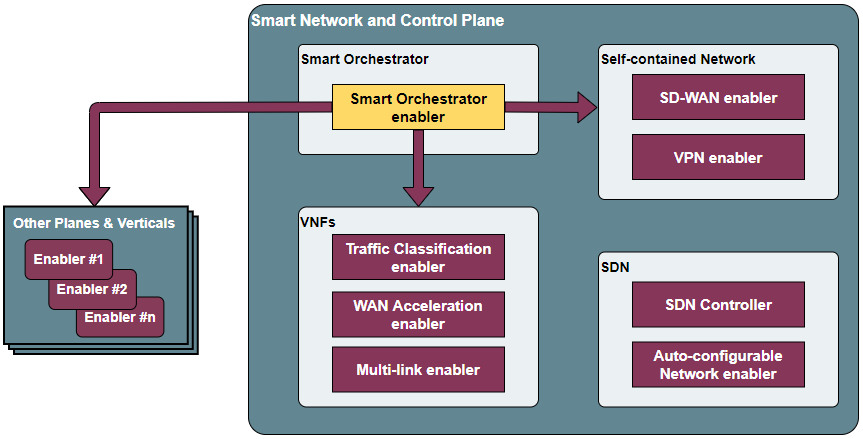
The enabler is composed of these elements:
API REST: The entry point for user interaction and responsible for communication with other components to obtain, add, or delete resources such as enablers, clusters, or repositories.
OSM: Controls the entire lifecycle of Containerized Network Functions (CNFs), from their instantiation to their termination, allowing deployment in any available k8s cluster.
Metrics server: Collects performance metrics from targets (Kubernetes clusters).
Scheduler: Provides logic to place enablers based on resources available in the joined Kubernetes clusters.
Multiservice controller: Allows the connectivity from edge services to cloud services based in name service.

1.2.1.4. Pre-requisites
MINIMUM: 2 CPUs, 6 GB RAM, 40GB disk and a single interface with Internet access.
RECOMMENDED: 2 CPUs, 8 GB RAM, 40GB disk and a single interface with Internet access.
Base image: Ubuntu 20.04 (64-bit variant required) in a clean machine.
1.2.1.5. Installation Smart Orchestrator
1. git clone https://gitlab.assist-iot.eu/enablers-registry/public.git
2. cd public/
3. cd smartorchestrator/
4. cd scripts/
5. chmod +x smartOrchestrator.sh
6. ./smartOrchestrator.sh -i
1.2.1.6. Installation K8s cluster
1.2.1.6.1. KUBEADM
Install a K8s cluster located in the edge tier of the architecture using Kubeadm.
1. git clone https://gitlab.assist-iot.eu/enablers-registry/public.git
2. cd public/
3. cd smartorchestrator/
4. cd scripts/
5. chmod +x kubernetes.sh
Warning
ENSURE THAT ALL NODES ARE ADDED TO THE MAIN CLUSTER (MASTER NODE) PRIOR TO ADDING THE CLUSTER TO THE SMARTORCHESTRATOR.
1.2.1.6.2. Master node
Install a K8s cluster with a master node.
There are two important flags: - t: SERVER or AGENT (in this case SERVER). - p: Pod CIDR Network (This MUST be different in each cluster. If you choose 10.216.0.0/16, the other cluster MUST be for instance 10.215.0.0/16).
Warning
DO NOT REPEAT POD CIDR NETWORK. - 10.217.0.0/16 IS RESERVED FOR THE SMART ORCHESTRATOR CLUSTER.
./kubernetes.sh -t SERVER -p 10.216.0.0/16
1.2.1.6.3. Worker node
Install a K8s worker node to add an existing master node.
./kubernetes.sh -t AGENT
Once the worker node is ready, switch to the main cluster (master node) and copy the output of this command:
kubeadm token create --print-join-command
Switch again to the master node of the cluster and paste the command output as sudo. .. note:
- A KUBEADM node can not be joined to a k3s cluster.
- A k3s node can not be joined to a KUBEADM cluster.
1.2.1.6.4. K3S
Install a K3s (a lightweight K8s distribution) cluster located in the edge tier of the architecture
1. git clone https://gitlab.assist-iot.eu/enablers-registry/public.git
2. cd public/
3. cd smartorchestrator/
4. cd scripts/
5. chmod +x k3s.sh
Warning
ENSURE THAT ALL NODES ARE ADDED TO THE MAIN CLUSTER (MASTER NODE) PRIOR TO ADDING THE CLUSTER TO THE SMARTORCHESTRATOR.
WE ARE FACING SOME ISSUES WITH CILIUM AND RPI, PLEASE WAIT UNTIL WE HAVE SOLVED IT.
1.2.1.6.5. Master node
Install a K8s cluster with a master node.
There are three important flags: - t: SERVER or AGENT (in this case SERVER). - i: Server IP. If the edge is behind a NAT and the Smart Orchestrator or the worker nodes are outside, the value is your Public IP. - p: Pod CIDR Network (This MUST be different in each cluster. If you choose 10.216.0.0/16, the other cluster MUST be for instance 10.215.0.0/16).
Warning
DO NOT REPEAT POD CIDR NETWORK.
10.217.0.0/16 IS RESERVED FOR THE SMART ORCHESTRATOR CLUSTER.
sudo ./k3s.sh -t SERVER -i serverIP -p 10.213.0.0/16
1.2.1.6.6. Worker node
Install a K8s worker node to add an existing master node.
There are three important flags: - s: Server IP (Master Node IP). - k: The server token can be found on the master node machine, located at the following path: /var/lib/rancher/k3s/server/node-token
sudo ./k3s.sh -t AGENT -i serverIP -k serverToken
Note - K8s clusters cannot mix nodes from different K8s distributions (kubeadm, K3s, …) , all the nodes of a cluster must belong to the same distribution. - A KUBEADM node can not be joined to a k3s cluster. - A k3s node can not be joined to a KUBEADM cluster.
1.2.1.7. User guide
The enabler has a management API with a REST interface that allows you to configure certain values. The API will respond with the requested information or the result of the command you executed.
Method
Endpoint
Description
Payload
Information
GET
/api/k8sclusters/
Return K8s clusters
POST
/api/k8sclusters/
Add a K8s cluster
{“name”: String, “description”: String, “credentials”: Object, “k8s_version”: String}
Cluster name and all the names in the k8s credentials must be the same name. First cluster to be added must be cloud cluster. If this steps are not followed the smartorchestrator does not allow to join a cluster.
DELETE
/api/k8sclusters/:id
Delete a k8s cluster by id
GET
/api/chartrepo
Return a helm repository
POST
/api/chartrepo
Add a helm repository
{“name”: String, “description”: String, “url”: String}
DELETE
/api/chartrepo/:id
Delete a helm repository by id
GET
/api/enabler/instanced
Return the instanced enablers
POST
/api/enabler/
Instantiate an enabler
{“enablerName”: String,”helmChart”: String, “additionalParams”: Object,”vim”: String, “auto”: Boolean,”placementPolicy”: String}
The placementPolicy can be: worst-fit, best-fit or traffic-most
POST
/api/enabler/:id /terminate
Terminate an enabler by id
DELETE
/api/enabler/:id
Delete an enabler by id
GET
/api/enabler/enabler_cluster/:id
Get enablers in a cluster by cluster name
POST
/api/login/tokens
Login
{“username”: String ,”password”: String}
DELETE
/api/enabler/pv/:id
Delete PV and PVC related with an enabler by enabler id
GET
/api/k8sclusters/node/:clusterid
Get nodes by k8s cluster
1.2.1.7.1. K8s cluster addition to the Smart Orchestrator
Here are the steps to follow for adding a cluster to the Smart Orchestrator:
The cluster name and all associated names in the Kubernetes credentials must be identical.
The initial cluster added should be the cloud cluster, which serves as the smart orchestrator cluster.
Failure to follow these steps will result in the Smart Orchestrator preventing the joining of a cluster.
Warning
ENSURE THAT ALL NODES ARE ADDED TO THE MAIN CLUSTER (MASTER NODE) PRIOR TO ADDING THE CLUSTER TO THE SMARTORCHESTRATOR.
WE ARE FACING SOME ISSUES WITH CILIUM AND RPI, PLEASE WAIT UNTIL WE HAVE SOLVED IT.
1.2.1.8. Troubleshooting
1.2.1.8.1. SmartOrchestrator installation fails
If the smartorchestrator installation fails, uninstall the installation and try it again:
1. ./smartOrchestrator.sh -u
2. ./smartOrchestrator.sh -i
The installation can fail because of the pull request limit of Docker, in that case contact with @framabio
1.2.1.8.2. Kubectl error
1.2.1.8.2.1. KUBEADM
The connection to the server localhost:8080 was refused - did you specify the right host or port?
Unable to connect to the server: x509: certificate signed by unknown authority
Please use this command:
mkdir -p $HOME/.kube
sudo cp -i /etc/kubernetes/admin.conf $HOME/.kube/config
sudo chown $(id -u):$(id -g) $HOME/.kube/config
1.2.1.8.2.2. K3S
Please use this command:
export KUBECONFIG=/etc/rancher/k3s/k3s.yaml
1.2.1.8.3. Reset kubernetes
1.2.1.8.3.1. KUBEADM
For reseting a kubernetes kubeadm cluster:
sudo kubeadm reset
1.2.1.8.3.2. K3s
For reseting a kubernetes k3s server node:
/usr/local/bin/k3s-uninstall.sh
For reseting a k3s agent node:
/usr/local/bin/k3s-agent-uninstall.sh
1.2.1.9. Developer Guide
Once the code is made public, best practices for maintaining the code in all aspects will be promoted. The maintenance team will be responsible for accepting or rejecting updates.
1.2.1.10. Version control and release
Version 3.0.0. New features:
Auto-Clustermesh
MultiCluster Service Controller
Acceptance of any helm repository.
Improvement of enabler removal.
1.2.1.11. License
Apache 2.0