1.3.1. Semantic Repository enabler
1.3.1.1. Introduction
This enabler offers a “nexus” for data models, ontologies, and other files, that can be uploaded in different file formats, and served to users with relevant documentation. This enabler is aimed to support files that describe data models or support data transformations, such as ontologies, schema files, semantic alignment files etc. However, there are no restrictions on file format and size.
Semantic Repository features flexible versioning, metadata support, built-in search capabilities, documentation generation and serving, and more.
Overall focus of the Semantic Repository’s design is high performance, scalability, and resiliency. It should be able to scale up and down to meet the needs of a specific use case.
This enabler has reached a TRL of 6 during the execution of the ASSIST-IoT project.
1.3.1.2. Features
1.3.1.2.1. Implemented features
Storage of any type of data model, both textual and binary.
Ability to provide multiple formats of one data model, depending on the requester’s preferences.
Grouping data models into namespaces.
Flexible versioning with arbitrary tag names.
Ability to attach arbitrary additional metadata.
Metadata searching and sorting.
Generating HTML documentation pages from source files.
Serving documentation.
Issuing notifications to external services about changes in the repository (via webhooks).
1.3.1.3. Place in architecture
The Semantic Repository is located in the Data management plane of the ASSIST-IoT architecture. It serves as a versioned and namespaced central repository of data models and other files. It has no limitations with regard to the content that it can store, thus it can be used for diverse data storage-related scenarios.
1.3.1.4. User guide
The Semantic Repository enabler exposes a single REST API endpoint for both manipulating the repository’s contents, as well as for retrieving stored data models. There is also a graphical user interface for performing most of the same tasks.
1.3.1.4.1. Basic concepts
Namespace – a top-level “group” in the repository, which can host any number of models.
Model – a data model, which can have many versions.
Model version – a specific version of a model. You can upload the content of a data model only to its specific version. The version can also have associated documentation pages and other metadata.
Content – each model version can have many content files attached, each in a different format.
There are few restrictions on how you can use these concepts to build your repository. For example, it is possible to upload files of arbitrary size and format.
To give some context, in GitHub terms, a namespace would translate a user or a group. A model would be a repository, and a model version would be a branch or tag. This is just an example, of course.
1.3.1.4.2. Model versions
The Semantic Repository does not force a specific versioning scheme on your models. You can use for example Git branches and tags, plain numbers, or Semantic Versioning.
The latest version tag is special – it is a pointer to the most
recent version of the model, as set by the model’s owner. It must always
be set manually. A model may have no latest pointer, and the pointer
may lead to a non-existent version. Enforcing a specific style of use is
up to the owner.
The benefit of the latest tag is that it allows clients to easily
retrieve the most recent version of the model (see the API user guide).
1.3.1.4.3. Content
One model version can have multiple content files attached, each in a different format. The format is recommended to correspond to the Media Type of the file – this is to best support HTTP-based technologies, such as Linked Data. However, you can always set the format to whatever you like.
The content for one model version should be immutable, i.e., you should avoid modifying the once-uploaded content for a specific version. This is so that clients can expect that the content for a given version will not change suddenly, introducing a backward-incompatible change. It is however possible to overwrite earlier-uploaded content, in case of a mistake, for example. See the API guide below for more details.
You can specify the default format to use when retrieving the content, when no preferences were specified. See the API guide below for more details.
1.3.1.4.4. Metadata
You can attach arbitrary metadata to namespaces, models, and model versions. This metadata can serve a multitude of applications such as dependency tracking, additional provenance information (e.g., author email, license), indicating the source Git branch, etc.
Each entity (that is, a namespace, model, or model version) can have a number of metadata keys. Each key can have either a single textual value or several values (an array).
For example, if you want to indicate the authorship of a model version and its source Git branch, its metadata could look like:
author:
RobBob
branch:
rob-bob-branch
Or, in JSON:
"metadata": {
  "author": ["Rob", "Bob"],
  "branch": "rob-bob-branch"
}
This metadata can be filtered and sorted when browsing collections of entities.
Refer to the API guide below for usage instructions.
1.3.1.4.4.1. Limits
By default, the Semantic Repository limits the amount of metadata that can be stored per entity. These default limits can be changed (see: Configuration).
Maximum number of keys per entity: 64
Maximum number of values per one metadata key: 32
Maximum length in characters of an individual metadata value: 1024
1.3.1.4.5. Documentation
To each model version you can attach documentation pages that, for example, help explain users how to use the various fields in your data model. Currently, the documentation must be uploaded in the form of Markdown or reStructuredText source files. It also possible to attach images to the documentation pages.
The documentation pages are generated from a given markup format with the use of a documentation plugin. Currently, Semantic Repository offers the following plugins:
markdownfor text formatted in vanilla Markdown; accepted file extensions:.md,.markdowngfmfor text in GitHub-flavored Markdown; accepted file extensions:.md,.markdownrstfor text in the reStructuredText format; accepted file extensions:.rst
The documentation can be attached to a model version, but it is also possible to test the behavior of the documentation generator in the sandbox. Please refer to the REST API and the graphical interface guides below for more information on how to upload and access documentation.
1.3.1.4.5.1. File structure
Multiple files can be uploaded as one documentation set, either in the
form of separate files or compressed (accepted are .tar,
.tar.gz, and .tgz archives). Each documentation set must have at
least one source markup file for the home page, named README.md,
README.markdown, or README.rst (depending on the source format).
All markup files will be compiled to human-readable HTML pages with
built-in navigation. The home page will be served under /
(documentation root) and /index.html. The other pages will simply
have their extension changed to .html, so for an input file named
extra.md, a page named /extra.html will be produced.
The uploaded files can include subdirectories and additional image
files. When referencing images and other pages, please use relative
paths (e.g., img/image.png).
Example
When given the following input file structure:
/
|- README.md
|- api.md
|- image1.png
|- extra/
|  |- image2.png
|  |- extra.md
This output file structure will be produced:
/
|- index.html
|- api.html
|- image1.png
|- extra/
|  |- image2.png
|  |- extra.html
To embed
image1.pngintoREADME.mduse:To embed
extra/image2.pngintoREADME.mduse:To embed
image1.pngintoextra/extra.mduse:To link from
README.mdtoextra.mduse:[Link text](extra/extra)
1.3.1.4.5.2. Limits
By default, the Semantic Repository places limits on the uploaded documentation. These default limits can be changed (see: Configuration). - Maximum number of files in a documentation set: 50 - Maximum total size of files in a documentation set: 4MB - Time after which documentation in the sandbox expires and cannot be accessed anymore: 24 hours
1.3.1.4.6. Webhooks
You may want to trigger some action automatically, for example after a model is changed in the Repository. There is a feature called webhooks that allows you to do just that – whenever a specific action is performed on some object, a the Repository executes an HTTP POST request to an endpoint defined by the user.
This functionality has many possible use cases. For example, you can automatically validate newly uploaded data models and add appropriate metadata with validation status. Or you could convert the data model to a different format, once a new version is uploaded.
A webhook’s body is a JSON file that looks like this:
{
  "action": "...",
  "body": {
    ...
  },
  "context": {
    "model": "sosa",
    "namespace": "w3c",
    "version": "1.0.0"
  },
  "hookId": "638f62056d64d41f7c3578ae",
  "timestamp": "2022-12-06T15:39:02"
}
See the API guide for more information on how to define and manage webhooks.
1.3.1.4.6.1. Webhook types (available actions)
Currently there is only one available action for webhooks.
1.3.1.4.6.1.1. content_upload
Triggered whenever content is uploaded to a specific version of the model.
Example webhook body:
{
  "action": "content_upload",
  "body": {
    "contentType": "application/json",
    "format": "json",
    "md5": "98df1bb4a4675383b7d9fa12449dbf35",
    "overwrite": true,
    "size": 110208
  },
  "context": {
    "model": "sosa",
    "namespace": "w3c",
    "version": "1.0.0"
  },
  "hookId": "638f62056d64d41f7c3578ae",
  "timestamp": "2022-12-06T16:04:10"
}
contentType– content type of the uploadformat– user-specified format of the uploadmd5– MD5 sum of the uploaded fileoverwrite– whether the upload overwrote previously uploaded content for this model versionsize– size of the upload in bytes
1.3.1.5. User guide – REST API
The following is a brief guide to using the v1 API in practice. The examples follow a basic use case of storing several W3C ontologies.
The full specification of the REST API can be found in the REST API reference section.
1.3.1.5.1. General information
The API follows a very simple structure of
/v1/m/{namespace}/{model}/{model_version}. In general, POST creates
a new thing at the given URL, GET retrieves it, DELETE deletes
it, and PATCH modifies it.
The API only returns responses in plain JSON. The following guide should give you a good idea of what the responses look like, but you can also find the full schemas in the REST API reference section.
It generally does not matter whether a URL ends with a slash or not.
1.3.1.5.2. Creating and retrieving models
1.3.1.5.2.1. Step 1: create a namespace
First, we will need to create a namespace for your models. We will name
it w3c.
Request URL |
Request body |
|---|---|
|
(empty) |
Response code |
Response body |
|---|---|
200 |
|
You can examine the created namespace by performing an HTTP GET request:
Request URL |
Request body |
|---|---|
|
– |
Response code |
Response body |
|---|---|
200 |
|
Currently, there is no other information in the namespace other than its name.
You can also list all namespaces in the repository:
Request URL |
Request body |
|---|---|
|
– |
Response:
{
  "inViewCount": 1,
  "items": [{"namespace": "w3c"}],
  "page": 1,
  "pageSize": 20,
  "totalCount": 1
}
A collection of namespaces is returned. Browsing such collections is described in detail in the Browsing collections section below.
Note: namespace name must meet the following criteria:
be at least 1 and at most 100 characters long
only contain lower or upper letters of the latin alphabet, digits, dashes (
-), and underscores (_)not start with one of the following characters:
_-
1.3.1.5.2.2. Step 2: create models
In this example we will create two models: sosa and ssn,
corresponding to two well-known IoT
ontologies. Creating a model is
similar to creating a namespace:
Request |
Body |
|---|---|
|
(empty) |
Response code |
Body |
|---|---|
200 |
|
and for sosa:
Request |
Body |
|---|---|
|
(empty) |
Response code |
Body |
|---|---|
200 |
|
You can examine the created model:
Request |
Body |
|---|---|
|
– |
Response code |
Body |
|---|---|
200 |
|
When you again examine the contents of the namespace
(GET /v1/m/w3c), you will see a collection of models:
{
  "models": {
    "inViewCount": 2,
    "items": [
      {
        "model": "sosa",
        "namespace": "w3c"
      },
      {
        "model": "ssn",
        "namespace": "w3c"
      }
    ],
    "page": 1,
    "pageSize": 20,
    "totalCount": 2
  },
  "namespace": "w3c"
}
Some additional information is also returned, such as page and
totalCount. These are described in detail in the Browsing
collections section.
Note: model names must meet the following criteria:
be at least 1 and at most 100 characters long
only contain lower or upper letters of the latin alphabet, digits, dashes (
-), and underscores (_)not start with one of the following characters:
_-
1.3.1.5.2.3. Step 3: create versions
You cannot upload content to a model directly. First, you must explicitly create a specific version of the model and work with that.
For example, to create a version 1.0 of model sosa:
Request |
Body |
|---|---|
|
(empty) |
Response code |
Body |
|---|---|
200 |
|
You can examine the content of this version:
Request |
Body |
|---|---|
|
– |
Response:
{
  "formats": {},
  "model": "sosa",
  "namespace": "w3c",
  "version": "1.0"
}
You can also retrieve a list of versions for the model (again,
GET /v1/m/w3c/sosa):
{
  "model": "sosa",
  "namespace": "w3c",
  "versions": {
    "inViewCount": 1,
    "items": [
      {
        "model": "sosa",
        "namespace": "w3c",
        "version": "1.0"
      }
    ],
    "page": 1,
    "pageSize": 20,
    "totalCount": 1
  }
}
Note: version tags must meet the following criteria:
be at least 1 and at most 100 characters long
only contain lower or upper letters of the latin alphabet, digits, dashes (
-), underscores (_), dots (.), and plus signs (+)not start with one of the following characters:
._-+not be
latest, which is a reserved tag (see below)
1.3.1.5.3. latest pointer
The latest version pointer can be set on a given model using a PATCH
request:
Request |
Body |
|---|---|
|
|
Response code |
Body |
|---|---|
200 |
|
Now it can be used in GET requests instead of the explicit version. So,
GET /v1/m/w3c/sosa/latest is equivalent to
GET /v1/m/w3c/sosa/1.0.
Important: to prevent accidental overwrites, it is not possible to make POST, PATCH, or DELETE requests via the ``latest`` pointer. Use the explicit version in the URL instead.
The version pointer can also be set during model creation:
Request |
Body |
|---|---|
|
|
Response code |
Body |
|---|---|
200 |
|
To change the pointer to a new value, simply make a PATCH request. To
unset the pointer completely, use the special @unset value in a
PATCH request:
Request |
Body |
|---|---|
|
|
Response code |
Body |
|---|---|
200 |
|
1.3.1.5.4. Uploading content
In the following examples we will focus on uploading and retrieving
content for the /w3c/sosa/1.0 model version we have created in the
previous section.
To upload content in format text/turtle:
Request |
Body |
|---|---|
|
content: (file) |
In the body of the request (form-data) set the field content to the
file you want to upload.
In response you will get:
{
    "message": "Uploaded content in format 'text/turtle' for model 'w3c/sosa/1.0'. Checksum: 5b844292b8402e448804f9c9f100d59e",
    "warnings": [
        "The default format of this model version was set to 'text/turtle'.'"
    ]
}
The response notes that the default format of the model version was set to “text/turtle” because that is the first format we have uploaded. You can upload more content files for the model version in a similar manner.
The Semantic Repository support multipart, streaming uploads and can handle files of any size this way.
To see the available formats, make a GET /v1/m/w3c/sosa/1.0 request:
{
  "defaultFormat": "text/turtle",
  "formats": {
    "text/turtle": {
      "contentType": "text/turtle",
      "md5": "5b844292b8402e448804f9c9f100d59e",
      "size": 27326
    }
  },
  "model": "sosa",
  "namespace": "w3c",
  "version": "1.0"
}
In the response notice that:
defaultFormathas been set to “text/turtle”. You can change that later.formatsis keyed by format name.contentTypedisplays the content type of the uploaded file, which in this case is the same as format.md5is the MD5 checksum of the entire file.sizeis the file’s size in bytes.
Note: format names must meet the following criteria:
be at least 1 and at most 100 characters long
only contain lower or upper letters of the latin alphabet, digits, dashes (
-), underscores (_), dots (.), and plus signs (+)not start with one of the following characters:
._-+
1.3.1.5.4.1. Overwriting content
As noted in the User guide, the content for a specific version of a model should be immutable. So, if you try to repeat the request presented above, it will be rejected with an HTTP 400 error:
{
  "error": "Content in format 'text/turtle' already exists for this model version. If you want to update it, it is recommended to create a new version instead. If you really want to overwrite this content, retry the upload with the 'overwrite=1' query parameter."
}
If you really want to overwrite this content (in case of a mistake, for
example), add the overwrite=1 parameter:
Request |
Body |
|---|---|
|
content: (file) |
Response:
{
  "message": "Uploaded content in format 'text/turtle' for model 'w3c/sosa/1.0'. Checksum: 5b844292b8402e448804f9c9f100d59e",
  "warnings": [
    "Overwrote an earlier version of the content."
  ]
}
1.3.1.5.4.2. Changing the default format
The defaultFormat field of a model version indicates which content
format will be used, if no other preferences are specified. It is set
automatically to the first content format that is uploaded to the model
version, but can also be changed later.
Changing the defaultFormat field is done with a PATCH request:
Request |
Body |
|---|---|
|
|
Response code |
Body |
|---|---|
200 |
|
Now when you request GET /v1/m/w3c/sosa/1.0/content (or any of the
equivalent forms shown above), the Repository will attempt to retrieve
content in the application/json+ld format.
Note that the Semantic Repository does not check whether the set default format is actually present in the model version. In case it is not, you will receive a 404 error when trying to retrieve the content.
The default format can also be set during model version creation:
Request |
Body |
|---|---|
|
|
Response code |
Body |
|---|---|
200 |
|
If you set the default format during model version creation, the first uploaded content will not overwrite this setting.
To change the default format to a new value, simply make a PATCH
request. To unset the default format completely, use the special
@unset value in a PATCH request:
Request |
Body |
|---|---|
|
|
Response code |
Body |
|---|---|
200 |
|
1.3.1.5.4.3. Downloading the content
Downloading the models is very straightforward. The most explicit way is to specify the namespace, model, version, and the desired format:
GET /v1/m/w3c/sosa/1.0/content?format=text/turtle
You can also omit the format parameter to obtain the content in the
default format:
GET /v1/m/w3c/sosa/1.0/content
If you have set the latest tag for this model, you can use it
instead of the explicit version, to fetch the most recent version of the
model.
There is also a second, shorter style of URLs for downloading content,
with the /c prefix:
GET /v1/c/w3c/sosa/1.0/text/turtleGET /v1/c/w3c/sosa/latest/text/turtleGET /v1/c/w3c/sosa/1.0GET /v1/c/w3c/sosa/latestGET /v1/c/w3c/sosa
Assuming that the latest tag is set to version 1.0 and the
default format is text/turtle, all of the above requests will return
the same result. Request 5 is simply a shorthand for “the latest version
of this model, in the default format”, which should be sufficient for
most applications.
In all cases the response will be simply the stored file, with the appropriate Content-Type header.
1.3.1.5.5. Attaching metadata
As described in the User guide, you can attach arbitrary metadata to any entity (namespace, model, model version). The API is identical for each of those cases, the only difference is in the URL.
You can attach metadata when creating an entity via a POST request. For
example, if we wanted to create a new model in the w3c namespace:
Request: POST /v1/m/w3c/dcat Body:
{
  "metadata": {
    "rdf-namespace": "https://www.w3.org/ns/dcat#",
    "external-docs": "https://www.w3.org/TR/vocab-dcat/",
    "editors": [
      "Riccardo Albertoni",
      "David Browning",
      "et al."
    ]
  }
}
This request will create a new model with this metadata attached. The metadata can be later modified, as explained below.
To examine the created model:
Request |
Body |
|---|---|
|
– |
Response:
{
  "metadata": {
    "editors": [
      "Riccardo Albertoni",
      "David Browning",
      "et al."
    ],
    "external-docs": "https://www.w3.org/TR/vocab-dcat/",
    "rdf-namespace": "https://www.w3.org/ns/dcat#"
  },
  "model": "dcat",
  "namespace": "w3c",
  (...)
}
Note: metadata keys must meet the following criteria:
be at least 1 and at most 100 characters long
only contain lower or upper letters of the latin alphabet, digits, dashes (
-), and underscores (_)
Values of the keys can be any strings (as long as they fit into the
length limit, 1024 characters by default) or arrays of such strings.
Values cannot be the exact string @unset, which is a reserved
keyword. No other types of values (e.g., numeric, null…) are supported.
Note: the process of attaching metadata to namespaces and model versions is identical and the same limitations apply.
1.3.1.5.6. Modifying metadata
The metadata can be modified using PATCH requests with a very similar syntax to the POST requests described above. There are three possible operations that can be performed with each individual key in a request:
Keep it unchanged. To do that, simply don’t include the key in the request.
Set it to a new value. For that, just specify it along with its new value, just like in a POST request.
Remove the key. This is done by setting it to the reserved
@unsetkeyword.
Note: individual array elements cannot be modified. You can only change or remove entire keys.
In this example we will modify the previously created w3c/dcat
model. We (1) remove the editors key (2) add the git-repo key
(3) change the value of external-docs to an array. The other keys
will remain unchanged.
Request: PATCH /v1/m/w3c/dcat Body:
{
  "metadata": {
    "editors": "@unset",
    "git-repo": "https://github.com/w3c/dxwg/",
    "external-docs": [
      "https://www.w3.org/TR/vocab-dcat/",
      "https://w3c.github.io/dxwg/dcat-implementation-report/"
    ]
  }
}
To examine the modified model:
Request |
Body |
|---|---|
|
– |
Response:
{
  "metadata": {
    "external-docs": [
      "https://www.w3.org/TR/vocab-dcat/",
      "https://w3c.github.io/dxwg/dcat-implementation-report/"
    ],
    "rdf-namespace": "https://www.w3.org/ns/dcat#",
    "git-repo": "https://github.com/w3c/dxwg/"
  },
  "model": "dcat",
  "namespace": "w3c",
  (...)
}
Note: the process of modifying metadata of namespaces and model versions is identical and the same limitations apply.
1.3.1.5.7. Deleting models and other objects
Namespaces, models, model versions, and contents can be permanently deleted from the repository. The rules and the interface are identical on all cases:
The entity must be “empty”, that is, must have no child entities. For example, to delete a namespace, all its models must be deleted beforehand.
To delete the entity, simply use the URL path you would for a GET request, but use the DELETE method instead.
Additionally, you must provide the
force=1query parameter to the request. This is to avoid accidental deletions.
For example, to delete a (previously emptied of any versions) model
w3c/dcat:
Request |
Body |
|---|---|
|
– |
Another example: deleting a specific content of a model version:
Request |
Body |
|---|---|
|
– |
Note 1: deleting things from the Repository is discouraged, do so only in exceptional circumstances (e.g., a mistake). The contents of the Repository should be mostly immutable.
Note 2: when deleting model versions you cannot use the latest
version pointer. Similarly, when deleting content, you cannot rely on
the default format. You must always explicitly define the format and the
version to be deleted.
Note 3: when deleting the target of the latest version pointer,
or the content in the default format, this may result in broken
references. Make sure to set the version pointer and the default format
to a valid value afterwards.
1.3.1.5.8. Browsing collections
The API supports browsing through long lists of namespaces, models, and model versions. The mechanism is identical in all three cases and is based on two query parameters:
page– 1-based number of the page to display.page_size– (optional) number of items to display per page, 20 by default. This parameter is subject to a configurable limit, set to 50 by default.
In the following example, let’s assume that we have namespace
example with 20 models named from 01 to 20. To display the
third page of the list of models in this namespace, while showing 4
items per page:
Request |
Body |
|---|---|
|
– |
Response:
{
  "models": {
    "inViewCount": 4,
    "items": [
      {
        "model": "09",
        "namespace": "example"
      },
      {
        "model": "10",
        "namespace": "example"
      },
      {
        "model": "11",
        "namespace": "example"
      },
      {
        "model": "12",
        "namespace": "example"
      }
    ],
    "page": 3,
    "pageSize": 4,
    "totalCount": 20
  },
  "namespace": "example"
}
The models key provides the following information:
items– list of models on this page.inViewCount– number of items currently displayed. Always lower or equal topageSize.totalCount– number of all items in this collection, given the currently set filters.pageSize– maximum number of items that can be displayed on the page.page– current page number (1-based).
Note: if you request a page number for which there are no results, an empty set will be returned.
Browsing collections of namespaces and model versions is performed identically.
1.3.1.5.9. Filtering and sorting collections
All collections that support paging (as described above) can be sorted and filtered. There is support for filtering by one field at a time (ascending or descending). An unlimited number of filters can be used – all will be joined with the AND operator. The sort & filter parameters can be freely combined with paging parameters.
The following fields can be sorted and filtered:
Namespace collection (
/v1/m):namespace,metadata.*Model collection (
/v1/m/{ns}):model,latestVersion,metadata.*Model version collection (
/v1/m/{ns}/{model}):version,defaultFormat,metadata.*
The metadata.* field indicates it is possible to sort or filter by
any of the metadata properties. For example, to sort by metadata field
source simple use the metadata.source field specifier.
1.3.1.5.9.1. Filtering
It is possible to filter for the exact value of one or more fields. Each
filter is specified with a query parameter in the form of
f.{fieldName}={value}, where fieldName corresponds to one of the
filter-able fields in this collection, as described above.
For example, to search for models that have the latest version set to
1.0.0 and their source metadata field is internal:
Request |
Body |
|---|---|
|
– |
Note 1: metadata fields can have multiple values. A filter on such a field will be satisfied if at least one value is equal to the filter value.
Note 2: a filter will not be satisfied if a given field is not present in the object.
1.3.1.5.9.2. Sorting
Only one field can be sorted at a time, ascending or descending. Sorting
is operated using two query parameters: sort_by={fieldName} and
order={ascending|descending}. The order parameter is optional and
set to ascending by default.
For example, to sort namespaces by their name, in descending order:
Request |
Body |
|---|---|
|
– |
Note 1: sorting is applied after filtering, but before paging. This allows you to freely browse filtered and sorted collections.
Note 2: the sort order is undefined for items that don’t contain the sorted field. This is especially relevant for sorting with metadata fields.
1.3.1.5.10. Documentation
The Semantic Repository can store and serve generated documentation pages – see the user guide for details on the available formats and modes of operation. This functionality can be accessed via two endpoints:
Documentation per model version:
/v1/m/{namespace}/{model}/{version}/docDocumentation sandbox:
/v1/doc_gen
In the following sections, it is explained how to upload new documentation jobs, monitor their status, and retrieve the generated documentation pages.
1.3.1.5.10.1. Documentation sandbox
To create a new documentation generation job in the sandbox using the
markdown plugin:
Request |
Body |
|---|---|
|
content: (file) |
Here, the content body field can be one or more files to be
processed. In response you will receive an acknowledgement with your
job’s unique identifier in the handle field. You will need this ID
for further requests:
{
  "handle": "638b357c5a6298307ca53fb8",
  "message": "Compilation started.",
  "plugin": "markdown"
}
The job has now been added to the queue and will be processed
asynchronously. You can check the job’s status by making a GET request
to /v1/doc_gen/{job_id}. In our example:
Request |
Body |
|---|---|
|
– |
The status of the job will be returned:
{
  "ended": "2022-08-26T12:48:01",
  "jobId": "638b357c5a6298307ca53fb8",
  "plugin": "markdown",
  "started": "2022-08-26T12:48:00",
  "status": "Success"
}
A documentation job can be in one of three states (the status
field):
Started– the job has been enqueued and is either waiting in line, or being processed.Success– the job has finished successfully, and the generated documentation can be accessed.Failed– the job has ended with an error. Theerrorfield provides additional detail as to the cause of the problem.
After the job has been finished successfully, you can access the
generated files at /v1/doc_gen/{job_id/doc/
GET /v1/doc_gen/{job_id}/docredirects toGET /v1/doc_gen/{job_id}/doc/GET /v1/doc_gen/{job_id}/doc/returns the content of the home page of the documentation (index.html)GET /v1/doc_gen/{job_id}/doc/{file_path}returns the content of the file under the given path.
1.3.1.5.10.2. Documentation for model versions
The process for adding documentation to model versions is very similar.
To add documentation to model version w3c/sosa/1.0:
Request |
Body |
|---|---|
|
content: (file) |
Response:
{
  "handle": "w3c/sosa/1.0",
  "message": "Compilation started.",
  "plugin": "markdown"
}
The returned job handle is not a unique ID, but rather the model version’s name. To check the status of the job, simply retrieve the details of the model version:
Request |
Body |
|---|---|
|
– |
This will return:
{
  "documentation": {
    "ended": "2022-08-26T12:49:33",
    "jobId": "638b3b0da6bf4d10bca9ff90",
    "plugin": "markdown",
    "started": "2022-08-26T12:49:33",
    "status": "Success"
  },
  "formats": {},
  "model": "sosa",
  "namespace": "w3c",
  "version": "1.0"
}
The generated documentation is available under
GET /v1/m/{namespace}/{model}/{version}/doc and is served in the
same manner as with sandbox jobs.
Note: when overwriting the documentation for a model version, it is
necessary to include the overwrite=1 query parameter. Otherwise, the
request will be rejected.
It is also possible to delete the documentation for a model version. To
do this, simply call DELETE /v1/m/{namespace}/{model}/{version}/doc
with the force=1 parameter:
Request |
Body |
|---|---|
|
– |
Response:
{
  "message": "Deleted documentation for model version 'w3c/sosa/1.0'."
}
1.3.1.5.10.3. Documentation plugins info
It is possible to list the installed documentation plugins and their
supported file extensions, with the /v1/doc_gen endpoint:
Request |
Body |
|---|---|
|
– |
Response:
{
  "enabledPlugins": {
    "markdown": {
      "allowedFileExtensions": ["webp", "png", "gif", "md", "markdown", "jpg", "svg", "jpeg", "bmp"],
      "description": "Markdown (vanilla)"
    },
    "gfm": {
      "allowedFileExtensions": ["webp", "png", "gif", "md", "markdown", "jpg", "svg", "jpeg", "bmp"],
      "description": "GitHub-flavored Markdown"
    },
    "rst": {
      "allowedFileExtensions": ["webp", "png", "jpg", "svg", "jpeg", "bmp", "gif", "rst"],
      "description": "reStructuredText"
    }
  }
}
1.3.1.5.11. Webhooks
See the user guide for an explanation of what webhooks are and their available types.
New webhooks are defined by POST. For example, to create a webhook that listens for content uploads in model version w3c/sosa/1.0:
Request: POST /v1/webhook Body:
{
  "action": "content_upload",
  "callback": "https://example.org/test/webhook",
  "context": {
    "namespace": "w3c",
    "model": "sosa",
    "version": "1.0"
  }
}
Response:
{
    "handle": "638f62056d64d41f7c3578ae",
    "message": "Webhook created."
}
The namespace, model, version subfields in the context
field are all optional, you can even omit the entire context field
if you want to listen to changes in the entire repository. It is
recomended to listen only to changes in a narrowly-defined fragment of
the repository (a single version or model), to avoid being bombarded
with webhooks.
The returned handle is the unique ID of the webhook.
You can retrieve a list of all webhooks using GET:
Request |
Body |
|---|---|
|
– |
Response
{
  "webhooks": {
    "inViewCount": 1,
    "items": [
      {
        "action": "content_upload",
        "callback": "https://example.org/test/webhook",
        "context": {
          "namespace": "w3c",
          "model": "sosa",
          "version": "1.0"
        },
        "id": "638f62056d64d41f7c3578ae"
      }
    ],
    "page": 1,
    "pageSize": 20,
    "totalCount": 1
  }
}
This collection can be filtered and sorted by the action field.
A single webhook can be retrieved by its ID:
Request |
Body |
|---|---|
|
– |
Response:
{
  "action": "content_upload",
  "callback": "https://example.org/test/webhook",
  "context": {
    "namespace": "w3c",
    "model": "sosa",
    "version": "1.0"
  },
  "id": "638f62056d64d41f7c3578ae"
}
Webhooks cannot be modified after they are created. They can only be
deleted using DELETE with the force=1 parameter:
Request |
Body |
|---|---|
|
– |
Response:
{
  "message": "Deleted webhook with ID '638f62056d64d41f7c3578ae'."
}
1.3.1.5.12. Meta endpoints
Will be implemented in the next release. TODO: health, doc plugins, version, Swagger.
1.3.1.6. REST API reference
Semantic Repository
Access
Methods
[ Jump to Models ]Table of Contents
Content
delete /v1/m/{namespace}/{model}/{version}/contentget /v1/m/{namespace}/{model}/{version}/contentget /v1/c/{namespace}/{model}/{version}get /v1/c/{namespace}/{model}get /v1/c/{namespace}/{model}/{version}/{format}post /v1/m/{namespace}/{model}/{version}/content
DocModel
delete /v1/m/{namespace}/{model}/{version}/docpost /v1/m/{namespace}/{model}/{version}/doc_genget /v1/m/{namespace}/{model}/{version}/doc/{file}
DocSandbox
Meta
Model
delete /v1/m/{namespace}/{model}get /v1/m/{namespace}/{model}patch /v1/m/{namespace}/{model}post /v1/m/{namespace}/{model}
Namespace
delete /v1/m/{namespace}get /v1/mget /v1/m/{namespace}patch /v1/m/{namespace}post /v1/m/{namespace}
Openapi
get /v1/api-export/swagger.jsonget /v1/api-export/openapiget /v1/api-export/swagger.yamlget /v1/api-export/docs
Version
delete /v1/m/{namespace}/{model}/{version}get /v1/m/{namespace}/{model}/{version}patch /v1/m/{namespace}/{model}/{version}post /v1/m/{namespace}/{model}/{version}
Webhook
Content
delete /v1/m/{namespace}/{model}/{version}/contentPath parameters
Query parameters
Return type
Example data
{
  "warnings" : [ "warnings", "warnings" ],
  "message" : "message"
}
Produces
This API call produces the following media types according to the Accept request header; the media type will be conveyed by the Content-Type response header.application/json
Responses
200
Success SuccessResponse400
Invalid request – malformed content, missing parameters, etc. ErrorResponse404
Content not found ErrorResponseget /v1/m/{namespace}/{model}/{version}/contentPath parameters
Query parameters
Produces
This API call produces the following media types according to the Accept request header; the media type will be conveyed by the Content-Type response header.*/*application/json
Responses
200
Content found404
Content not found ErrorResponseget /v1/c/{namespace}/{model}/{version}Path parameters
Produces
This API call produces the following media types according to the Accept request header; the media type will be conveyed by the Content-Type response header.*/*application/json
Responses
200
Content found404
Content not found ErrorResponseget /v1/c/{namespace}/{model}Path parameters
Produces
This API call produces the following media types according to the Accept request header; the media type will be conveyed by the Content-Type response header.*/*application/json
Responses
200
Content found404
Content not found ErrorResponseget /v1/c/{namespace}/{model}/{version}/{format}Path parameters
Produces
This API call produces the following media types according to the Accept request header; the media type will be conveyed by the Content-Type response header.*/*application/json
Responses
200
Content found404
Content not found ErrorResponsepost /v1/m/{namespace}/{model}/{version}/contentPath parameters
Consumes
This API call consumes the following media types via the Content-Type request header:multipart/form-data
Query parameters
Form parameters
Return type
Example data
{
  "warnings" : [ "warnings", "warnings" ],
  "message" : "message"
}
Produces
This API call produces the following media types according to the Accept request header; the media type will be conveyed by the Content-Type response header.application/json
Responses
200
Success SuccessResponse400
Invalid request – malformed content, missing parameters, etc. ErrorResponse404
Model version not found ErrorResponseDocModel
delete /v1/m/{namespace}/{model}/{version}/docPath parameters
Query parameters
Return type
Example data
{
  "warnings" : [ "warnings", "warnings" ],
  "message" : "message"
}
Produces
This API call produces the following media types according to the Accept request header; the media type will be conveyed by the Content-Type response header.application/json
Responses
200
Success SuccessResponse400
Invalid request – malformed content, missing parameters, etc. ErrorResponse404
Documentation not found ErrorResponsepost /v1/m/{namespace}/{model}/{version}/doc_genPath parameters
Consumes
This API call consumes the following media types via the Content-Type request header:multipart/form-data
Query parameters
GET /v1/doc_gen. default: null Form parameters
Return type
Example data
{
  "warnings" : [ "warnings", "warnings" ],
  "message" : "message"
}
Produces
This API call produces the following media types according to the Accept request header; the media type will be conveyed by the Content-Type response header.application/json
Responses
200
Success SuccessResponse400
Invalid request – malformed content, missing parameters, etc. ErrorResponse404
Model version not found ErrorResponseget /v1/m/{namespace}/{model}/{version}/doc/{file}Path parameters
Produces
This API call produces the following media types according to the Accept request header; the media type will be conveyed by the Content-Type response header.*/*
Responses
200
Content found404
Content not foundDocSandbox
get /v1/doc_gen/{job_id}Path parameters
Return type
Example data
{
  "jobId" : "jobId",
  "plugin" : "plugin",
  "ended" : "ended",
  "started" : "started",
  "error" : "error",
  "status" : "Started"
}
Produces
This API call produces the following media types according to the Accept request header; the media type will be conveyed by the Content-Type response header.application/json
Responses
200
Documentation job status DocumentationJob404
Documentation job not found ErrorResponsepost /v1/doc_genConsumes
This API call consumes the following media types via the Content-Type request header:multipart/form-data
Query parameters
GET /v1/doc_gen. default: null Form parameters
Return type
Example data
{
  "warnings" : [ "warnings", "warnings" ],
  "message" : "message"
}
Produces
This API call produces the following media types according to the Accept request header; the media type will be conveyed by the Content-Type response header.application/json
Responses
200
Success SuccessResponse400
Invalid request – malformed content, missing parameters, etc. ErrorResponseget /v1/doc_gen/{job_id}/content/{file}Path parameters
Produces
This API call produces the following media types according to the Accept request header; the media type will be conveyed by the Content-Type response header.*/*
Responses
200
Content found404
Content not foundMeta
get /v1/doc_genReturn type
Example data
{
  "enabledPlugins" : {
    "key" : {
      "allowedFileExtensions" : [ "allowedFileExtensions", "allowedFileExtensions" ],
      "description" : "description"
    }
  }
}
Produces
This API call produces the following media types according to the Accept request header; the media type will be conveyed by the Content-Type response header.application/json
Responses
200
Metadata about available documentation plugins DocMetadataget /healthResponses
200
Health statusget /v1/healthResponses
200
Health statusget /infoReturn type
Example data
{
  "name" : "name",
  "version" : "version"
}
Produces
This API call produces the following media types according to the Accept request header; the media type will be conveyed by the Content-Type response header.application/json
Responses
200
General information InfoResponseget /v1/infoReturn type
Example data
{
  "name" : "name",
  "version" : "version"
}
Produces
This API call produces the following media types according to the Accept request header; the media type will be conveyed by the Content-Type response header.application/json
Responses
200
General information InfoResponseget /versionReturn type
Produces
This API call produces the following media types according to the Accept request header; the media type will be conveyed by the Content-Type response header.text/plain
Responses
200
Semantic Versioning version tag (as plain string) Stringget /v1/versionReturn type
Produces
This API call produces the following media types according to the Accept request header; the media type will be conveyed by the Content-Type response header.text/plain
Responses
200
Semantic Versioning version tag (as plain string) StringModel
delete /v1/m/{namespace}/{model}Path parameters
Query parameters
Return type
Example data
{
  "warnings" : [ "warnings", "warnings" ],
  "message" : "message"
}
Produces
This API call produces the following media types according to the Accept request header; the media type will be conveyed by the Content-Type response header.application/json
Responses
200
Success SuccessResponse400
Invalid request – malformed content, missing parameters, etc. ErrorResponse404
Model not found ErrorResponseget /v1/m/{namespace}/{model}Path parameters
Query parameters
Return type
Example data
nullProduces
This API call produces the following media types according to the Accept request header; the media type will be conveyed by the Content-Type response header.application/json
Responses
200
Model with model version list. The model versions will be returned WITHOUT the details on the available formats and the status of the documentation. FullModel404
Model not found ErrorResponsepatch /v1/m/{namespace}/{model}Path parameters
Consumes
This API call consumes the following media types via the Content-Type request header:application/json
Request body
Return type
Example data
{
  "warnings" : [ "warnings", "warnings" ],
  "message" : "message"
}
Produces
This API call produces the following media types according to the Accept request header; the media type will be conveyed by the Content-Type response header.application/json
Responses
200
Success SuccessResponse400
Invalid request – malformed content, missing parameters, etc. ErrorResponse404
Model not found ErrorResponsepost /v1/m/{namespace}/{model}Path parameters
Consumes
This API call consumes the following media types via the Content-Type request header:application/json
Request body
Return type
Example data
{
  "warnings" : [ "warnings", "warnings" ],
  "message" : "message"
}
Produces
This API call produces the following media types according to the Accept request header; the media type will be conveyed by the Content-Type response header.application/json
Responses
200
Success SuccessResponse400
Invalid request – malformed content, missing parameters, etc. ErrorResponse409
Duplicate key error. There already exists an entity with this name. ErrorResponse404
Namespace not found ErrorResponseNamespace
delete /v1/m/{namespace}Path parameters
Query parameters
Return type
Example data
{
  "warnings" : [ "warnings", "warnings" ],
  "message" : "message"
}
Produces
This API call produces the following media types according to the Accept request header; the media type will be conveyed by the Content-Type response header.application/json
Responses
200
Success SuccessResponse400
Invalid request – malformed content, missing parameters, etc. ErrorResponse404
Namespace not found ErrorResponseget /v1/mQuery parameters
Return type
Example data
{ }Produces
This API call produces the following media types according to the Accept request header; the media type will be conveyed by the Content-Type response header.application/json
Responses
200
List of namespaces WITHOUT their models RootInfoget /v1/m/{namespace}Path parameters
Query parameters
Return type
Example data
nullProduces
This API call produces the following media types according to the Accept request header; the media type will be conveyed by the Content-Type response header.application/json
Responses
200
Namespace with its models. The models will be returned WITHOUT their versions. FullNamespace404
Namespace not found ErrorResponsepatch /v1/m/{namespace}Path parameters
Consumes
This API call consumes the following media types via the Content-Type request header:application/json
Request body
Return type
Example data
{
  "warnings" : [ "warnings", "warnings" ],
  "message" : "message"
}
Produces
This API call produces the following media types according to the Accept request header; the media type will be conveyed by the Content-Type response header.application/json
Responses
200
Success SuccessResponse400
Invalid request – malformed content, missing parameters, etc. ErrorResponse404
Namespace not found ErrorResponsepost /v1/m/{namespace}Path parameters
Consumes
This API call consumes the following media types via the Content-Type request header:application/json
Request body
Return type
Example data
{
  "warnings" : [ "warnings", "warnings" ],
  "message" : "message"
}
Produces
This API call produces the following media types according to the Accept request header; the media type will be conveyed by the Content-Type response header.application/json
Responses
200
Success SuccessResponse400
Invalid request – malformed content, missing parameters, etc. ErrorResponse409
Duplicate key error. There already exists an entity with this name. ErrorResponseOpenapi
get /v1/api-export/swagger.jsonReturn type
Produces
This API call produces the following media types according to the Accept request header; the media type will be conveyed by the Content-Type response header.application/json
Responses
200
OpenAPI specification Objectget /v1/api-export/openapiReturn type
Produces
This API call produces the following media types according to the Accept request header; the media type will be conveyed by the Content-Type response header.application/json
Responses
200
OpenAPI specification Objectget /v1/api-export/swagger.yamlReturn type
Produces
This API call produces the following media types according to the Accept request header; the media type will be conveyed by the Content-Type response header.application/yaml
Responses
200
OpenAPI specification Objectget /v1/api-export/docsReturn type
Produces
This API call produces the following media types according to the Accept request header; the media type will be conveyed by the Content-Type response header.text/html
Responses
200
Swagger UI StringVersion
delete /v1/m/{namespace}/{model}/{version}Path parameters
Query parameters
Return type
Example data
{
  "warnings" : [ "warnings", "warnings" ],
  "message" : "message"
}
Produces
This API call produces the following media types according to the Accept request header; the media type will be conveyed by the Content-Type response header.application/json
Responses
200
Success SuccessResponse400
Invalid request – malformed content, missing parameters, etc. ErrorResponse404
Model not found ErrorResponseget /v1/m/{namespace}/{model}/{version}Path parameters
Return type
Example data
nullProduces
This API call produces the following media types according to the Accept request header; the media type will be conveyed by the Content-Type response header.application/json
Responses
200
Model version found FullModelVersion404
Model version not found ErrorResponsepatch /v1/m/{namespace}/{model}/{version}Path parameters
Consumes
This API call consumes the following media types via the Content-Type request header:application/json
Request body
Return type
Example data
{
  "warnings" : [ "warnings", "warnings" ],
  "message" : "message"
}
Produces
This API call produces the following media types according to the Accept request header; the media type will be conveyed by the Content-Type response header.application/json
Responses
200
Success SuccessResponse400
Invalid request – malformed content, missing parameters, etc. ErrorResponse404
Model version not found ErrorResponsepost /v1/m/{namespace}/{model}/{version}Path parameters
Consumes
This API call consumes the following media types via the Content-Type request header:application/json
Request body
Return type
Example data
{
  "warnings" : [ "warnings", "warnings" ],
  "message" : "message"
}
Produces
This API call produces the following media types according to the Accept request header; the media type will be conveyed by the Content-Type response header.application/json
Responses
200
Success SuccessResponse400
Invalid request – malformed content, missing parameters, etc. ErrorResponse409
Duplicate key error. There already exists an entity with this name. ErrorResponse404
Namespace or model not found ErrorResponseWebhook
delete /v1/webhook/{hook_id}Path parameters
Query parameters
Return type
Example data
{
  "warnings" : [ "warnings", "warnings" ],
  "message" : "message"
}
Produces
This API call produces the following media types according to the Accept request header; the media type will be conveyed by the Content-Type response header.application/json
Responses
200
Success SuccessResponse404
Webhook not found ErrorResponseget /v1/webhook/{hook_id}Path parameters
Return type
Example data
{
  "context" : {
    "namespace" : "namespace",
    "model" : "model",
    "version" : "version"
  },
  "callback" : "callback",
  "id" : "id"
}
Produces
This API call produces the following media types according to the Accept request header; the media type will be conveyed by the Content-Type response header.application/json
Responses
200
Webhook found. Webhook404
Webhook not found ErrorResponseget /v1/webhookQuery parameters
Return type
Example data
nullProduces
This API call produces the following media types according to the Accept request header; the media type will be conveyed by the Content-Type response header.application/json
Responses
200
List of webhooks WebhookSetpost /v1/webhookConsumes
This API call consumes the following media types via the Content-Type request header:application/json
Request body
Return type
Example data
{
  "handle" : "handle",
  "message" : "message"
}
Produces
This API call produces the following media types according to the Accept request header; the media type will be conveyed by the Content-Type response header.application/json
Responses
200
Created webhook. WebhookCreatedInfoModels
[ Jump to Methods ]Table of Contents
DocMetadata-DocPlugin-DocumentationJob-EntityMetadata_value-EntitySet-ErrorResponse-FullModel-FullModelVersion-FullModelVersion_allOf-FullModel_allOf-FullNamespace-FullNamespace_allOf-InfoResponse-Model-ModelSet-ModelSet_allOf-ModelUpdate-ModelVersion-ModelVersionSet-ModelVersionSet_allOf-ModelVersionUpdate-Namespace-NamespaceSet-NamespaceSet_allOf-NamespaceUpdate-RootInfo-StoredFile-SuccessResponse-Webhook-WebhookAction-WebhookContext-WebhookCreatedInfo-WebhookSet-WebhookSet_allOf-WebhookUpdate-
DocMetadata - Up
DocPlugin - Up
DocumentationJob - Up
EntitySet - Up
ErrorResponse - Up
FullModel - Up
FullModelVersion - Up
FullModel_allOf - Up
FullNamespace - Up
FullNamespace_allOf - Up
Model - Up
ModelSet - Up
ModelSet_allOf - Up
ModelUpdate - Up
ModelVersion - Up
ModelVersionSet - Up
ModelVersionUpdate - Up
Namespace - Up
NamespaceSet - Up
NamespaceUpdate - Up
RootInfo - Up
StoredFile - Up
SuccessResponse - Up
Webhook - Up
WebhookContext - Up
WebhookCreatedInfo - Up
WebhookSet - Up
WebhookUpdate - Up
1.3.1.7. Prerequisites
The enabler requires only the base Kubernetes environment with Helm to function.
Machines with at least 8 GB of RAM are recommended for running the enabler efficiently. Fast and plentiful storage will also be useful for large installations.
1.3.1.8. Installation
The primary way of installing this enabler is with Kubernetes and Helm. However, it can also be installed with docker-compose, which is especially useful for development purposes.
1.3.1.8.1. Kubernetes installation
Install the provided Helm chart on your Kubernetes cluster. Take into account the persistent volume claims for the MongoDB database and storage – you may want to modify their parameters.
1.3.1.8.2. Development docker-compose stack
To simplify development and integration with the Semantic Repository, a
simple docker-compose stack is provided. To use it, you will have to
first pull the Docker image of the core application from the registry,
or build it locally (see section below). Make sure that the
docker-compose.yml file has the right container image tag set (by
default, it’s assistiot/semantic-repository).
To deploy the stack, simply run:
docker-compose up -d
You can also deploy only the services in the stack (MongoDB and minIO) and run the Semantic Repository on localhost. This is especially useful when you want to debug the application, or quickly iterate on it. To do this:
In the
docker-compose.ymlfile uncomment the line# MONGODB_ADVERTISED_HOSTNAME: localhostRun
docker-compose up -d mongo-primary minioRun the Semantic Repository on localhost. It should connect to the containerized services.
1.3.1.8.2.1. Local Docker image build
In general, it is easier to just pull the ready image from the container registry, but if you need to build the container by yourself, it is also possible.
First, check the Scala version used by your branch. You can find this in
the build.sbt file in the line that looks like
scalaVersion := "3.1.3". Here we assume Scala version 3.1.3, replace
that in your commands as needed.
sbt assembly
mv target/scala-3.1.3/semantic-repository-assembly.jar .
docker build -t assistiot/semantic-repository .
1.3.1.8.3. Demo database
The Semantic Repository comes with a script that can set up an example
database for you to get started. This is especially useful if you want
to try out the Repository’s features or integrate it with another
service. You will find the script and an appropriate README file in
the demo directory.
1.3.1.9. Configuration
1.3.1.9.1. Helm chart
The provided Helm chart exposes several configurable values, such as
ports, interfaces, RAM and CPU limits, etc. You can find them in the
values.yaml file of the chart.
1.3.1.9.2. Main application (API server)
The main JVM application has the most important settings that control the Semantic Repository’s behavior (listed below). You can set these settings in several ways, depending on your deployment setup:
In Kubernetes (production deployment) use the extraConfig
property in the values.yaml file. There, you can put multiple lines of
config settings in the HOCON
format.
Example:
backend:
  # ...
  envVars:
    extraConfig: |
      semrepo.limits.max-page-size = 100
      semrepo.scheduled.doc-job-cleanup = 60m
In other Docker-based deployments, you can use the REPO_EXTRA_CONFIG
environment variable in the same way.
1.3.1.9.2.1. Settings
Config key |
Type |
Description |
Default value |
|---|---|---|---|
semrepo.mongodb .connection-str ing |
String |
MongoDB connection string. The default config works for a local development setup. |
(…) |
semrepo.http.po rt |
String |
Port to listen on |
“8080” |
semrepo.http.ho st |
String |
Host to listen on |
“0.0.0.0” |
semrepo.limits. max-page-size |
Integer |
Maximum allowed page size when browsing collections of namespaces, models, and model versions. |
50 |
semrepo.limits. default-page-si ze |
Integer |
Default page size. Must be lower or equal to max-page-size. |
20 |
semrepo.limits. metadata.max-pr operties |
Integer |
Maximum number of unique metadata keys allowed per entity. |
64 |
semrepo.limits. metadata.max-va lues |
Integer |
Maximum number of values each metadata key can have. Must be at least 1. |
32 |
semrepo.limits. metadata.max-va lue-length |
Integer |
Maximum length of each individual metadata value, in characters. |
1024 |
semrepo.limits. docs.max-upload -size |
Memory size |
Maximum allowed size of all uploaded files for a doc compilation job |
4M |
semrepo.limits. docs.max-files- in-upload |
Integer |
Maximum number of files in a single upload for a doc compilation job |
50 |
semrepo.limits. docs.sandbox-ex piry |
Duration |
Time after which sandbox doc compilation jobs expire and are deleted |
1d |
semrepo.limits. docs.job-execut ion-time |
Duration |
Maximum time a job can execute |
30s |
semrepo.limits. webhook.max-cal lback-length |
Integer |
Maximum length of the callback URI of a webhook |
512 |
semrepo.schedul ed.doc-job-clea nup |
Duration |
How frequently to check for expired doc compilation jobs to remove them |
15m |
semrepo.schedul ed.get-new-doc- jobs |
Duration |
How frequently to check for stalled doc compilation jobs in the queue |
5m |
1.3.1.9.2.2. Settings of dependencies (advanced)
In the file, you can configure the libraries that Semantic Repository uses, such as Akka. This way you can for example modify the size of the thread pool. These settings are generally only meant for advanced users, so proceed with caution. Please refer to the documentation of:
1.3.1.10. Developer guide
The Semantic Repository is written in Scala 3, using the Akka framework. The information about the managed objects is stored in MongoDB and the files are stored in MinIO (S3-compatible storage).
Semantic Repository’s architecture:
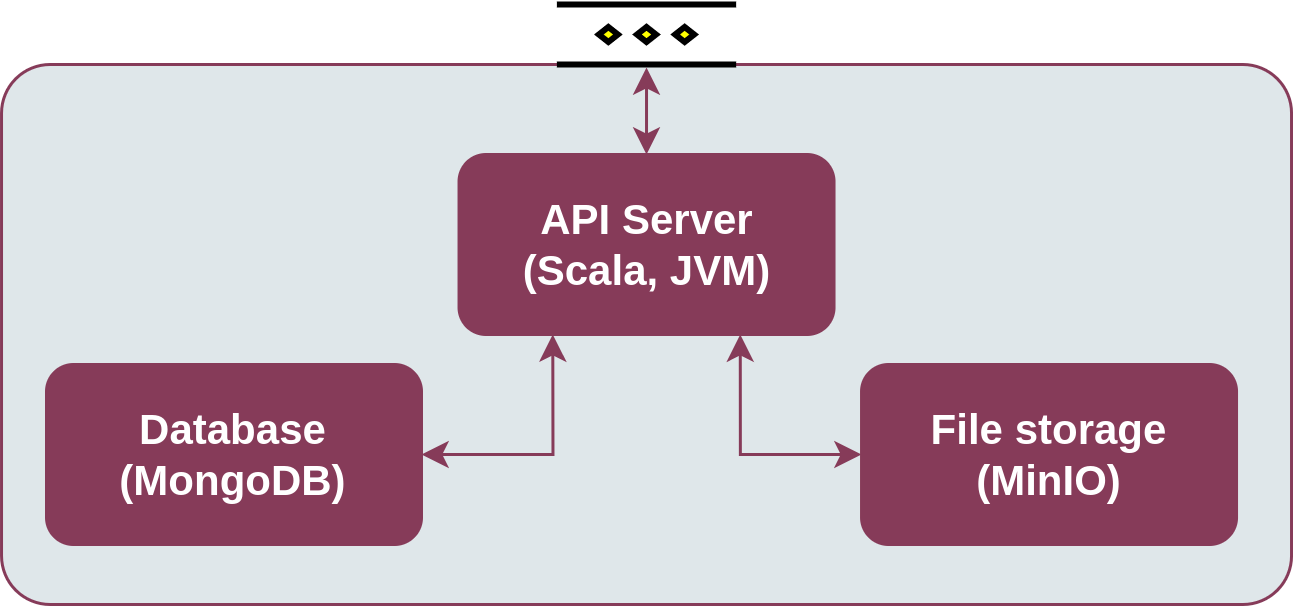
Enabler architecture
1.3.1.10.1. Running a dev deployment
See the page Installation, section Development docker-compose stack for details on how to deploy the Semantic Repository locally for development purposes.
1.3.1.11. Version control and releases
The enabler’s code is published on GitHub.
Semantic Repository follows the Semantic Versioning 2.0 scheme. The current version is 1.0.0, which is the final version delivered in the ASSIST-IoT project.
1.3.1.12. License
The Semantic Repository is licensed under the Apache License, Version 2.0 (the “License”).
You may obtain a copy of the License at: http://www.apache.org/licenses/LICENSE-2.0
1.3.1.13. Notice (dependencies)
1.3.1.13.1. Components
MongoDB – Server Side Public License (SSPL 1.0)
1.3.1.13.2. Main application (API server) dependencies
Note that Akka changed its license to a restrictive one for versions 2.7.X and up. Because the Semantic Repository is using the 2.6.X version (still under the Apache License), it remains unaffected. Future versions of the Semantic Repository are expected to use Apache Pekko, the free fork of Akka.
C a t e g o r y |
License |
Dependency |
|---|---|---|
A p a c h e |
Apache 2 <https://www.apache.org/ licenses/LICENSE-2.0.txt> __ |
|
A p a c h e |
Apache 2 _ |
|
A p a c h e |
||
A p a c h e |
||
A p a c h e |
||
A p a c h e |
`Apache License, Version 2.0 <https://www.apache.or g/licenses/LICENSE-2.0.txt >`__ |
|
A p a c h e |
||
A p a c h e |
software.amazon.awssdk # annotations # 2.11.14 |
|
A p a c h e |
||
A p a c h e |
software.amazon.awssdk # http-client-spi # 2.11.14 |
|
A p a c h e |
||
A p a c h e |
software.amazon.awssdk # regions # 2.11.14 |
|
A p a c h e |
||
A p a c h e |
software.amazon.awssdk # utils # 2.11.14 |
|
A p a c h e |
||
A p a c h e |
||
A p a c h e |
||
A p a c h e |
||
A p a c h e |
||
A p a c h e |
||
A p a c h e |
||
A p a c h e |
||
A p a c h e |
||
A p a c h e |
||
A p a c h e |
||
A p a c h e |
||
A p a c h e |
||
A p a c h e |
||
A p a c h e |
||
A p a c h e |
||
A p a c h e |
||
A p a c h e |
||
A p a c h e |
||
A p a c h e |
||
A p a c h e |
||
A p a c h e |
||
A p a c h e |
||
A p a c h e |
||
A p a c h e |
org.scala-lang.modules # scala-parser-combinators_2.13 # 1.1.2 _ |
|
A p a c h e |
||
A p a c h e |
||
A p a c h e |
||
A p a c h e |
||
A p a c h e |
||
A p a c h e |
||
A p a c h e |
||
A p a c h e |
||
A p a c h e |
||
A p a c h e |
||
A p a c h e |
||
A p a c h e |
||
A p a c h e |
||
A p a c h e |
||
A p a c h e |
com.fasterxml.jackson.dataformat # jackson-dataformat-yaml # 2.13.4 |
|
A p a c h e |
||
A p a c h e |
||
A p a c h e |
||
A p a c h e |
||
A p a c h e |
||
A p a c h e |
||
A p a c h e |
||
A p a c h e |
||
A p a c h e |
||
A p a c h e |
||
A p a c h e |
||
A p a c h e |
||
A p a c h e |
||
A p a c h e |
||
A p a c h e |
||
A p a c h e |
||
B S D |
||
C C 0 |
||
M I T |
||
M I T |
||
M I T |
||
M I T |
||
M I T |
||
M I T |