2.5.2. Composite services manager
2.5.2.1. Introduction
This enabler presents a graphical environment where ASSIST-IoT administrators can connect previously deployed enablers to compose a composite service (i.e., a workflow or a pipeline). Having information about the physical topology and available K8s nodes/clusters, it allows the user to decide whether to select the proper node or cluster for deploying an enabler, or let the system decide based on pre-defined architectural rules.
In addition, the composite services manager can be integrated in the tactile dashboard enabler.
This enabler has reached a TRL of 5 during the execution of the ASSIST-IoT project.
2.5.2.2. Features
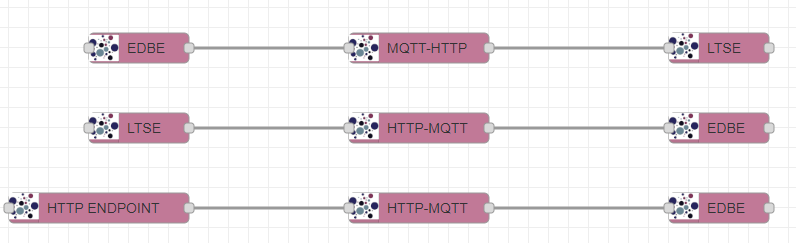
Users can define flows among ASSIST-IoT enablers (previously defined as nodes) to move data among them, facilitating the translation between different communication protocols. For instance, published messages on an MQTT topic of the EDBE are needed to be stored in the LTSE, or some data available through an HTTP REST API needs to be published in an MQTT topic to be available for the subscribers.
List of available nodes:
EDBE
LTSE
HTTP ENDPOINT
MQTT-HTTP
HTTP-MQTT
List of available translation agents:
MQTT-HTTP
HTTP-MQTT
2.5.2.3. Place in architecture
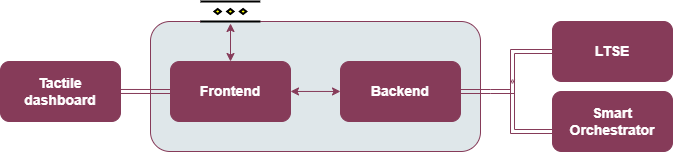
The Composite services manager is part of the vertical plane manageability enablers. Moreover, the frontend component of this enabler will be part of the Tactile dashboard enabler.
2.5.2.4. User guide
2.5.2.4.1. REST API endpoints
This enabler will be included in the Tactile Dashboard of the project, so a logged user with the right permissions will be able to access to it by clicking its menu entry.
Method |
Endpoint |
Description |
Payload (if needed) |
Response format |
|---|---|---|---|---|
GET |
/composite-services-manager |
Composite services manager view of the dashboard |
Web page |
Endpoints of the Backend component:
Method |
Endpoint |
Description |
Payload (if needed) |
Response format |
|---|---|---|---|---|
GET |
/version |
Get the enabler version |
{ “enabler”: String, “version”: String } |
|
GET |
/health |
Get the enabler’s health status |
||
GET |
/metrics |
Obtain some enabler metrics |
{ “flows”: Number, “deployedAgents”: Number } |
|
GET |
/api-export |
Get the OpenAPI specification in JSON |
OpenAPI specification in JSON |
|
POST |
/ |
Update flows as defined in the front endpoint |
Node-RED flows format in JSON |
{ “message”: String } |
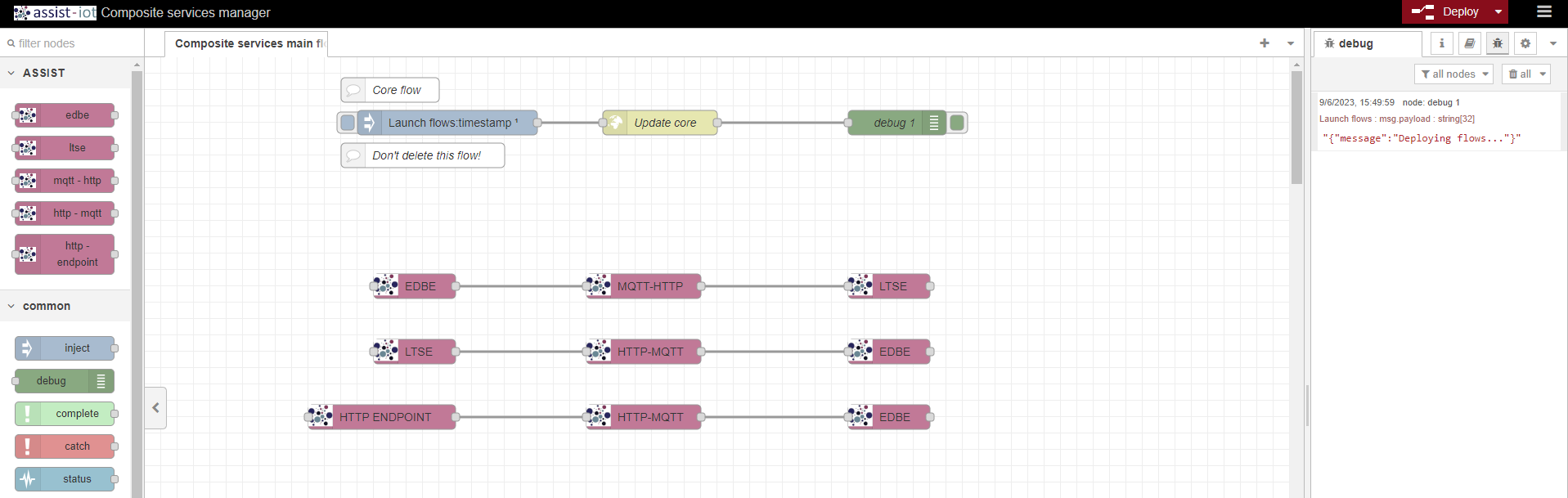
2.5.2.4.2. Frontend dashboard
2.5.2.4.3. Create a flow
Drag a node of an enabler from the ASSIST-IoT group from the left side menu and drop it onto the dashboard.
Double-click on the enabler node to configure it and save the configuration.
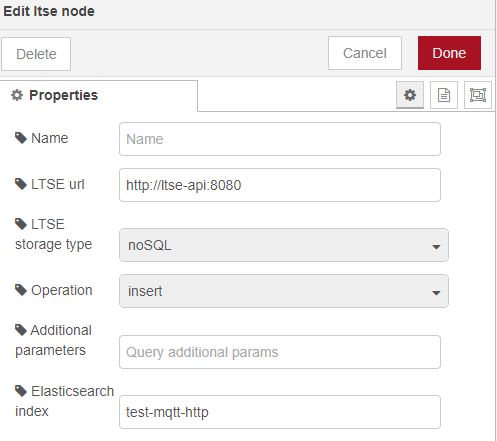
Drag an agent node, drop it on the dashboard and connect the two nodes by clicking on the edge of the node.
Double-click on the agent node to configure it and save the configuration.
Drag a node of another enabler, drop it on the dashboard and connect it to the agent by clicking on the node border.
Double-click on the enabler node to configure it and save the configuration.
Click on the Deploy button at the top right of the dashboard.
A JSON with the response of the Backend API will be displayed in the Debug section.
The Smart Orchestrator will deploy the configured agents in the flows in the corresponding K8s cluster.
Example of working flows:
2.5.2.4.4. Delete a flow
Select and delete the flows from the dashboard.
Click on the Deploy button at the top right of the dashboard.
A JSON with the response of the Backend API will be displayed in the Debug section.
The Smart Orchestrator will deploy the configured agents in the flows in the corresponding K8s cluster.
Note
It’s better to click on the Deploy button after the creation and deletion of all the flows.
2.5.2.5. Prerequisites
The Smart Orchestrator and the LTSE must be previously installed.
Warning
This enabler has some prerequisites regarding the Smart Orchestrator: - At least the cloud K8s cluster must be registered - The ASSIST-IoT enabler’s Helm chart public repository must be resgistered
2.5.2.6. Installation
The enabler can be installed using its Helm chart, which is publicly available in Artifact Hub.
Add the Helm chart repository:
helm repo add assist-iot-composite-services https://assist-iot.github.io/composite_services/composite-services-manager-artifactInstall the lastest version of the enabler:
helm install composite-services-enabler assist-iot-composite-services/composite-services
2.5.2.7. Configuration options
The backend of the enabler can be configured using the following environment variables in the Helm chart:
smartOrchestratorUrl: complete URL of the Smart Orchestrator.
validNodes: list of valid nodes (Node-RED nodes) to be used to define the flows in the frontend dashboard.
helmChartRepository: name of the Helm chart repository which contains the charts of the agents.
ltseUrl: complete URL of the LTSE API.
ltseIndex: name of the Elasticsearch index to store the defined flows.
2.5.2.8. Developer guide
The source code is publicly available in GitHub.
The intention of this enabler is to be open to the development of new Node-RED nodes and translation agents. Please, use the developed nodes , which have been published in the Node-RED Flow Library, and agents as a reference.
2.5.2.9. Version control and release
Version 1.1.0 fully functional, but it is open to the addition of more agents, nodes and features. Furthermore, it is aligned with the version 4.0.0 of the Smart Orchestrator enabler.
2.5.2.10. License
This software is licensed under the Apache 2.0 license.
2.5.2.11. Notice (dependencies)
ASSIST-IoT - Architecture for Scalable, Self-*, human-centric, Intelligent, Se-cure, and Tactile next generation IoT
This project has received funding from the European Union’s Horizon 2020 research and innovation programme under grant agreement No 957258.
Composite services manager enabler of the manageability enablers
Copyright 2020-2023 Universitat Politècnica de València
Included Software
Used Software
Node-RED (https://github.com/node-red/node-red), Apache-2.0 license
elastic/elasticsearch (https://github.com/elastic/elasticsearch-js), Apache-2.0 license
elastic/transport (https://github.com/elastic/elastic-transport-js), Apache-2.0 license
accepts 1.3.8 (https://github.com/jshttp/accepts), MIT license
array-flatten 1.1.1 (https://github.com/blakeembrey/array-flatten), MIT license
asynckit 0.4.0 (https://github.com/alexindigo/asynckit), MIT license
axios 1.1.3 (https://github.com/axios/axios), MIT license
body-parser 1.20.1 (https://github.com/expressjs/body-parser), MIT license
busboy 1.6.0 (https://github.com/mscdex/busboy), MIT license
bytes 3.1.2 (https://github.com/visionmedia/bytes.js), MIT license
call-bind 1.0.2 (https://github.com/ljharb/call-bind), MIT license
combined-stream 1.0.8 (https://github.com/felixge/node-combined-stream), MIT license
content-disposition 0.5.4 (https://github.com/jshttp/content-disposition), MIT license
content-type 1.0.4 (https://github.com/jshttp/content-type), MIT license
cookie-signature 1.0.6 (https://github.com/visionmedia/node-cookie-signature), MIT license
cookie 0.5.0 (https://github.com/jshttp/cookie), MIT license
debug 2.6.9 (https://github.com/visionmedia/debug), MIT license
debug 4.3.4 (https://github.com/debug-js/debug), MIT license
delayed-stream 1.0.0 (https://github.com/felixge/node-delayed-stream), MIT license
depd 2.0.0 (https://github.com/dougwilson/nodejs-depd), MIT license
destroy 1.2.0 (https://github.com/stream-utils/destroy), MIT license
ee-first 1.1.1 (https://github.com/jonathanong/ee-first), MIT license
encodeurl 1.0.2 (https://github.com/pillarjs/encodeurl), MIT license
escape-html 1.0.3 (https://github.com/component/escape-html), MIT license
etag 1.8.1 (https://github.com/jshttp/etag), MIT license
express 4.18.2 (https://github.com/expressjs/express), MIT license
finalhandler 1.2.0 (https://github.com/pillarjs/finalhandler), MIT license
follow-redirects 1.15.2 (https://github.com/follow-redirects/follow-redirects), MIT license
form-data 4.0.0 (https://github.com/form-data/form-data), MIT license
forwarded 0.2.0 (https://github.com/jshttp/forwarded), MIT license
fresh 0.5.2 (https://github.com/jshttp/fresh), MIT license
function-bind 1.1.1 (https://github.com/Raynos/function-bind), MIT license
get-intrinsic 1.1.3 (https://github.com/ljharb/get-intrinsic), MIT license
has-symbols 1.0.3 (https://github.com/inspect-js/has-symbols), MIT license
has 1.0.3 (https://github.com/tarruda/has), MIT license
hpagent 1.2.0 (https://github.com/delvedor/hpagent), MIT license
http-errors 2.0.0 (https://github.com/jshttp/http-errors), MIT license
iconv-lite 0.4.24 (https://github.com/ashtuchkin/iconv-lite), MIT license
inherits 2.0.4 (https://github.com/isaacs/inherits), ISC license
ipaddr.js 1.9.1 (https://github.com/whitequark/ipaddr.js), MIT license
media-typer 0.3.0 (https://github.com/jshttp/media-typer), MIT license
merge-descriptors 1.0.1 (https://github.com/component/merge-descriptors), MIT license
methods 1.1.2 (https://github.com/jshttp/methods), MIT license
mime-db 1.52.0 (https://github.com/jshttp/mime-db), MIT license
mime-types 2.1.35 (https://github.com/jshttp/mime-types), MIT license
mime 1.6.0 (https://github.com/broofa/node-mime), MIT license
ms 2.0.0 (https://github.com/zeit/ms), MIT license
ms 2.1.2 (https://github.com/zeit/ms), MIT license
ms 2.1.3 (https://github.com/vercel/ms), MIT license
negotiator 0.6.3 (https://github.com/jshttp/negotiator), MIT license
object-inspect 1.12.2 (https://github.com/inspect-js/object-inspect), MIT license
on-finished 2.4.1 (https://github.com/jshttp/on-finished), MIT license
parseurl 1.3.3 (https://github.com/pillarjs/parseurl), MIT license
path-to-regexp 0.1.7 (https://github.com/component/path-to-regexp), MIT license
proxy-addr 2.0.7 (https://github.com/jshttp/proxy-addr), MIT license
proxy-from-env 1.1.0 (https://github.com/Rob–W/proxy-from-env), MIT license
qs 6.11.0 (https://github.com/ljharb/qs), BSD-3-Clause license
range-parser 1.2.1 (https://github.com/jshttp/range-parser), MIT license
raw-body 2.5.1 (https://github.com/stream-utils/raw-body), MIT license
safe-buffer 5.2.1 (https://github.com/feross/safe-buffer), MIT license
safer-buffer 2.1.2 (https://github.com/ChALkeR/safer-buffer), MIT license
secure-json-parse 2.7.0 (https://github.com/fastify/secure-json-parse), BSD-3-Clause license
send 0.18.0 (https://github.com/pillarjs/send), MIT license
serve-static 1.15.0 (https://github.com/expressjs/serve-static), MIT license
setprototypeof 1.2.0 (https://github.com/wesleytodd/setprototypeof), ISC license
side-channel 1.0.4 (https://github.com/ljharb/side-channel), MIT license
statuses 2.0.1 (https://github.com/jshttp/statuses), MIT license
streamsearch 1.1.0 (https://github.com/mscdex/streamsearch), MIT license
toidentifier 1.0.1 (https://github.com/component/toidentifier), MIT license
tslib 2.5.0 (https://github.com/Microsoft/tslib), 0BSD license
type-is 1.6.18 (https://github.com/jshttp/type-is), MIT license
undici 5.20.0 (https://github.com/nodejs/undici), MIT license
unpipe 1.0.0 (https://github.com/stream-utils/unpipe), MIT license
utils-merge 1.0.1 (https://github.com/jaredhanson/utils-merge), MIT license
uuid 9.0.0 (https://github.com/uuidjs/uuid), MIT license
vary 1.1.2 (https://github.com/jshttp/vary), MIT license
List of licenses
Apache-2.0 license (https://www.apache.org/licenses/LICENSE-2.0)
MIT license (https://opensource.org/licenses/MIT)
ISC license (https://opensource.org/licenses/ISC)
BSD-3-Clause license (https://opensource.org/licenses/BSD-3-Clause)
0BSD license (https://www.openbsd.org/)