2.2.3. FL Repository enabler
2.2.3.1. Introduction
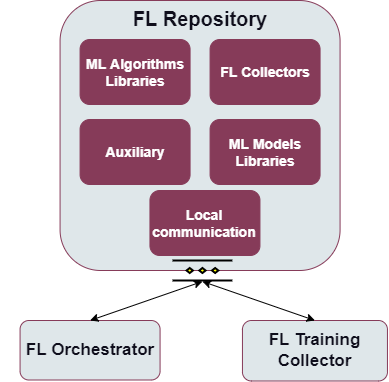
The FL Repository is a set of different collections stored in a MongoDB database, including initial ML models ready for training, weight results and metrics stored after specific training processes, various aggregation strategies, ML collectors responsible for properly loading data in a specific format, as well as numerous data transformations which can be combined and used in order to properly process the data across multiple heterogenous devices, in addition to any auxiliary collections for other functionalities that may be needed, and are not specifically identified yet.
2.2.3.2. Features
Provide storage for FL related data like: initial ML model weights and structure, the resulting training weights of specific ML models combined with stored metrics, aggregation strategies encapsulating different model weight averaging approaches, ML collectors for loading data of a certain format, data transformations for reusable data preprocessing, and auxiliary repositories for other additional functionalities that may be needed, and are not specifically identified yet.
Provide interfaces to put and retrieve data from different components of the enabler.
Communication with other FL enablers.
2.2.3.3. Place in architecture
FL Repository enabler is one of the Federated Learning enablers that together enable to deploy a federated learning environment. Functionally, it operates on scalability and manageability verticals in the Assist-IoT architecture.
More specifically the following figure provides the semantic diagam of the enabler:
2.2.3.4. User guide
Interactions with this enabler are done through a REST API. In the FL environment this enabler interacts with FL Orchestrator, FL Training Collector and FL Local Operations.
Method |
Endpoint |
Description |
|---|---|---|
POST |
/model |
Adds new ML model metadata to the library |
PUT |
/model/{model_name}/ {model_version} |
Update the data (the structure and the weights) of the model stored in FL Repository |
PUT |
/model/meta/{model_n ame}/{model_version} |
Update metadata of a model that is already in the repository under identifier model name and version |
GET |
/model |
Retrieve list of all models stored in the repository |
GET |
/model/meta/{model_n ame}/{model_version} |
Retrieve the metadata of a model with a specific model name and version |
GET |
/model/{model_name}/ {model_version} |
Retrieve the data specifying the structure and weights of a model with a specific name and version in the format of zipped files |
DELETE |
/model/{model_name}/ {model_version} |
Delete a model with a specific model name and version |
POST |
/training-results |
Adds new ML training results to the collection |
PUT |
/training-results/{m odel_name}/{model_ve rsion}/{training_id} /{configuration_id} |
Update the model weights serving as the training results of a specific model name and version during the training process marked with training_id using a configuration marked as configuration_id |
GET |
/training-results |
Retrieve the list of all training results metadata stored in the FL Repository |
GET |
/training-results/{m odel_name}/{model_ve rsion} |
Retrieve the list of all training results of training processes conducted for a selected model name and version stored in the FL Repository |
GET |
/training-results/we ights/{model_name}/{ model_version}/{trai ning_id}/{configurat ion_id} |
Retrieve the training weights which were a product of the training of a specific model during the training with a specific configuration and training id |
DELETE |
/training-results/{m odel_name}/{model_ve rsion}/{training_id} |
Delete the training results of the training of a specific model name and version obtained throughout the training with this training_id |
POST |
/strategy |
Adds new ML aggregation strategy metadata to the library |
PUT |
/strategy/{name} |
Update the aggregation strategy object stored under the selected name |
PUT |
/strategy/meta/{name } |
Update metadata of a strategy marked by this specific name |
GET |
/strategy |
Retrieve list of all aggregation strategies stored in the repository |
GET |
/strategy/{name} |
Download the selected strategy in the form of a pickle file |
DELETE |
/strategy/{name} |
Delete the file and metadata of a selected strategy |
POST |
/collector |
Adds new ML collector metadata to the library |
PUT |
/collector/{name}/{v ersion} |
Update the collector object stored under a specific name and version |
PUT |
/collector/meta/{nam e}/{version} |
Update metadata of the collector object marked by this specific name and version |
GET |
/collector |
Retrieve the list of all ML collectors stored in the repository |
GET |
/collector/{name}/{v ersion} |
Download the selected ML collector in the form of a pickle file |
DELETE |
/collector/{name}/{v ersion} |
Delete the file and metadata of a selected ML collector |
POST |
/transformation |
Adds new ML data transformation metadata to the library |
PUT |
/transformation/{id} |
Update the transformation object stored under a specific name and version |
PUT |
/transformation/meta /{id} |
Update metadata of the data transformation object marked by this specific id |
GET |
/transformation |
Retrieve the list of all ML data transformations stored in the repository |
GET |
/transformation/{id} |
Download the selected ML collector in the form of a pickle file |
DELETE |
/transformation/{id} |
Delete the file and metadata of a selected ML data transformation |
2.2.3.5. Prerequisities
There are three possible ways to run the FL Repository. The first, no
longer actively supported mode of deployment necessitates a local
installation of Python 3.8+, along with all the packages located in
requirements.txt files already preinstalled. A second, much more
strongly encouraged mode of deployment uses Docker and docker-compose to
locally create the appropriate containers. The third and final mode of
deployment relies on the inclusion of the appropriate Helm charts. In
order to use this mode of deployment, the local machine needs a
preinstalled version of Kubernetes.
2.2.3.6. Installation
In order to properly set up the enabler with the use of Helm charts,
first you have to set up the appropriate configuration. For this
purposes, the repository-config-map.yaml is included in this
repository. This is a ConfigMap containing information that may be
specific to this deployment that the application must be able to access.
After performing appropriate modifications, run
kubectl apply -f repository-config-map.yaml to create the ConfigMap.
Finally, run helm install flrepositorylocaldb flrepositorydb in
order to properly install the release using Helm charts.
2.2.3.7. Configuration options
The are no configuration options for this enabler.
2.2.3.8. Developer guide
2.2.3.8.1. Collections
2.2.3.8.1.1. FL Models
This collection stores the ready-for-training data of a selected model. The information about the model weights and structure is stored in files inside a zipped directory, allowing for easy incorporation of different formats preferred by different libraries. Aside from that, metadata like information about the library that this model data uses or the capabilities needed to train this model will be saved here as well.
2.2.3.8.1.2. FL Training Results
This collection stores the training results obtained after finishing the
training of a specific ML model. It incorporated the obtained metrics,
information about the training and configuration id, as well as the
final training weights saved in the pickle format.
2.2.3.8.1.3. FL Strategies
FL Strategies contain information about the available weight aggregation strategies for the FL enabler. The custom strategies have to implement the Strategy Abstract Base Class from the Flower library in order to easily incorporate them into the FL Training Collector. The strategy files will contain a pickled strategy object, with the metadata describing the purpose and usage of this strategy.
2.2.3.8.1.4. FL Collector
This collection will contain objects allowing for the dynamic loading of various data formats. They will be stored as dill or pickle files.
2.2.3.8.1.5. FL Transformations
FL Transformations contain information about the available data
transformations for the FL Local Operations or FL Training Collector.
The custom transformations have to implement the DataTransformation
Abstract Base Class described in the data_transformation module in
FL Local Operations. The metadata of this collection will include not
only the description of this specific transformation, but also necessary
parameter types, default values and the capabilities needed to run this
transformation on the local machine. The transformation files will
contain a Data Transformation object in a dill or pickle format.
2.2.3.8.1.6. Auxiliary
Any other collections that may be needed to instantiate FL can be also stored in the FL Repository. Among them possible modules related to process verification, error handling, stopping criteria, authorization, belong to this category.
2.2.3.8.1.7. Local communication
The communication between the collections and an outside developer is carried out through the (described above) RESTful endpoints. In order to do so, a FastAPI application has been implemented.
2.2.3.8.2. Technologies
2.2.3.8.2.1. Python
Python is an interpreted high-level general-purpose programming language with a set of libraries. Very popular for data analysis and ML applications. Component: Local communication
2.2.3.8.2.2. FastAPI
A popular web microframework written in Python, FastAPI is known for being both robust and high performing. It is based on OpenAPI (previously Swagger) standards. Component: Local communication
2.2.3.8.2.3. MongoDB
MongoDB is a source-available cross-platform document-oriented database program. Classified as a NoSQL database program. Component: ML Models Libraries, Auxiliary
2.2.3.8.2.4. GridFS
GridFS is a specification for storing and retrieving MongoDB files that exceed the BSON-document size limit of 16 MB. It uses the technique of dividing them into chunks for this specific purpose.
2.2.3.8.2.5. Pickle
A Python library allowing for the serialization and de-serialization of any Python object through converting them to a byte stream. An extension (one of many) of the pickle library is known as dill.
2.2.3.9. Version control and release
Version control and release details will be provided in the next release of the documentation.
2.2.3.10. License
The FL Local Operations is licensed under the Apache License, Version2.0 (the “License”).
You may obtain a copy of the License at: http://www.apache.org/licenses/LICENSE-2.0
2.2.3.11. Notice (dependencies)
The information about the dependencies needed to run a specific part of
the application can be found described in the appropriate
requirements.txt files located. However, since they are downloaded
automatically during the construction of the appropriate Docker images,
the local dependencies needed to deploy the application include only a
local Docker along with Docker Compose or Kubernetes installation.