2.2.2. FL Training Collector enabler
2.2.2.1. Introduction
The FL training process involves several independent parties that commonly collaborate in order to provide an enhanced ML model. In this process, the different local updates suggestions shall be aggregated accordingly. This duty within ASSIST-IoT will be tackled by the FL Training Collector, which will also be in charge of delivering back the updated model.
2.2.2.2. Features
Aggregate local updates of the ML model prepared by independent parties as part of a model enhancement process.
Allow for the flexible use of the custom aggregation strategies located in FL Repository.
Allow for the use of selected privacy mechanisms (Adaptive Differential Privacy, Homomorphic Encryption) during the Federated Learning process.
Performing global evaluation throughout the FL training process,
Delivering the results of the training (final aggregated weights and metrics) to the FL Repository for storage.
2.2.2.3. Place in architecture
FL Training Collector enabler is one of the Federated Learning enablers that together allow to deploy a federated learning environment. Functionally, it operates on scalability and manageability verticals in the Assist-IoT architecture.
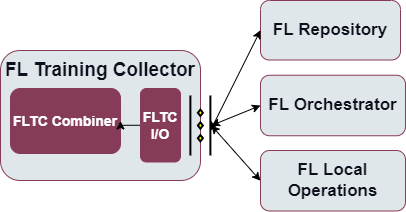
More specifically the following figure provides the semantic diagam of the enabler:
2.2.2.4. User guide
Interactions with this enabler are done through a REST API. In the FL environment the FL Orchestrator enabler sends the appropriate configuration to FL Training Collector.
The enabler exposes REST API (see endpoints below) to communicate with external enablers/applications but also uses gRPC to communicate with FL Local Operations during model trainings.
Method |
Endpoint |
Description |
|---|---|---|
POST |
/job/config/{id} |
Receive configuration for the specific training of a selected model for job with identifier id |
GET |
/job/status/{id} |
Retrieve status of the training process with identifier id |
2.2.2.5. Prerequisities
There are three possible ways to run the FL Local Operations. The first,
no longer supported mode of deployment necessitates a local installation
of Python 3.8+, along with all the packages located in
requirements.txt files already preinstalled. A second, much more
strongly encouraged mode of deployment uses Docker and docker-compose to
locally create the appropriate containers. The third and final mode of
deployment relies on the inclusion of the appropriate Helm charts. In
order to use this mode of deployment, the local machine needs a
preinstalled version of Kubernetes.
2.2.2.6. Installation
In order to properly set up the enabler with the use of Helm charts,
first you have to set up the appropriate configuration. For this
purposes, the training-collector-config-map.yaml is included in this
repository. This is a ConfigMap containing information that may be
specific to this deployment that the application must be able to access.
After performing appropriate modifications, run
kubectl apply -f training-collector-config-map.yaml to create the
ConfigMap. Finally, run
helm install trainingcollectorlocal trainingcollector in order to
properly install the release using Helm charts.
2.2.2.7. Configuration options
The configuration of the training process for the FL Training Collector enabler is done with a request to REST API where the following parameters for a training job to be executed can be set:
strategy - name of the strategy to be used in this training job, e.g. “avg”
model_name - the name of the model used throughout training, e.g. “custom_resnet”
model_version - the version of the model selected for training, e.g. “version_0”
server_conf - the training configuration accepted by and specific to FL Flower server, e.g. “num_rounds”
strategy_conf - the configuration accepted by and specific to the selected strategy, containing fields like e.g. “min_fit_clients”
adapt_config e.g. “custom”
configuration_id - identifier of the configuration to be used
privacy_mechanisms - the configuration specifying the selected privacy mechanisms and their parameters
client_conf - the configuration specifying the client side of training
learning_rate - tuning parameter in an optimization algorithm, e.g. “0.001”
2.2.2.8. Developer guide
2.2.2.8.1. Components
The enabler provides a REST API to allow the input and output communication to and from the FL Training Collector enabler. On the one hand it is responsible of receiving FL local updates that are sent to the FLC Combiner component. On the other hand, it is responsible of communicating updates of the new FL model obtained in the FLC Component to the FL Repository. The communication capabilities of this component are designed so that it can conceptually deal with situations in which more complex topologies are used.
The enabler will receive weight updates from a certain number (possibly all) local nodes and combine them to generate an updated FL model. It can include both homogeneous and heterogeneous FedAvg solutions for e.g., logistic regression models, decision-tree models, or even neural network models.
Additionally, the enabler allows for the usage of selected privacy mechanisms. Here, it is important to mention that Homomorphic Encryption can only be used currently with very small models, like Logistic Regression.
2.2.2.8.2. Technologies
2.2.2.8.2.1. Python
Python is an interpreted high-level general-purpose programming language with a set of libraries. Very popular for data analysis and ML applications.
2.2.2.8.2.2. FastAPI
A popular web microframework written in Python, FastAPI is known for being both robust and high performing. It is based on OpenAPI (previously Swagger) standards.
2.2.2.8.2.3. Flower
A federated learning framework designed to work with a large number of clients. It is both compatible with a variety of ML frameworks and supports a wide range of devices.
2.2.2.8.2.4. TenSEAL
A library that empowers users to easily conduct Homomorphic Encryption operations on tensors, built on top of Microsoft SEAL. Since the underlying implementation uses C++, the resulting methods consume as little resources as possible.
2.2.2.9. Version control and release
Version control and release details will be provided in the next release of the documentation.
2.2.2.10. Licence
The FL Local Operations is licensed under the Apache License, Version2.0 (the “License”).
You may obtain a copy of the License at: http://www.apache.org/licenses/LICENSE-2.0
2.2.2.11. Notice (dependencies)
The information about the dependencies needed to run a specific part of
the application can be found described in the appropriate
requirements.txt files located. However, since they are downloaded
automatically during the construction of the appropriate Docker images,
the local dependencies needed to deploy the application include only a
local Docker along with Docker Compose or Kubernetes installation.