1.2.1. Smart Orchestrator
1.2.1.1. Introduction
The Smart Orchestrator simplifies how user interfaces and other enablers interact with the primary components of the kubernetes clusters. This enabler manages the complete lifecycle of Containerized Functions, whether they are network-related or not, from their creation to their termination, enabling deployment on any available k8s cluster.
This enabler has reached a TRL of 6 during the execution of the ASSIST-IoT project.
1.2.1.2. Features
The Smart Orchestrator has the goal of deploying, monitoring, and orchestrating resources that have been instantiated in each of the Kubernetes clusters that have been added to it. To achieve these objectives, the enabler relies on four different technologies: API REST, Prometheus, MongoDB, and mck8s. The Smart Orchestrator includes the following main features:
Decision intelligence: The Smart Orchestrator offers Kubernetes decision intelligence by accessing the metrics servers in the other joined clusters to determine the optimal placement of enablers based on the resources available in each cluster.
Lifecycle control: The Smart Orchestrator provides lifecycle control, enabling the management of enablers from their deployment to their deletion.
1.2.1.3. Place in architecture
The Smart Orchestrator is part of the Smart Network and Control plane in the ASSIST-IoT architecture. It provides an intelligent and dynamic network infrastructure where nodes work in parallel and communicate seamlessly. The Smart Orchestrator monitors enablers and schedules them efficiently based on CPU and memory resources.
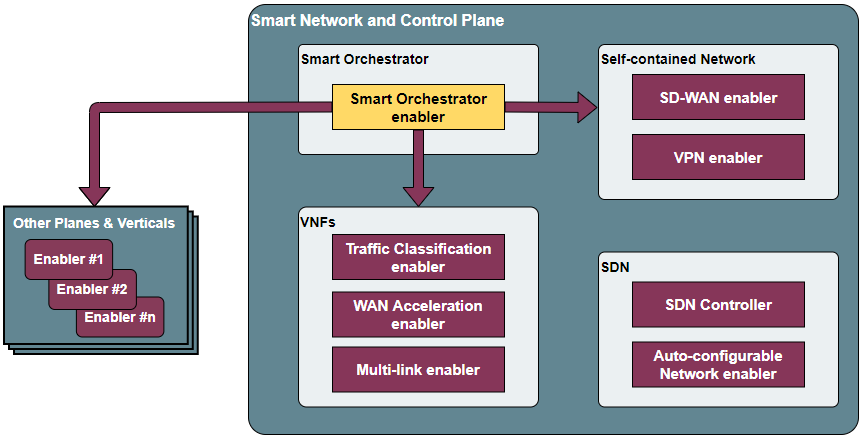
The enabler is composed of these elements:
API REST: The entry point for user interaction and responsible for communication with other components to obtain, add, or delete resources such as enablers, clusters, or repositories.
Orchestrator: Controls the entire lifecycle of Containerized Network Functions (CNFs), from their instantiation to their termination, allowing deployment in any available k8s cluster.
Metrics server: Collects performance metrics from targets (Kubernetes clusters).
Scheduler: Provides logic to place enablers based on resources available in the joined Kubernetes clusters. Also, it is responsible for using AI to predict the resources utilized at another time and make a scheduling decision.
Multiservice controller: Allows the connectivity from edge services to cloud services based in name service.

1.2.1.4. Pre-requisites
MINIMUM: 2 CPUs, 6 GB RAM, 40GB disk and a single interface with Internet access.
RECOMMENDED: 2 CPUs, 8 GB RAM, 40GB disk and a single interface with Internet access.
Base image: Ubuntu 20.04 (64-bit variant required).
1.2.1.5. Installation K8s cluster & Smart Orchestrator
1.2.1.5.1. KUBEADM
Install a K8s cluster located in the edge tier of the architecture using Kubeadm.
1. git clone https://gitlab.assist-iot.eu/enablers-registry/public.git
2. cd public/
3. cd smartorchestrator/
4. cd scripts/
5. chmod +x kubernetes.sh
Warning
ENSURE THAT ALL NODES ARE ADDED TO THE MAIN CLUSTER (MASTER NODE) PRIOR TO ADDING THE CLUSTER TO THE SMARTORCHESTRATOR.
1.2.1.5.2. Master node & Smart Orchestrator
Install a K8s cluster with a master node.
There are two important flags:
t: SERVER or AGENT (in this case SERVER).
p: Pod CIDR Network (This MUST be different in each cluster. If you choose 10.216.0.0/16, the other cluster MUST be for instance 10.215.0.0/16).
c/f: Install cilium (-c) or flannel (-f).
Warning
DO NOT REPEAT POD CIDR NETWORK. - 10.217.0.0/16 IS RESERVED FOR THE SMART ORCHESTRATOR CLUSTER.
sudo ./kubernetes.sh -t SERVER -p 10.216.0.0/16 -c
1.2.1.5.3. Worker node
Install a K8s worker node to add an existing master node.
./kubernetes.sh -t AGENT
Once the worker node is ready, switch to the main cluster (master node) and copy the output of this command:
kubeadm token create --print-join-command
Switch again to the agent node of the cluster and paste the command output as sudo.
Note
A KUBEADM node can not be joined to a k3s cluster.
A k3s node can not be joined to a KUBEADM cluster.
1.2.1.5.4. K3S
Install a K3s (a lightweight K8s distribution) cluster located in the edge tier of the architecture
1. git clone https://gitlab.assist-iot.eu/enablers-registry/public.git
2. cd public/
3. cd smartorchestrator/
4. cd scripts/
5. chmod +x k3s.sh
Warning
ENSURE THAT ALL NODES ARE ADDED TO THE MAIN CLUSTER (MASTER NODE) PRIOR TO ADDING THE CLUSTER TO THE SMARTORCHESTRATOR.
WE ARE FACING SOME ISSUES WITH CILIUM AND RPI, PLEASE WAIT UNTIL WE HAVE SOLVED IT.
1.2.1.5.5. Master node
Install a K8s cluster with a master node.
There are three important flags:
t: SERVER or AGENT (in this case SERVER).
i: Server IP. If the edge is behind a NAT and the Smart Orchestrator or the worker nodes are outside, the value is your Public IP.
p: Pod CIDR Network (This MUST be different in each cluster. If you choose 10.216.0.0/16, the other cluster MUST be for instance 10.215.0.0/16).
c/f: Install cilium (-c) or flannel (-f).
Warning
DO NOT REPEAT POD CIDR NETWORK.
10.217.0.0/16 IS RESERVED FOR THE SMART ORCHESTRATOR CLUSTER.
sudo ./k3s.sh -t SERVER -i serverIP -p 10.213.0.0/16 -c
1.2.1.5.6. Worker node
Install a K8s worker node to add an existing master node.
There are three important flags: - s: Server IP (Master Node IP). - k: The server token can be found on the master node machine, located at the following path: /var/lib/rancher/k3s/server/node-token
sudo ./k3s.sh -t AGENT -i serverIP -k serverToken
Note K8s clusters cannot mix nodes from different K8s distributions (kubeadm, K3s, …) , all the nodes of a cluster must belong to the same distribution. - A KUBEADM node can not be joined to a k3s cluster. - A k3s node can not be joined to a KUBEADM cluster.
1.2.1.6. User guide
The enabler has a management API with a REST interface that allows you to configure certain values. The API will respond with the requested information or the result of the command you executed.
Method
Endpoint
Description
Payload
Information
GET
/clusters
Return K8s clusters
GET
/clusters/:clusterid
Get k8s cluster by id
GET
/clusters/node/:clusterid
Get nodes by k8s cluster
GET
/clusters/cloud/find
Get cluster cloud
POST
/clusters
Add a K8s cluster
{“name”: String, “description”: String, “credentials”: Object, “cloud”: String, “cni”: String}
DELETE
/clusters/:id
Delete a k8s cluster by id
GET
/repos
Return the helm repositories
GET
/repos/charts/:repositoryId
Return the charts in a helm repository
POST
/repos/public
Add a public helm repository
{“name”: String, “description”: String, “url”: String}
POST
/repos/private
Add a private helm repository
{“name”: String, “description”: String, “url”: String, “auth”: { “username”: String, “password”: String }}
POST
/repos/update
Update helm repositories
DELETE
/repos/:id
Delete a helm repository by id
GET
/enabler
Return the instanced enablers
POST
/enabler
Instantiate an enabler
{“name”: String, “helmChart”: String, “values”: Object, “cluster”: String, “version”: String, “timeout”: String, “auto”: Boolean}
PlacementPolicy: worst-fit, best-fit, or traffic-most
POST
/enabler/upgrade/:enablerId
Upgrade an enabler by id
{“values”: Object, “version”: String, “timeout”: String}
DELETE
/enabler/:id
Delete an enabler by id
GET
/enabler/cluster/:clusterId
Get enablers in a cluster by cluster name
DELETE
/enabler/volumes/:enableId
Delete PV and PVC related with an enabler by enabler id
GET
/version
Get Enabler Version
GET
/api-export
Get Enabler OpenAPI
1.2.1.7. Troubleshooting
1.2.1.7.1. Kubectl error
1.2.1.7.1.1. KUBEADM
The connection to the server localhost:8080 was refused - did you specify the right host or port?
Unable to connect to the server: x509: certificate signed by unknown authority
Please use this command:
mkdir -p $HOME/.kube
sudo cp -i /etc/kubernetes/admin.conf $HOME/.kube/config
sudo chown $(id -u):$(id -g) $HOME/.kube/config
1.2.1.7.1.2. K3S
Please use this command:
export KUBECONFIG=/etc/rancher/k3s/k3s.yaml
1.2.1.7.2. Reset kubernetes
1.2.1.7.2.1. KUBEADM
For reseting a kubernetes kubeadm cluster:
sudo kubeadm reset
1.2.1.7.2.2. K3s
For reseting a kubernetes k3s server node:
/usr/local/bin/k3s-uninstall.sh
For reseting a k3s agent node:
/usr/local/bin/k3s-agent-uninstall.sh
1.2.1.8. Developer guide
The Smart Orchestrator is written in Javascript, using the Express framework, Python and Go. The information about the clusters, enablers and repositories objects is stored in MongoDB.
This code is expected to be executed within a Helm chart, in a Kubernetes-governed platform. In case that developers aims at using the code directly over a given Operating System, non-virtualized, the code has been tested in Ubuntu 20.04 machines in amd64.
This code is open source and can be freely used by the innovation and research community. In case that commits are to be made, the mantainer team (UPV) holds the rights to accept or deny them. Best practices are encouraged in the latter case.
To run it in a development environment, the installation of Node.js, Python, and Go is required. Each of these components is an API, where the paths to the cluster, repository, and enabler services are accessible from the routes specified in the user guide. The MultiCluster Service Controller is a kubernetes controller, the only service that does not works as an API.
1.2.1.9. Version control and release
Version 4.0.0. New features:
Auto-Clustermesh
MultiCluster Service Controller
Acceptance of any helm repository (public or private).
Scheduler Policy using AI
1.2.1.10. License
This software is licensed under the Apache 2.0 license.
1.2.1.11. Notice (dependencies)
ASSIST-IoT - Architecture for Scalable, Self-*, human-centric, Intelligent, Se-cure, and Tactile next generation IoT
This project has received funding from the European Union’s Horizon 2020 research and innovation programme under grant agreement No 957258.
Smart Orchestrator enabler
Copyright 2020-2023 Universitat Politècnica de València
Included Software
Used Software
colors/colors (https://github.com/DABH/colors.js), MIT license
cspotcode/source-map-support (https://github.com/cspotcode/node-source-map-support), MIT license
dabh/diagnostics (https://github.com/3rd-Eden/diagnostics), MIT license
hapi/hoek (https://github.com/hapijs/hoek), BSD-3-Clause license
hapi/topo (https://github.com/hapijs/topo), BSD-3-Clause license
jridgewell/resolve-uri (https://github.com/jridgewell/resolve-uri), MIT license
jridgewell/sourcemap-codec (https://github.com/jridgewell/sourcemap-codec), MIT license
jridgewell/trace-mapping (https://github.com/jridgewell/trace-mapping), MIT license
kubernetes/client-node (https://github.com/kubernetes-client/javascript), Apache-2.0 license
panva/asn1.js (https://github.com/panva/asn1.js), MIT license
sideway/address (https://github.com/sideway/address), BSD-3-Clause license
sideway/formula (https://github.com/sideway/formula), BSD-3-Clause license
sideway/pinpoint (https://github.com/sideway/pinpoint), BSD-3-Clause license
sindresorhus/is (https://github.com/sindresorhus/is), MIT license
szmarczak/http-timer (https://github.com/szmarczak/http-timer), MIT license
tsconfig/node10 (https://github.com/tsconfig/bases), MIT license
tsconfig/node12 (https://github.com/tsconfig/bases), MIT license
tsconfig/node14 (https://github.com/tsconfig/bases), MIT license
tsconfig/node16 (https://github.com/tsconfig/bases), MIT license
types/cacheable-request (https://github.com/DefinitelyTyped/DefinitelyTyped), MIT license
types/caseless (https://github.com/DefinitelyTyped/DefinitelyTyped), MIT license
types/http-cache-semantics (https://github.com/DefinitelyTyped/DefinitelyTyped), MIT license
types/js-yaml (https://github.com/DefinitelyTyped/DefinitelyTyped), MIT license
types/json-buffer (https://github.com/DefinitelyTyped/DefinitelyTyped), MIT license
types/keyv (https://github.com/DefinitelyTyped/DefinitelyTyped), MIT license
types/minipass (https://github.com/DefinitelyTyped/DefinitelyTyped), MIT license
types/node (https://github.com/DefinitelyTyped/DefinitelyTyped), MIT license
types/request (https://github.com/DefinitelyTyped/DefinitelyTyped), MIT license
types/responselike (https://github.com/DefinitelyTyped/DefinitelyTyped), MIT license
types/stream-buffers (https://github.com/DefinitelyTyped/DefinitelyTyped), MIT license
types/tar (https://github.com/DefinitelyTyped/DefinitelyTyped), MIT license
types/tough-cookie (https://github.com/DefinitelyTyped/DefinitelyTyped), MIT license
types/underscore (https://github.com/DefinitelyTyped/DefinitelyTyped), MIT license
types/webidl-conversions (https://github.com/DefinitelyTyped/DefinitelyTyped), MIT license
types/whatwg-url (https://github.com/DefinitelyTyped/DefinitelyTyped), MIT license
types/ws (https://github.com/DefinitelyTyped/DefinitelyTyped), MIT license
accepts 1.3.8 (https://github.com/jshttp/accepts), MIT license
acorn-walk 8.2.0 (https://github.com/acornjs/acorn), MIT license
acorn 8.7.1 (https://github.com/acornjs/acorn), MIT license
aggregate-error 3.1.0 (https://github.com/sindresorhus/aggregate-error), MIT license
ajv 6.12.6 (https://github.com/ajv-validator/ajv), MIT license
arg 4.1.3 (https://github.com/zeit/arg), MIT license
argparse 2.0.1 (https://github.com/nodeca/argparse), Python-2.0 license
array-flatten 1.1.1 (https://github.com/blakeembrey/array-flatten), MIT license
asn1 0.2.6 (https://github.com/joyent/node-asn1), MIT license
assert-plus 1.0.0 (https://github.com/mcavage/node-assert-plus), MIT license
async-mqtt 2.6.3 (https://github.com/mqttjs/async-mqtt), MIT license
async 3.2.3 (https://github.com/caolan/async), MIT license
asynckit 0.4.0 (https://github.com/alexindigo/asynckit), MIT license
aws-sign2 0.7.0 (https://github.com/mikeal/aws-sign), Apache-2.0 license
aws4 1.11.0 (https://github.com/mhart/aws4), MIT license
axios 0.27.2 (https://github.com/axios/axios), MIT license
balanced-match 1.0.2 (https://github.com/juliangruber/balanced-match), MIT license
base64-js 1.5.1 (https://github.com/beatgammit/base64-js), MIT license
bcrypt-pbkdf 1.0.2 (https://github.com/joyent/node-bcrypt-pbkdf), BSD-3-Clause license
bl 4.1.0 (https://github.com/rvagg/bl), MIT license
body-parser 1.20.0 (https://github.com/expressjs/body-parser), MIT license
brace-expansion 1.1.11 (https://github.com/juliangruber/brace-expansion), MIT license
bson 4.6.4 (https://github.com/mongodb/js-bson), Apache-2.0 license
buffer-from 1.1.2 (https://github.com/LinusU/buffer-from), MIT license
buffer 5.7.1 (https://github.com/feross/buffer), MIT license
byline 5.0.0 (https://github.com/jahewson/node-byline), MIT license
bytes 3.1.2 (https://github.com/visionmedia/bytes.js), MIT license
cacheable-lookup 5.0.4 (https://github.com/szmarczak/cacheable-lookup), MIT license
cacheable-request 7.0.2 (https://github.com/lukechilds/cacheable-request), MIT license
call-bind 1.0.2 (https://github.com/ljharb/call-bind), MIT license
caseless 0.12.0 (https://github.com/mikeal/caseless), Apache-2.0 license
celebrate 15.0.1 (https://github.com/arb/celebrate), MIT license
chownr 2.0.0 (https://github.com/isaacs/chownr), ISC license
clean-stack 2.2.0 (https://github.com/sindresorhus/clean-stack), MIT license
clone-response 1.0.2 (https://github.com/lukechilds/clone-response), MIT license
color-convert 1.9.3 (https://github.com/Qix-/color-convert), MIT license
color-name 1.1.3 (https://github.com/dfcreative/color-name), MIT license
color-string 1.9.1 (https://github.com/Qix-/color-string), MIT license
color 3.2.1 (https://github.com/Qix-/color), MIT license
colorspace 1.1.4 (https://github.com/3rd-Eden/colorspace), MIT license
combined-stream 1.0.8 (https://github.com/felixge/node-combined-stream), MIT license
commist 1.1.0 (https://github.com/mcollina/commist), MIT license
compress-brotli 1.3.8 (https://github.com/Kikobeats/compress-brotli), MIT license
concat-map 0.0.1 (https://github.com/substack/node-concat-map), MIT license
concat-stream 2.0.0 (https://github.com/maxogden/concat-stream), MIT license
content-disposition 0.5.4 (https://github.com/jshttp/content-disposition), MIT license
content-type 1.0.4 (https://github.com/jshttp/content-type), MIT license
cookie-signature 1.0.6 (https://github.com/visionmedia/node-cookie-signature), MIT license
cookie 0.5.0 (https://github.com/jshttp/cookie), MIT license
core-util-is 1.0.2 (https://github.com/isaacs/core-util-is), MIT license
cors 2.8.5 (https://github.com/expressjs/cors), MIT license
create-require 1.1.1 (https://github.com/nuxt-contrib/create-require), MIT license
cross-spawn 7.0.3 (https://github.com/moxystudio/node-cross-spawn), MIT license
dashdash 1.14.1 (https://github.com/trentm/node-dashdash), MIT license
debug 2.6.9 (https://github.com/visionmedia/debug), MIT license
debug 4.3.4 (https://github.com/debug-js/debug), MIT license
decompress-response 6.0.0 (https://github.com/sindresorhus/decompress-response), MIT license
defer-to-connect 2.0.1 (https://github.com/szmarczak/defer-to-connect), MIT license
delayed-stream 1.0.0 (https://github.com/felixge/node-delayed-stream), MIT license
denque 2.0.1 (https://github.com/invertase/denque), Apache-2.0 license
depd 2.0.0 (https://github.com/dougwilson/nodejs-depd), MIT license
destroy 1.2.0 (https://github.com/stream-utils/destroy), MIT license
diff 4.0.2 (https://github.com/kpdecker/jsdiff), BSD-3-Clause license
dotenv 16.0.1 (https://github.com/motdotla/dotenv), BSD-2-Clause license
duplexify 4.1.2 (https://github.com/mafintosh/duplexify), MIT license
ecc-jsbn 0.1.2 (https://github.com/quartzjer/ecc-jsbn), MIT license
ee-first 1.1.1 (https://github.com/jonathanong/ee-first), MIT license
enabled 2.0.0 (https://github.com/3rd-Eden/enabled), MIT license
encodeurl 1.0.2 (https://github.com/pillarjs/encodeurl), MIT license
end-of-stream 1.4.4 (https://github.com/mafintosh/end-of-stream), MIT license
escape-html 1.0.3 (https://github.com/component/escape-html), MIT license
etag 1.8.1 (https://github.com/jshttp/etag), MIT license
execa 5.0.0 (https://github.com/sindresorhus/execa), MIT license
express 4.18.1 (https://github.com/expressjs/express), MIT license
extend 3.0.2 (https://github.com/justmoon/node-extend), MIT license
extsprintf 1.3.0 (https://github.com/davepacheco/node-extsprintf), MIT license
fast-deep-equal 3.1.3 (https://github.com/epoberezkin/fast-deep-equal), MIT license
fast-json-stable-stringify 2.1.0 (https://github.com/epoberezkin/fast-json-stable-stringify), MIT license
fecha 4.2.3 (git+https://taylorhakes@github.com/taylorhakes/fecha), MIT license
finalhandler 1.2.0 (https://github.com/pillarjs/finalhandler), MIT license
fn.name 1.1.0 (https://github.com/3rd-Eden/fn.name), MIT license
follow-redirects 1.15.0 (https://github.com/follow-redirects/follow-redirects), MIT license
forever-agent 0.6.1 (https://github.com/mikeal/forever-agent), Apache-2.0 license
form-data 2.3.3 (https://github.com/form-data/form-data), MIT license
form-data 2.5.1 (https://github.com/form-data/form-data), MIT license
form-data 4.0.0 (https://github.com/form-data/form-data), MIT license
forwarded 0.2.0 (https://github.com/jshttp/forwarded), MIT license
fresh 0.5.2 (https://github.com/jshttp/fresh), MIT license
fs-minipass 2.1.0 (https://github.com/npm/fs-minipass), ISC license
fs.realpath 1.0.0 (https://github.com/isaacs/fs.realpath), ISC license
function-bind 1.1.1 (https://github.com/Raynos/function-bind), MIT license
get-intrinsic 1.1.1 (https://github.com/ljharb/get-intrinsic), MIT license
get-stream 5.2.0 (https://github.com/sindresorhus/get-stream), MIT license
get-stream 6.0.1 (https://github.com/sindresorhus/get-stream), MIT license
getpass 0.1.7 (https://github.com/arekinath/node-getpass), MIT license
glob 7.2.3 (https://github.com/isaacs/node-glob), ISC license
got 11.8.5 (https://github.com/sindresorhus/got), MIT license
har-schema 2.0.0 (https://github.com/ahmadnassri/har-schema), ISC license
har-validator 5.1.5 (https://github.com/ahmadnassri/node-har-validator), MIT license
has-symbols 1.0.3 (https://github.com/inspect-js/has-symbols), MIT license
has 1.0.3 (https://github.com/tarruda/has), MIT license
help-me 3.0.0 (https://github.com/mcollina/help-me), MIT license
http-cache-semantics 4.1.0 (https://github.com/kornelski/http-cache-semantics), BSD-2-Clause license
http-errors 2.0.0 (https://github.com/jshttp/http-errors), MIT license
http-signature 1.2.0 (https://github.com/joyent/node-http-signature), MIT license
http2-wrapper 1.0.3 (https://github.com/szmarczak/http2-wrapper), MIT license
human-signals 2.1.0 (https://github.com/ehmicky/human-signals), Apache-2.0 license
iconv-lite 0.4.24 (https://github.com/ashtuchkin/iconv-lite), MIT license
ieee754 1.2.1 (https://github.com/feross/ieee754), BSD-3-Clause license
indent-string 4.0.0 (https://github.com/sindresorhus/indent-string), MIT license
inflight 1.0.6 (https://github.com/npm/inflight), ISC license
inherits 2.0.4 (https://github.com/isaacs/inherits), ISC license
interpret 1.4.0 (https://github.com/gulpjs/interpret), MIT license
ip 1.1.8 (https://github.com/indutny/node-ip), MIT license
ipaddr.js 1.9.1 (https://github.com/whitequark/ipaddr.js), MIT license
is-arrayish 0.3.2 (https://github.com/qix-/node-is-arrayish), MIT license
is-core-module 2.9.0 (https://github.com/inspect-js/is-core-module), MIT license
is-stream 2.0.1 (https://github.com/sindresorhus/is-stream), MIT license
is-typedarray 1.0.0 (https://github.com/hughsk/is-typedarray), MIT license
isexe 2.0.0 (https://github.com/isaacs/isexe), ISC license
isomorphic-ws 4.0.1 (https://github.com/heineiuo/isomorphic-ws), MIT license
isstream 0.1.2 (https://github.com/rvagg/isstream), MIT license
joi 17.6.0 (https://github.com/sideway/joi), BSD-3-Clause license
jose 2.0.5 (https://github.com/panva/jose), MIT license
js-sdsl 4.1.4 (https://github.com/js-sdsl/js-sdsl), MIT license
js-yaml 4.1.0 (https://github.com/nodeca/js-yaml), MIT license
jsbn 0.1.1 (https://github.com/andyperlitch/jsbn), MIT license
json-buffer 3.0.1 (https://github.com/dominictarr/json-buffer), MIT license
json-schema-traverse 0.4.1 (https://github.com/epoberezkin/json-schema-traverse), MIT license
json-schema 0.4.0 (https://github.com/kriszyp/json-schema), (AFL-2.1 OR BSD-3-Clause) license
json-stringify-safe 5.0.1 (https://github.com/isaacs/json-stringify-safe), ISC license
json5 2.2.1 (https://github.com/json5/json5), MIT license
jsonpath-plus 0.19.0 (https://github.com/s3u/JSONPath), MIT license
jsprim 1.4.2 (https://github.com/joyent/node-jsprim), MIT license
kareem 2.3.5 (https://github.com/vkarpov15/kareem), Apache-2.0 license
keyv 4.3.1 (https://github.com/jaredwray/keyv), MIT license
kuler 2.0.0 (https://github.com/3rd-Eden/kuler), MIT license
leven 2.1.0 (https://github.com/sindresorhus/leven), MIT license
lodash 4.17.21 (https://github.com/lodash/lodash), MIT license
logform 2.4.0 (https://github.com/winstonjs/logform), MIT license
lowercase-keys 2.0.0 (https://github.com/sindresorhus/lowercase-keys), MIT license
lru-cache 6.0.0 (https://github.com/isaacs/node-lru-cache), ISC license
make-error 1.3.6 (https://github.com/JsCommunity/make-error), ISC license
media-typer 0.3.0 (https://github.com/jshttp/media-typer), MIT license
memory-pager 1.5.0 (https://github.com/mafintosh/memory-pager), MIT license
merge-descriptors 1.0.1 (https://github.com/component/merge-descriptors), MIT license
merge-stream 2.0.0 (https://github.com/grncdr/merge-stream), MIT license
methods 1.1.2 (https://github.com/jshttp/methods), MIT license
mime-db 1.52.0 (https://github.com/jshttp/mime-db), MIT license
mime-types 2.1.35 (https://github.com/jshttp/mime-types), MIT license
mime 1.6.0 (https://github.com/broofa/node-mime), MIT license
mimic-fn 2.1.0 (https://github.com/sindresorhus/mimic-fn), MIT license
mimic-response 1.0.1 (https://github.com/sindresorhus/mimic-response), MIT license
mimic-response 3.1.0 (https://github.com/sindresorhus/mimic-response), MIT license
minimatch 3.1.2 (https://github.com/isaacs/minimatch), ISC license
minimist 1.2.6 (https://github.com/substack/minimist), MIT license
minipass 3.3.3 (https://github.com/isaacs/minipass), ISC license
minizlib 2.1.2 (https://github.com/isaacs/minizlib), MIT license
mkdirp 1.0.4 (https://github.com/isaacs/node-mkdirp), MIT license
mongodb-connection-string-url 2.5.2 (https://github.com/mongodb-js/mongodb-connection-string-url), Apache-2.0 license
mongodb 4.5.0 (https://github.com/mongodb/node-mongodb-native), Apache-2.0 license
mongodb 4.6.0 (https://github.com/mongodb/node-mongodb-native), Apache-2.0 license
mongoose 6.3.4 (https://github.com/Automattic/mongoose), MIT license
mpath 0.9.0 (https://github.com/aheckmann/mpath), MIT license
mqtt-packet 6.10.0 (https://github.com/mqttjs/mqtt-packet), MIT license
mqtt 4.3.7 (https://github.com/mqttjs/MQTT.js), MIT license
mquery 4.0.3 (https://github.com/aheckmann/mquery), MIT license
ms 2.0.0 (https://github.com/zeit/ms), MIT license
ms 2.1.2 (https://github.com/zeit/ms), MIT license
ms 2.1.3 (https://github.com/vercel/ms), MIT license
negotiator 0.6.3 (https://github.com/jshttp/negotiator), MIT license
node-gzip 1.1.2 (https://github.com/Rebsos/node-gzip), MIT license
normalize-url 6.1.0 (https://github.com/sindresorhus/normalize-url), MIT license
npm-run-path 4.0.1 (https://github.com/sindresorhus/npm-run-path), MIT license
number-allocator 1.0.12 (https://github.com/redboltz/number-allocator), MIT license
oauth-sign 0.9.0 (https://github.com/mikeal/oauth-sign), Apache-2.0 license
object-assign 4.1.1 (https://github.com/sindresorhus/object-assign), MIT license
object-hash 2.2.0 (https://github.com/puleos/object-hash), MIT license
object-inspect 1.12.1 (https://github.com/inspect-js/object-inspect), MIT license
oidc-token-hash 5.0.1 (https://github.com/panva/oidc-token-hash), MIT license
on-finished 2.4.1 (https://github.com/jshttp/on-finished), MIT license
once 1.4.0 (https://github.com/isaacs/once), ISC license
one-time 1.0.0 (https://github.com/3rd-Eden/one-time), MIT license
onetime 5.1.2 (https://github.com/sindresorhus/onetime), MIT license
openid-client 4.9.1 (https://github.com/panva/node-openid-client), MIT license
p-cancelable 2.1.1 (https://github.com/sindresorhus/p-cancelable), MIT license
parseurl 1.3.3 (https://github.com/pillarjs/parseurl), MIT license
path-is-absolute 1.0.1 (https://github.com/sindresorhus/path-is-absolute), MIT license
path-key 3.1.1 (https://github.com/sindresorhus/path-key), MIT license
path-parse 1.0.7 (https://github.com/jbgutierrez/path-parse), MIT license
path-to-regexp 0.1.7 (https://github.com/component/path-to-regexp), MIT license
performance-now 2.1.0 (https://github.com/braveg1rl/performance-now), MIT license
process-nextick-args 2.0.1 (https://github.com/calvinmetcalf/process-nextick-args), MIT license
proxy-addr 2.0.7 (https://github.com/jshttp/proxy-addr), MIT license
psl 1.8.0 (https://github.com/lupomontero/psl), MIT license
pump 3.0.0 (https://github.com/mafintosh/pump), MIT license
punycode 2.1.1 (https://github.com/bestiejs/punycode.js), MIT license
qs 6.10.3 (https://github.com/ljharb/qs), BSD-3-Clause license
qs 6.5.3 (https://github.com/ljharb/qs), BSD-3-Clause license
quick-lru 5.1.1 (https://github.com/sindresorhus/quick-lru), MIT license
range-parser 1.2.1 (https://github.com/jshttp/range-parser), MIT license
raw-body 2.5.1 (https://github.com/stream-utils/raw-body), MIT license
readable-stream 3.6.0 (https://github.com/nodejs/readable-stream), MIT license
rechoir 0.6.2 (https://github.com/tkellen/node-rechoir), MIT license
reflect-metadata 0.1.13 (https://github.com/rbuckton/reflect-metadata), Apache-2.0 license
reinterval 1.1.0 (https://github.com/4rzael/reInterval), MIT license
request 2.88.2 (https://github.com/request/request), Apache-2.0 license
resolve-alpn 1.2.1 (https://github.com/szmarczak/resolve-alpn), MIT license
resolve 1.22.1 (https://github.com/browserify/resolve), MIT license
responselike 2.0.0 (https://github.com/lukechilds/responselike), MIT license
rfc4648 1.5.2 (https://github.com/swansontec/rfc4648.js), MIT license
rfdc 1.3.0 (https://github.com/davidmarkclements/rfdc), MIT license
rimraf 3.0.2 (https://github.com/isaacs/rimraf), ISC license
safe-buffer 5.2.1 (https://github.com/feross/safe-buffer), MIT license
safe-stable-stringify 2.3.1 (https://github.com/BridgeAR/safe-stable-stringify), MIT license
safer-buffer 2.1.2 (https://github.com/ChALkeR/safer-buffer), MIT license
saslprep 1.0.3 (https://github.com/reklatsmasters/saslprep), MIT license
send 0.18.0 (https://github.com/pillarjs/send), MIT license
serve-static 1.15.0 (https://github.com/expressjs/serve-static), MIT license
setprototypeof 1.2.0 (https://github.com/wesleytodd/setprototypeof), ISC license
shebang-command 2.0.0 (https://github.com/kevva/shebang-command), MIT license
shebang-regex 3.0.0 (https://github.com/sindresorhus/shebang-regex), MIT license
shelljs 0.8.5 (https://github.com/shelljs/shelljs), BSD-3-Clause license
side-channel 1.0.4 (https://github.com/ljharb/side-channel), MIT license
sift 16.0.0 (https://github.com/crcn/sift.js), MIT license
signal-exit 3.0.7 (https://github.com/tapjs/signal-exit), ISC license
simple-swizzle 0.2.2 (https://github.com/qix-/node-simple-swizzle), MIT license
smart-buffer 4.2.0 (https://github.com/JoshGlazebrook/smart-buffer), MIT license
socks 2.6.2 (https://github.com/JoshGlazebrook/socks), MIT license
sparse-bitfield 3.0.3 (https://github.com/mafintosh/sparse-bitfield), MIT license
split2 3.2.2 (https://github.com/mcollina/split2), ISC license
sshpk 1.17.0 (https://github.com/joyent/node-sshpk), MIT license
stack-trace 0.0.10 (https://github.com/felixge/node-stack-trace), MIT license
statuses 2.0.1 (https://github.com/jshttp/statuses), MIT license
stream-buffers 3.0.2 (https://github.com/samcday/node-stream-buffer), Unlicense license
stream-shift 1.0.1 (https://github.com/mafintosh/stream-shift), MIT license
string_decoder 1.3.0 (https://github.com/nodejs/string_decoder), MIT license
strip-bom 3.0.0 (https://github.com/sindresorhus/strip-bom), MIT license
strip-final-newline 2.0.0 (https://github.com/sindresorhus/strip-final-newline), MIT license
supports-preserve-symlinks-flag 1.0.0 (https://github.com/inspect-js/node-supports-preserve-symlinks-flag), MIT license
tar 6.1.11 (https://github.com/npm/node-tar), ISC license
text-hex 1.0.0 (https://github.com/3rd-Eden/text-hex), MIT license
tmp-promise 3.0.3 (https://github.com/benjamingr/tmp-promise), MIT license
tmp 0.2.1 (https://github.com/raszi/node-tmp), MIT license
toidentifier 1.0.1 (https://github.com/component/toidentifier), MIT license
tough-cookie 2.5.0 (https://github.com/salesforce/tough-cookie), BSD-3-Clause license
tr46 3.0.0 (https://github.com/jsdom/tr46), MIT license
triple-beam 1.3.0 (https://github.com/winstonjs/triple-beam), MIT license
ts-node 10.8.0 (https://github.com/TypeStrong/ts-node), MIT license
tsconfig-paths 4.0.0 (https://github.com/dividab/tsconfig-paths), MIT license
tslib 1.14.1 (https://github.com/Microsoft/tslib), 0BSD license
tunnel-agent 0.6.0 (https://github.com/mikeal/tunnel-agent), Apache-2.0 license
tweetnacl 0.14.5 (https://github.com/dchest/tweetnacl-js), Unlicense license
type-is 1.6.18 (https://github.com/jshttp/type-is), MIT license
typedarray 0.0.6 (https://github.com/substack/typedarray), MIT license
typedi 0.10.0 (https://github.com/pleerock/typedi), MIT license
typescript 4.6.4 (https://github.com/Microsoft/TypeScript), Apache-2.0 license
underscore 1.13.4 (https://github.com/jashkenas/underscore), MIT license
unpipe 1.0.0 (https://github.com/stream-utils/unpipe), MIT license
uri-js 4.4.1 (https://github.com/garycourt/uri-js), BSD-2-Clause license
util-deprecate 1.0.2 (https://github.com/TooTallNate/util-deprecate), MIT license
utils-merge 1.0.1 (https://github.com/jaredhanson/utils-merge), MIT license
uuid 3.4.0 (https://github.com/uuidjs/uuid), MIT license
uuid 8.3.2 (https://github.com/uuidjs/uuid), MIT license
v8-compile-cache-lib 3.0.1 (https://github.com/cspotcode/v8-compile-cache-lib), MIT license
vary 1.1.2 (https://github.com/jshttp/vary), MIT license
verror 1.10.0 (https://github.com/davepacheco/node-verror), MIT license
webidl-conversions 7.0.0 (https://github.com/jsdom/webidl-conversions), BSD-2-Clause license
whatwg-url 11.0.0 (https://github.com/jsdom/whatwg-url), MIT license
which 2.0.2 (https://github.com/isaacs/node-which), ISC license
winston-transport 4.5.0 (https://github.com/winstonjs/winston-transport), MIT license
winston 3.7.2 (https://github.com/winstonjs/winston), MIT license
wrappy 1.0.2 (https://github.com/npm/wrappy), ISC license
ws 7.5.8 (https://github.com/websockets/ws), MIT license
xtend 4.0.2 (https://github.com/Raynos/xtend), MIT license
yallist 4.0.0 (https://github.com/isaacs/yallist), ISC license
yn 3.1.1 (https://github.com/sindresorhus/yn), MIT license
fmt (https://github.com/golang/go), BSD-3-Clause license
net/http (https://github.com/golang/go), BSD-3-Clause license
sync (https://github.com/golang/go), BSD-3-Clause license
io/ioutil (https://github.com/golang/go), BSD-3-Clause license
os (https://github.com/golang/go), BSD-3-Clause license
strings (https://github.com/golang/go), BSD-3-Clause license
time (https://github.com/golang/go), BSD-3-Clause license
encoding/json (https://github.com/golang/go), BSD-3-Clause license
strconv (https://github.com/golang/go), BSD-3-Clause license
context (https://github.com/golang/go), BSD-3-Clause license
github.com/gin-gonic/gin (https://github.com/gin-gonic/gin), MIT license
helm.sh/helm/v3/pkg/repo (https://github.com/helm/helm), Apache-2.0 license
helm.sh/helm/v3/pkg/getter (https://github.com/helm/helm), Apache-2.0 license
helm.sh/helm/v3/pkg/cli (https://github.com/helm/helm), Apache-2.0 license
helm.sh/helm/v3/pkg/action (https://github.com/helm/helm), Apache-2.0 license
helm.sh/helm/v3/pkg/chart/loader (https://github.com/helm/helm), Apache-2.0 license
helm.sh/helm/v3/cmd/helm/search (https://github.com/helm/helm), Apache-2.0 license
helm.sh/helm/v3/pkg/helmpath (https://github.com/helm/helm), Apache-2.0 license
kubernetes (https://github.com/kubernetes-client/python), Apache-2.0 license
pint (https://github.com/hgrecco/pint/tree/master), BSD-3-Clause li-cense
pymsql (https://github.com/PyMySQL/PyMySQL), MIT license
pandas (https://github.com/pandas-dev/pandas), BSD-3-Clause license
prometheus-api-client (https://github.com/4n4nd/prometheus-api-client-python), MIT license
flask (https://github.com/pallets/flask), BSD-3-Clause license
peewee 3.14.10 (https://github.com/coleifer/peewee/tree/3.14.10), MIT license
Flask 2.3.3 (https://github.com/pallets/flask/tree/2.0.x), BSD-3-Clause license
requests 2.27.1 (https://github.com/psf/requests/tree/v2.27.x), Apache-2.0 license
neuralprophet (https://github.com/ourownstory/neural_prophet), MIT license
mck8s (https://github.com/moule3053/mck8s), Apache-2.0 license
Prometheus (https://github.com/prometheus-operator/kube-prometheus), Apache-2.0 license
krakend (https://github.com/krakend), Apache-2.0 license
List of licenses
MIT license (https://opensource.org/licenses/MIT)
BSD-3-Clause license (https://opensource.org/licenses/BSD-3-Clause)
Apache-2.0 license (https://www.apache.org/licenses/LICENSE-2.0)
Python-2.0 license (https://docs.python.org/3/license.html)
ISC license (https://opensource.org/licenses/ISC)
BSD-2-Clause license (https://opensource.org/licenses/BSD-2-Clause)
Unlicense license (https://unlicense.org/)
0BSD license (https://www.openbsd.org/)
1.2.1.12. Components
Scheduler:
mck8s: Apache-2.0 license.
Prometheus: Apache-2.0 license.
Helm Component:
Helm libraries: Apache-2.0 license.
API Gateway Component:
KrakenD: Apache-2.0 license.