1.2.1. Smart Orchestrator
1.2.1.1. Introduction
This enabler facilitates the interaction of user interfaces and other enablers with the main components of the MANO framework, namely the Network Function Virtualisation Orchestrator (NFVO) and the Kubernetes clusters, exposing only the required inherent functionalities. In particular, this enabler will control the whole lifecycle of Containerised Functions, network and not-network related, from their instantiation to their termination, allowing their deployment in any k8s cluster available.
1.2.1.2. Features
The Smart Orchestrator aims to deploy, monitoring and orchestrate the instantiated resources in each of the kubernetes clusters added to it. To meet this objectives, the enabler set out 4 differents technologies such as: API REST. Prometheus, Mongo DB, mck8s and OSM. The Smart Orchestrator presents the next main features:
Decision intelligence: It provides kubernetes decision intelligence accessing the metrics servers in the others joined clusters to place the enablers given the resources of the clusters.
Lifecycle control: The Smart orchestrator allows to control the enablers lifecycle from their deployment to their deletion.
Energy saving: It saves energy by running a job when it is required instead of having a component permanetly working just for one API call.
1.2.1.3. Place in architecture
Smart Orchestrator enabler is located in the Smart Network and Control plane of the ASSIST-IoT architecture set up to provide an smart, dynamic and auto-configurable network infrastructure, in which all ASSIST-IoT nodes/components work in parallel, in a decentralized way, and communicate seamlessly, ensuring low latency, resilient and secure communication. The smart orchestrator is responsible for monitoring the enablers state and collect data from clusters to schedule the enablers the best possible way depending on the CPU and memory.
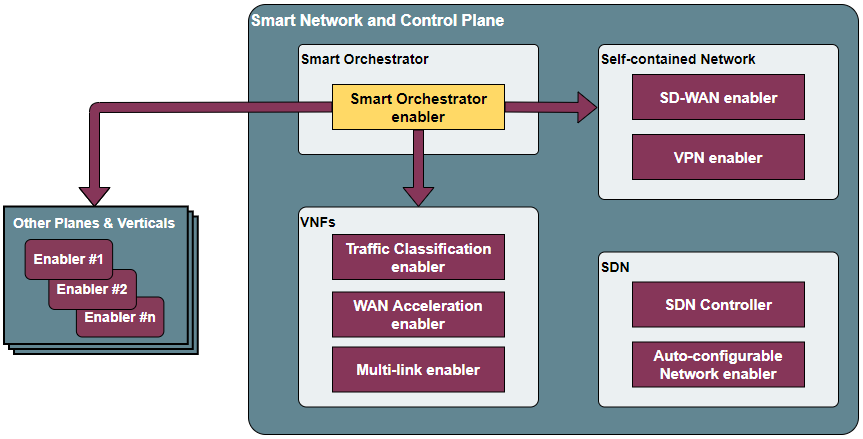
The five elements which compose the enabler are:
API REST: The entry component to interact with the user and in charge of communicating with the other components to get, add or delete the different resources such as enablers, clusters or repositories.
OSM: Controls the whole lifecycle of Containerized Network Functions (CNFs), from their instantiation to their termination, allowing their deployment in any k8s cluster available.
Metrics server: Collects the performance metrics from targets (kubernetes clusters).
Scheduler: Provides the logic to place the enablers depending on the resources availabe in the kubernetes clusters joined.

1.2.1.4. User guide
The enabler has a management API that provides a flash-based REST interface that can be interacted with to configure certain values. The url must include not only the address of the enabler, but also the action to be performed and the message body if necessary. The response shall include the requested information or the result of the execution of a command.
Method |
Endpoint |
Description |
Payload |
|---|---|---|---|
GET |
/api/k8sclusters/ |
Return clusters |
|
POST |
/api/k8sclusters/ |
Add a cluster |
{“name”: String, “description”: String, “credentials”: Object, “k8s_version”: String} |
DELETE |
api/k8sclusters/:id |
Delete a cluster by id |
|
GET |
/api/chartrepo |
Return a repository |
|
POST |
/api/chartrepo |
Add a repository |
{“name”: String, “description”: String, “url”: String} |
DELETE |
/api/chartrepo/:id |
Delete a repository by id |
|
GET |
/api/enabler/instanced |
Return the instanced enablers |
|
POST |
/api/enabler/ |
Instantiate an enabler |
{“enablerName”: String,”helmChart”: String, “additionalParams”: Object,”vim”: String, “auto”: Boolean,”placementPolicy”: String} |
POST |
/api/enabler/:id /terminate |
Terminate an enabler by id |
|
DELETE |
/api/enabler/:id |
Delete an enabler by id |
|
POST |
/api/login/tokens |
Login |
{“username”: String ,”password”: String} |
1.2.1.5. Prerequisites
The prerequisites to install the Smart Orchestrator enabler are:
MINIMUM: 2 CPUs, 6 GB RAM, 40GB disk and a single interface with Internet access
RECOMMENDED: 2 CPUs, 8 GB RAM, 40GB disk and a single interface with Internet access
Base image: Ubuntu20.04 (64-bit variant required)
1.2.1.6. Installation
The installation is run by a script. This script can be download from the url: Before running it, type the next commands:
cd scriptfolder/
chmod +x smartOrchestrator.sh
./smartOrchestrator.sh
1.2.1.7. Configuration options
Currently, the enabler is installed via script without configuration options, therefore any option can be set up before its deployment.
1.2.1.8. Developer guide
Will be determined after the release of the enabler.
1.2.1.9. Version control and release
Version 0.1. Under development.
1.2.1.10. License
The licenses of internal code are under analysis. Once assessed, an open source one will be selected (likely Apache 2.0).
1.2.1.11. Notice(dependencies)
This enabler does not depend on any other.